
You’ve probably felt this already. You visit a news site, check the weather, read an industry article, and ads follow you across half the internet. Some fade into the page so completely you don’t notice them. Others interrupt your attention for a second, then disappear from memory just as fast.
That mix of invisibility and repetition is why banners and display advertising confuse so many business owners. The channel looks simple from the outside. Put an image online, pick an audience, wait for clicks. In practice, it works more like shelf placement in retail. The format matters, the placement matters, the audience matters, and poor creative gets ignored no matter how much you spend.
For small and mid-sized businesses, that’s good news. You don’t need enterprise scale to use display ads well. You need clear decisions. Which format fits the job? Which network gives you the right reach? What kind of targeting narrows waste? How do you make an ad people notice?
The Evolution of Digital Billboards
Display advertising used to be easy to dismiss. Many business owners still picture the old web banner sitting in a sidebar, static and forgettable. That picture is outdated.
Display is now the largest digital ad format globally. Global spending reached $207.4 billion in 2023 and is forecasted to hit $266.6 billion by 2026, according to display advertising market data from Keywords Everywhere. In the US, programmatic ads accounted for 91.3% of digital display spending in 2024 and are projected to reach $180 billion by 2025 through the same source.
That matters because it changes how you should think about banners and display advertising. This isn’t a leftover tactic from the early internet. It’s a major visibility channel, and most of the buying now happens through software that matches ads to audiences and placements in real time.
Why SMBs keep running into display ads
A small business owner usually notices display advertising in fragments. A banner on a local news site. A product ad inside an app. A remarketing ad after someone visits a pricing page. Those fragments are part of one large system.
Three things make the display more relevant now than it used to be:
- Scale: Your audience spends time across websites, apps, video platforms, and social feeds.
- Automation: Programmatic buying handles placement decisions much faster than manual media buying.
- Creative range: You can run simple banners, motion ads, video units, or interactive formats.
Practical rule: If your buyers don’t search every day for your service, display helps you stay visible between moments of active intent.
Offline visibility still matters too. If you’re preparing for an event, retail activation, or local promotion, physical displays and digital placements should support each other. A strong booth or branded setup often shapes first impressions before a prospect ever clicks an ad. If you need inspiration for that side of the mix, this guide to captivating trade show exhibits is useful because it shows how visual presentation affects attention in physical spaces as much as online ones.
Banner Ads vs Modern Display Advertising
Banner ads are one part of display advertising, not the whole category. That distinction clears up a lot of confusion.
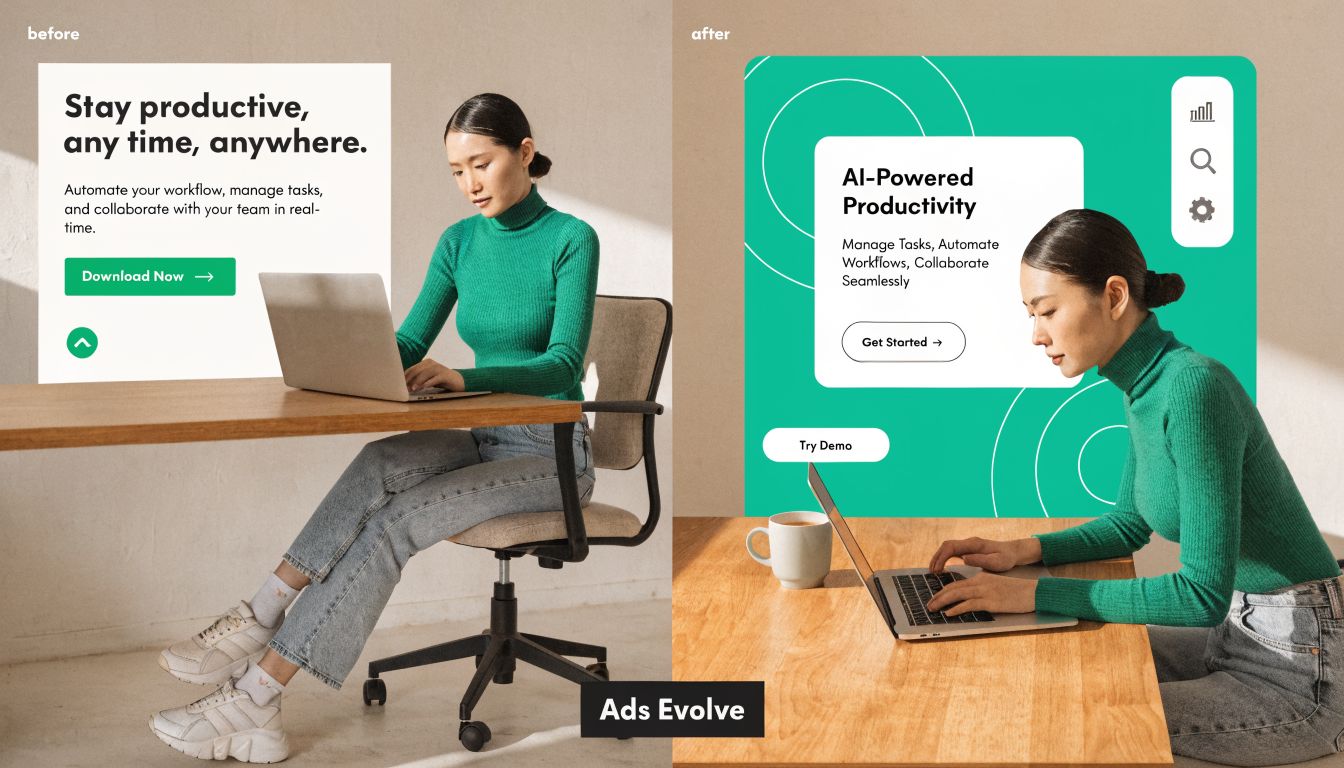
A banner ad is the classic format. It’s usually a fixed image placed in a standard area on a webpage or app. A modern display campaign can include banners, but it also includes animated units, video, rich media, responsive layouts, and audience targeting that changes who sees what.
The old model and the current one
Think of old banner ads as fixed signs on a wall. Everyone passing by sees the same message in the same format, whether it fits or not.
Modern display advertising behaves more like modular signage. The creative can change by device, audience, placement, or stage in the buying journey. A first-time visitor might see a broad awareness ad. Someone who visited a product page might see a reminder ad. A warm lead might see a more direct offer.
That shift is why many SMBs get mixed results. They buy modern ad inventory but use old banner logic. One static image. One message. One audience setup. Then they wonder why performance stalls.
What “modern” actually changes
Modern display adds three practical layers:
- Audience logic: Ads can be shown based on interests, browsing behavior, geography, or prior site visits.
- Creative flexibility: One campaign can use several sizes and formats instead of a single file.
- Optimization: Platforms can shift spend toward placements and audiences that respond better.
If you want a broader view of how display fits into a paid media mix, this article on the best types of online advertising for SMB growth helps place display next to search, social, and other channels.
A lot of business owners also assume display means “low intent, so weak results.” That’s too narrow. Display works differently from search. Search captures active demand. Display supports awareness, recall, and return visits. Used well, it fills the gap between first exposure and later action.
Here’s a quick visual walkthrough of how better ad design changes the result in practice:
A simple test for your own campaigns
Ask four questions:
- Is this just a banner file, or part of a display system?
- Does the message change for new visitors and returning visitors?
- Are you using the same creative everywhere, even when placements differ?
- Would the ad still make sense on a phone screen?
If the answer to most of those is “no,” you’re probably running banner ads, not a modern display strategy.
Choosing Your Ad Format Arsenal
Format choice affects results more than many SMBs expect. This isn’t only a design decision. It’s a performance decision.
Display advertising benchmark data from Digital Applied shows a clear hierarchy: static banner ads average a 0.46% click-through rate, while rich media units achieve 1.84% CTR, a 4x performance differential. The same source reports that video display formats deliver a 73% higher CTR than static banner equivalents.
That doesn’t mean every business should jump straight to the most complex format. It means each format has a job, and the wrong choice can cap performance before a campaign even starts.
Static ads
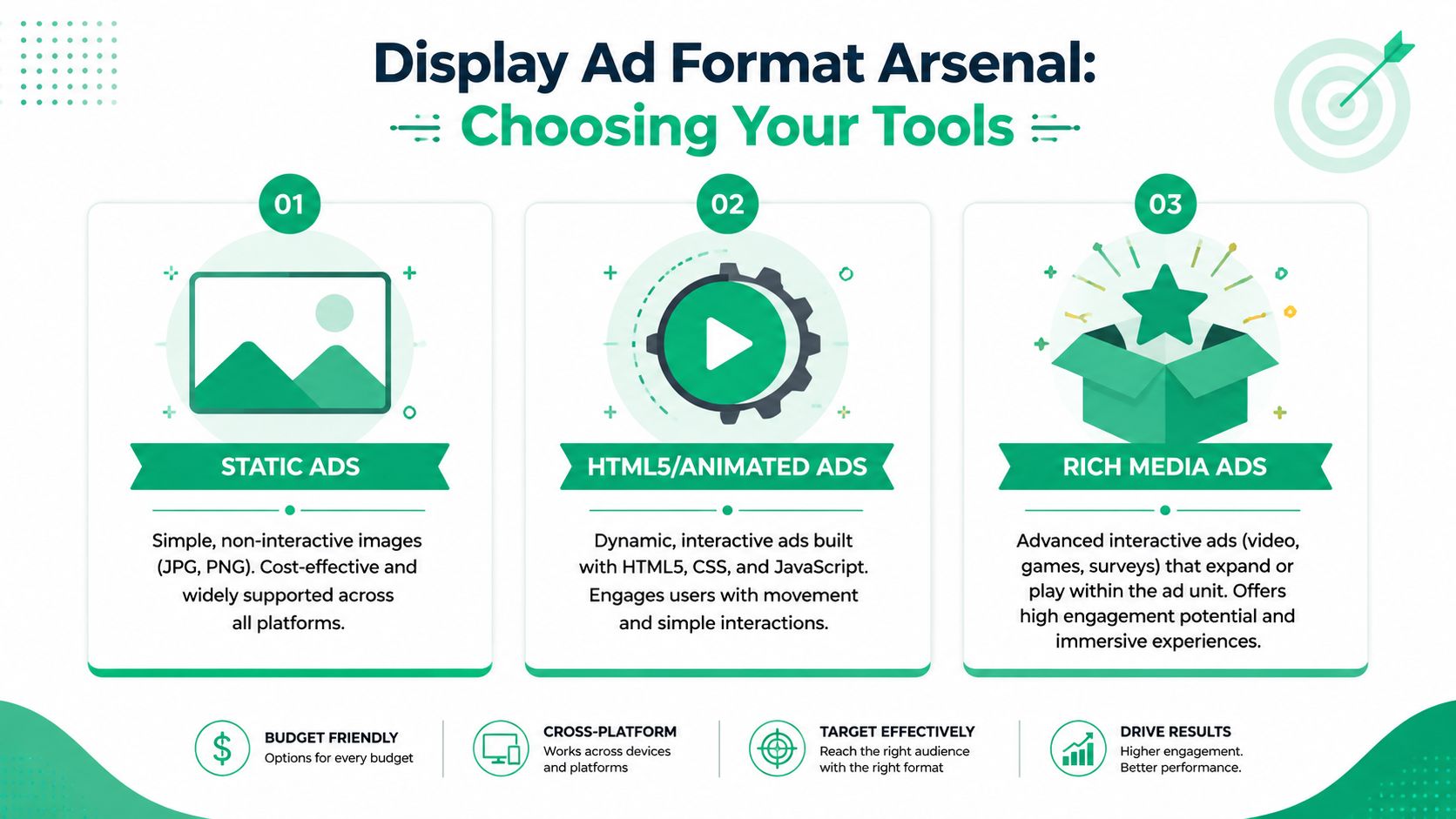
Static ads are simple image files, usually JPG or PNG. They’re cheap to produce, easy to resize, and supported almost everywhere.
Use them when:
- You need speed: A local promotion or short campaign often needs assets live fast.
- You’re validating messaging: Simple ads help test the headline and offer before investing in motion or interactivity.
- Your budget is tight: Static creative lowers production overhead.
Their weakness is obvious. They don’t do much to pull attention back once a user has learned to ignore banner-like layouts.
HTML5 and animated ads
These add movement, transitions, and lightweight interaction. They sit between static banners and full rich media. For many SMBs, this is the most practical upgrade path.
Why they help:
- Motion creates contrast: Subtle movement can interrupt scanning behavior.
- You can show a sequence: One ad can rotate through benefit, proof point, and call to action.
- They fit many placements: HTML5 works well across responsive inventory.
Better format choices don’t fix weak offers. They give a strong offer more ways to be noticed.
Rich media and video
Rich media can include expansion, interaction, embedded forms, surveys, or layered content. Video adds motion and narrative in a more direct way.
These formats fit best when:
- You need demonstration: Products, software, or visual services benefit from showing rather than telling.
- Your audience needs more context: A complex sale often requires more than one headline and one image.
- You’re retargeting warm prospects: Someone who already knows your name may give more time to an interactive unit.
Display Ad Format Comparison
| Ad Format | Description | Best For | Common Sizes (Pixels) |
|---|---|---|---|
| Static | Simple, non-interactive image ads | Fast launches, message testing, basic awareness | 300×250, 728×90, 160×600 |
| HTML5 Animated | Motion-based ads built with animation and lightweight interaction | Product highlights, stronger visual attention, multi-message creative | 300×250, 728×90, 160×600 |
| Rich Media | Interactive units that may expand or include video or engagement elements | Retargeting, product demos, deeper engagement | 300×250, 728×90, 160×600 |
| Video | Motion-led ads for storytelling or demonstration | Brand recall, product explanation, high-attention placements | Varies by platform and placement |
A practical way to choose
Start with your campaign goal, not your design preference.
- Awareness first: Use static or animated ads if you need broad coverage with manageable production.
- Engagement first: Use rich media when interaction itself helps qualify interest.
- Explanation first: Use video when a still image can’t carry the message.
A common mistake is building one expensive ad and forcing it into every placement. A better move is to treat formats like tools in a small kit. Use one for reach, another for re-engagement, and another for warmer traffic that needs more detail.
Where Your Ads Live: Platforms and Networks
Once you know what kind of ad you want to run, the next question is where it should appear. Many campaigns lose focus at this stage. Business owners often hear platform names, but not the strategic difference between them.
Three buckets matter most: Google Display Network, programmatic platforms, and social media ad networks. They overlap, but each one has a different strength.
Google Display Network
Google Display Network is often the first stop for SMBs because it combines broad reach with familiar Google Ads controls. If you already run search campaigns, the learning curve is lower.
Its core advantage is reach. Your ads can appear across websites, apps, and other properties inside a large ecosystem. For businesses that want visibility beyond search, it gives a practical entry point.
Good fit:
- Local service brands that need regional awareness
- E-commerce stores that want remarketing
- B2B firms that need repeated visibility before inquiry
Programmatic platforms
Programmatic sounds technical, but the business value is straightforward. Software handles the buying process across many publishers and placements, often with tighter audience control.
Display advertising offers increased precision at this stage. You can buy audiences, contexts, or inventory in a more flexible way than a basic network setup. For larger or more mature campaigns, that control can reduce waste and improve placement quality.
Use programmatic when:
- Audience precision matters more than broad volume
- You want more control over where ads appear
- You’re managing multiple audience segments with different creative
Programmatic buying is less about buying “more ads” and more about buying the right impressions.
Social media display environments
Social platforms also function as display environments, even though many business owners think of them as separate from display. Ads inside feeds, sidebars, stories, and audience networks are still visual placements designed to interrupt scrolling and prompt action.
Their advantage is context. People are grouped by interests, behaviors, follows, and interactions. That creates strong targeting opportunities, especially when your offer fits a clear lifestyle, identity, or professional role.
Which one should an SMB choose
A side-by-side view makes the decision easier:
| Platform Type | Core Strength | Best Use |
|---|---|---|
| Google Display Network | Massive reach | Awareness, remarketing, and easy expansion from search |
| Programmatic | Efficient targeting and placement control | Multi-audience campaigns, refined buys, broader inventory control |
| Social networks | Community and feed context | Interest-driven offers, visual storytelling, fast creative testing |
Choose based on buying behavior.
If buyers already know they have a problem and search for solutions, search plus display remarketing often makes sense. If they need repeated exposure before they recognize your brand, broader display can help. If identity, taste, or community shapes purchase decisions, social placements may pull more attention.
The mistake isn’t choosing one over another. The mistake is expecting all three to behave the same way.
Finding Your People With Advanced Targeting
Targeting is where modern banners and display advertising become useful instead of noisy. Without targeting, you’re just renting space. With targeting, you’re deciding who sees the message, where they see it, and what context surrounds it.

A simple local example
Say you own a bakery that wants to grow catering orders and local foot traffic. You don’t need your ads shown to everyone in the state. You need the right slice of people.
You might target:
- people in your delivery area
- users reading local event content
- people who visited your order page but didn’t submit a request
- nearby residents interested in food, hosting, or small business events
That turns a generic campaign into a useful one. Instead of shouting broadly, you narrow the audience to the people most likely to care.
The main targeting types in plain English
Contextual targeting
Your ad appears next to content that matches the subject. A bakery ad beside local event planning content makes more sense than the same ad beside unrelated content.
This works well when the topic itself signals interest.
Demographic and geographic targeting
You can shape campaigns around age bands, household characteristics, and location. For local businesses, location often does the heaviest lifting. A service area, city cluster, or radius-based approach usually matters more than broad national reach.
Behavioral targeting
Behavioral targeting uses actions and patterns. Pages visited, shopping behavior, or prior engagement all help shape who sees the ad. If you want a practical framework for segmenting audiences beyond age and location, these behavioral and psychographic insights are helpful because they show how motivations and habits can separate one customer group from another.
Retargeting
Retargeting reaches people who already interacted with your brand. They visited your site, viewed a product, or started a form. That makes them warmer than a completely new audience.
Retargeting works best when the ad answers the question that stopped the first visit.
If someone viewed a pricing page and left, a generic brand ad isn’t the right follow-up. A better message might address trust, timing, or what happens next.
Layering makes targeting stronger
One targeting method rarely does enough on its own. Layering improves relevance.
For example:
- Context plus geography: Show ads on relevant content only within your service area.
- Behavior plus retargeting: Re-engage users based on pages they visited.
- Demographic plus offer stage: Show different messages to first-time viewers and returning visitors.
The confusion usually starts when business owners think targeting means “pick one audience setting, and you’re done.” It’s closer to building a filter. Each layer removes waste and makes the message more useful to the person seeing it.
A modest budget can still work if that filter is tight and the message matches the audience.
Designing Ads that Defeat Banner Blindness
Most display campaigns don’t fail because the platform is wrong. They fail because the ad looks exactly like something users have trained themselves to ignore.
A 2013 Infolinks study found that 86% of consumers exhibit banner blindness, and the average click-through rate for static banner ads sits around 0.06% to 0.1%, according to banner blindness data summarized by GrowthSRC. That’s the central design problem in banners and display advertising. People often don’t reject the ad after considering it. They skip noticing it in the first place.
What good design is actually doing
A display ad has a short job description:
- get noticed
- make the offer clear
- create enough interest for the next click
That means design isn’t decoration. Design is how the message becomes legible under low attention.
What to include
A single point, not a pile of points
One ad should carry one main idea. A discount, a product category, a service promise, a reminder. When an ad tries to include every benefit, every feature, and every call to action, the eye doesn’t know where to land.
Clear visual hierarchy
The user should know what to read first, second, and third. Usually that means:
- headline
- image or product cue
- call to action
- brand mark
If every element has the same size and weight, nothing stands out.
Strong contrast and readable type
Tiny text fails. Weak contrast fails. Overdesigned backgrounds fail. Many banners look good in a design file and collapse when shown on a small screen beside busy page content.
One useful call to action
“Learn More,” “Shop Now,” and “Book a Demo” each signal different intent. Pick the one that matches the landing page and stage of the audience.
If your team needs a deeper view of how design connects to business performance, this piece on the role of designers in marketing explains why design choices affect results beyond appearance.
What to remove
A quick filter helps here.
- Drop clutter: Too many logos, badges, icons, or lines of copy weaken the message.
- Remove generic stock imagery: If the image could belong to any company in any industry, it won’t hold attention well.
- Avoid vague offers: “Advanced solutions” means almost nothing in a display ad.
- Stop copying desktop layouts into mobile placements: Readability changes fast on smaller screens.
A good banner doesn’t ask for attention politely. It earns attention by being easy to process.
A simple review checklist
Before approving a display ad, ask:
- Can someone understand the offer at a glance?
- Does the image support the message, or just fill space?
- Is the call to action visible without searching for it?
- Would this ad still work if seen for a second or two?
That checklist catches many expensive mistakes early. Banner blindness won’t disappear, but better creative reduces how often your ad blends into the page.
Your First Campaign: A Practical Blueprint
A first display campaign doesn’t need to be complicated. It needs to be structured. Many SMBs waste budget by launching too wide, measuring the wrong thing, or mixing too many ideas into one campaign.
A cleaner approach starts with a short planning sheet and a narrow objective.
Step one: Set one campaign goal
Pick one primary goal for the first run. Not three.
Examples:
- drive traffic to a service page
- re-engage recent site visitors
- promote one local event or offer
- support a product category launch
The goal shapes the budget, creative, audience, and bid strategy. If the goal is fuzzy, the campaign setup usually becomes fuzzy too.
Step two: Choose the right pricing logic
You’ll usually run into three common bidding models.
| Bid Type | What You Pay For | Best Fit |
|---|---|---|
| CPM | Impressions | Awareness and visibility |
| CPC | Clicks | Traffic and landing page visits |
| CPA | Conversions | When conversion tracking is reliable, and the goal is direct action |
If you’re new to display, CPC is often easier to evaluate because you can connect spend to visits. CPM fits awareness campaigns better. CPA becomes useful when tracking is stable, and you know what action matters.
Step three: Keep the first campaign narrow
Don’t launch with ten audiences, six offers, and five formats.
Start with:
- One audience group
- One clear offer
- A small set of creative variations
- One landing page
That makes performance easier to read. You’ll know whether the issue came from the message, the audience, or the destination page.
Step four: Define what success means before launch
Use a few practical KPIs, not a giant dashboard.
A first campaign might track:
- clicks
- click-through rate
- landing page engagement
- form fills or purchases
- cost by result
The exact mix depends on the campaign goal. Awareness campaigns care more about reach and visibility. Traffic campaigns care more about clicks and on-site behavior. Lead generation campaigns care more about completed actions.
Step five: Avoid common money pits
These mistakes show up often:
- Sending traffic to the homepage: Campaigns work better when the landing page matches the ad message.
- Using one ad everywhere: Different placements need different creative treatment.
- Judging too early: Early swings happen. Let the campaign collect enough data before changing everything.
- Ignoring offline support: Local campaigns often perform better when physical and digital signals reinforce each other.
That last point gets overlooked. For local SMBs, a hybrid strategy can work well. Readpeak notes that physical banners in high-traffic perpendicular positions can yield 3-5x higher visibility than digital side rails, and adding QR codes can boost digital conversions by 20-30%. If you sponsor events, run storefront promotions, or attend trade shows, a physical banner can help push people into a measurable digital path.
Step six: Build a simple creative workflow
If video feels out of reach, don’t assume you need a full production setup. Tools can help you create lighter ad assets faster. For example, this guide on how to generate faceless video ads using Aicut is a practical reference for businesses testing video without filming talent.
Step seven: Review and optimize in cycles
Look at the campaign in layers.
- Audience performance: Which group responds at all?
- Creative performance: Which version gets attention?
- Placement quality: Where are clicks useful and where are they weak?
- Landing page follow-through: Does the page complete the promise made in the ad?
If you want a stronger framework for launch, tracking, and optimization, this breakdown of the paid advertising process for business growth gives a clearer operating model than trying to manage every setting by instinct.
If you want help building banners and display advertising campaigns that fit your budget, audience, and growth goals, Ascendly Marketing can help you plan the strategy, design the creative, and manage the optimization without wasting spend on guesswork.