

To appear in Google Maps results, you need to provide information aligned with Google's ranking criteria: relevance, distance, and prominence. Your Google Business Profile (GBP) is the mechanism to supply this information to Google. A correctly configured GBP has a high impact on your local search visibility.
Your Foundation for Google Maps Visibility
Your Google Business Profile is a primary interaction point for a potential customer. Before you can optimize it, you must claim and verify the business listing. This action gives you control over the profile.
After gaining access, the next step is to communicate to Google exactly who you are, what you do, and where you are located. The algorithm processes factual data. Precision and completeness directly influence the relevance factor.
This table provides a breakdown of these core factors and how you can influence them.
Google Maps Ranking Factors Breakdown
| Ranking Factor | What It Means | Your Actionable Tip |
|---|---|---|
| Relevance | How well your business profile matches a search query. | Fill out every section of your profile with detailed descriptions of your services and products using relevant keywords. |
| Distance | The physical distance between your business and the searcher's location or the location specified in their search. | You can define your service areas by city, zip code, or other regions within your profile. |
| Prominence | How well-known your business is based on online and offline signals. | Actively collect reviews, build local backlinks, and secure mentions in local directories and articles. |
Addressing the "Relevance" factor starts with the basic settings in your Google Business Profile dashboard.
Selecting Precise Business Categories
The first selection you will make is a primary business category. This setting is a heavily weighted factor for local search because it determines which search queries your business is eligible for.
If you operate a restaurant known for wood-fired pizza that also serves pasta, your primary category should be "Pizza restaurant." You can then add "Italian restaurant" as a secondary category to appear in related searches. Higher specificity allows Google to better match you with users.
The selection of a primary category is a foundational choice. This single choice dictates which local searches you are eligible to appear in.
From there, add all applicable secondary categories. A general contractor, for example, should not stop at "General contractor." They can also add "Kitchen remodeler," "Bathroom remodeler," and "Deck builder" to appear when users search for those specific projects.
Filling Every Field for Maximum Impact
An incomplete profile signals inactivity to Google. Your objective is to fill out every available field in your GBP dashboard.
- Service Areas: Define the specific cities, zip codes, or neighborhoods you serve. This action allows you to appear in "near me" searches for users who are not in your immediate vicinity.
- Hours of Operation: Keep your hours updated, especially for holidays. An incorrect listing can result in a negative customer experience if they arrive at a closed location.
- Products and Services: Describe your products and services. Use the language your customers use, and ensure consistency with the details on your website.
- Attributes: Add details like "Wheelchair accessible," "Free Wi-Fi," or "Women-led." These attributes enable you to appear in filtered searches and provide additional information to potential customers.
Completing your profile signals to Google that you are an active, legitimate business. Businesses with complete profiles receive more requests for directions and more clicks to their website.
The information you provide informs customers and fuels the algorithm. For more information on the effects of a complete profile, review these key benefits of a Google Business Profile. This is not a one-time task; keep it updated to signal fresh activity, which is a ranking factor.
Keep Your Profile Humming with Fresh Visuals and Updates
A Google Business Profile requires ongoing maintenance to improve Google Maps rankings. It needs a consistent supply of high-quality photos and fresh Google Posts.
A stale online profile can cause both customers and Google to shift their attention to competitors who appear more active.
A Picture Is Worth a Thousand Clicks
Photos offer potential customers a preview of your business, providing tangible evidence of your quality and environment. A well-curated photo gallery helps people visualize themselves at your location.
For product sales, consider professional photography techniques. Using a Ghost Mannequin Service can create a professional and polished look for your items. Your visuals should tell an authentic and compelling story.
What types of photos generate results?
- Real Team Photos: Show the actual people behind your business. This builds a human connection and a layer of trust.
- Products in Action: Display products in use. For example, show a steaming latte being poured, not just a coffee mug. A remodeler should feature a finished kitchen.
- Crystal-Clear Storefront Shots: Make your business easy to find. Take well-lit photos of your entrance from different angles and at various times of day.
- Behind-the-Scenes Glimpses: Show how your products are made or services are delivered. This type of content can make your audience feel like they have special access.
Don't Let Your Content Go Stale
A common error is uploading a batch of photos once and then ceasing activity. Google's algorithm values freshness. You need to provide a steady supply of new content. Establishing a routine of adding a few new photos each week signals that your profile is active and relevant.
A consistent visual and content strategy directly feeds Google's "prominence" signal. This demonstrates that your business is an active and relevant participant in the local market.
Profiles with a steady stream of photos see more requests for directions and more website visits. Combining this with weekly Google Posts, a tactic few businesses use consistently, will provide a competitive advantage.
Get Strategic with Google Posts
Google Posts are a direct communication channel to customers in search results. Use them to create buzz, share timely information, and provide immediate incentives.
What topics should you post about?
- Flash Sales and Promotions: Announce a weekend sale with a Post that includes a clear call to action.
- New Service Spotlights: Announce a new service with a Post explaining its benefits for your customers.
- Company Wins and News: Share local awards or new team members. This builds credibility and shows momentum.
Consistency is the key. Publishing at least one Post per week indicates to Google that you are open, active, and seeking business. This action differentiates you from less active competitors and helps improve your Google Maps rankings.
Reviews and Citations: Your Keys to the Local Kingdom
Customer reviews serve as social proof and are a significant signal Google uses to determine top rankings on Google Maps. The objective is to create a continuous stream of feedback that confirms your business is active and valued by the local community.
How to Get More Reviews (Without Begging)
Most satisfied customers do not leave a review without a prompt. You have to ask. The optimal time to ask is when they have recently had a positive experience, such as immediately after a service, upon product delivery, or following a positive interaction at your location.
You need a simple, repeatable system. The following methods are effective:
- Email Follow-Ups: A polite email sent a day or two after a purchase can generate reviews.
- Text Message Links: A text with a direct link to your Google review page is immediate and mobile-friendly.
- In-Person Nudges: A small card or sign at your checkout counter can serve as a low-pressure reminder.
Make leaving a review as easy as possible. One click should take them directly to the review form. For additional ideas, explore these strategies to boost your Google reviews. A smoother process will result in more reviews.
Businesses that dominate the Map Pack actively build a review generation engine. They do not just wait for feedback; they systematically ask for it and integrate the process into their customer service workflow.
A study of over 8,000 businesses showed that profiles consistently earning new reviews each month performed better in "near me" results on Maps. Higher average ratings and detailed, location-specific reviews signal relevance to Google. Responding to feedback proves you are an engaged, active business. You can learn more about this at skyway.media.
Master the Art of the Reply
Responding to reviews is a way to stand out. It is a public forum to demonstrate your customer service to everyone, including potential customers. You have to respond to every single review, both positive and negative.
For glowing reviews: Thank the customer by name and mention something specific from their feedback. This shows you have read and considered their comments.
For negative reviews: This is an opportunity. Acknowledge the issue, apologize that their experience did not meet expectations, and offer to take the conversation offline to resolve the problem. This action demonstrates accountability and can turn a public complaint into a public display of integrity. Google's algorithm favors this type of engagement.
The Underrated Power of Consistent Citations
The other part of the trust equation is citations. A citation is any online mention of your business's Name, Address, and Phone number (NAP). These appear in online directories like Yelp, Bing Places, Apple Maps, and industry-specific sites.
Each time Google finds a citation that matches your GBP information, it serves as a vote of confidence, confirming your identity and location.
Inconsistency is a major issue. If Yelp lists you as "Smith Plumbing Inc." at 123 Main St, but another site has "Smith's Plumbing" at 123 Main Street, it creates confusion. This discrepancy can cause Google’s algorithm to question your legitimacy, which can negatively affect your rankings.
Perform a citation audit. Use a spreadsheet to track your business listings across the web and check for any NAP discrepancies. Correct them all. This digital cleanup sends a unified signal to Google, solidifying your business's identity and position in the local landscape.
Turning Your Website Into a Local Authority Magnet
Your Google Business Profile and your business website need to work in tandem. When they are synchronized, they send a strong signal to Google that you are an established business in your local market.
Your GBP is the sign, but your website is the establishment. It is where you demonstrate expertise, showcase your work, and establish your community ties. This on-site authority directly impacts your prominence and relevance, which in turn fuels your Google Maps ranking.
Get Granular With Location and Service Pages
A generic "Services" page is no longer sufficient. To appear in specific local searches, you need to create dedicated pages for each service in each location you serve. These pages act as targeted landing zones for Google.
For instance, a plumber in Austin should create pages beyond a general "Plumbing" page. They can build out pages like:
- "Emergency Plumbing in Downtown Austin"
- "South Congress Water Heater Installation"
- "Drain Cleaning Services for The Domain"
Each page provides a precise answer to a specific local search query. On these pages, mention local landmarks, common neighborhood issues, and use local terminology. This communicates to Google that you are an integral part of the communities you serve.
Nail Down Your On-Page Location Signals
After creating these location-specific pages, reinforce your physical presence with two on-page elements. These eliminate any doubt for Google about where you operate.
First, embed a Google Map. Place it on your contact page and on every location page. This creates a direct technical link between your site and your verified GBP, tying your digital assets together.
Second, you must use Local Business schema markup. This is a piece of code added to your website that directly provides your business information to Google. It confirms your name, address, phone number (NAP), hours, and service area, mirroring the information on your GBP.
Schema is a structured data vocabulary that communicates directly with search engines. It removes ambiguity for Google, making it easier for them to confirm who you are, where you are, and what you do. Many competitors overlook this, creating a significant opportunity.
Create Hyperlocal Content and Score Local Links
To become a local authority, shift from just selling to being a resource. Creating hyperlocal content is a method to achieve this.
Create content that is specific to your locality.
- Write about a community fair your business sponsored.
- Post a case study about a project you completed for a well-known local landmark.
- Create guides like "A Texan's Guide to Prepping Your A/C for a Brutal Summer."
This strategy changes your business's perception from a faceless company to a trusted neighbor. You can find more information on critical on-site and off-site signals in this guide on local SEO ranking factors.
Finally, pursue local backlinks. A link from the local Chamber of Commerce, a blog post from a neighborhood influencer, or a mention from a non-competing business next door are valuable. These links act as powerful endorsements from your community, cementing your website's authority and boosting your GBP in the Maps pack.
This 90-day roadmap breaks down the process into manageable steps to help you make measurable progress in climbing the Google Maps rankings.
Are you ready to stop guessing and start ranking?
Your First 30 Days: The Foundational Fix
The first month focuses on establishing a solid foundation. The goal is to make your Google Business Profile (GBP) 100% complete and accurate. This action signals to Google that you are a legitimate, active business.
Your primary task is to review your GBP in detail and complete all sections.
- Week 1: Claim and verify your profile. Then, conduct a full NAP (Name, Address, Phone) audit. Find and correct every old address or incorrect phone number on major web directories.
- Week 2: Conduct a deep dive into your GBP. Finalize your primary and secondary business categories. Write a keyword-aware business description that is also readable, and fill out every attribute Google offers.
- Week 3: Upload an initial batch of at least 10-15 high-quality photos. Include clear shots of your storefront, the interior, your team, and your products or services in use.
- Week 4: Build out your Services and Products sections. Ensure the names and descriptions are consistent with your website. Conclude the month by publishing your first two Google Posts.
By the end of month one, your profile will be a complete and trustworthy representation of your business. This is the foundation for all subsequent actions.
The first 30 days are about correcting errors and completing your profile to provide Google with a clear signal of your identity and offerings.
This initial GBP work complements your on-site efforts. As you clean up your profile, consider how your website will support your local presence over time.
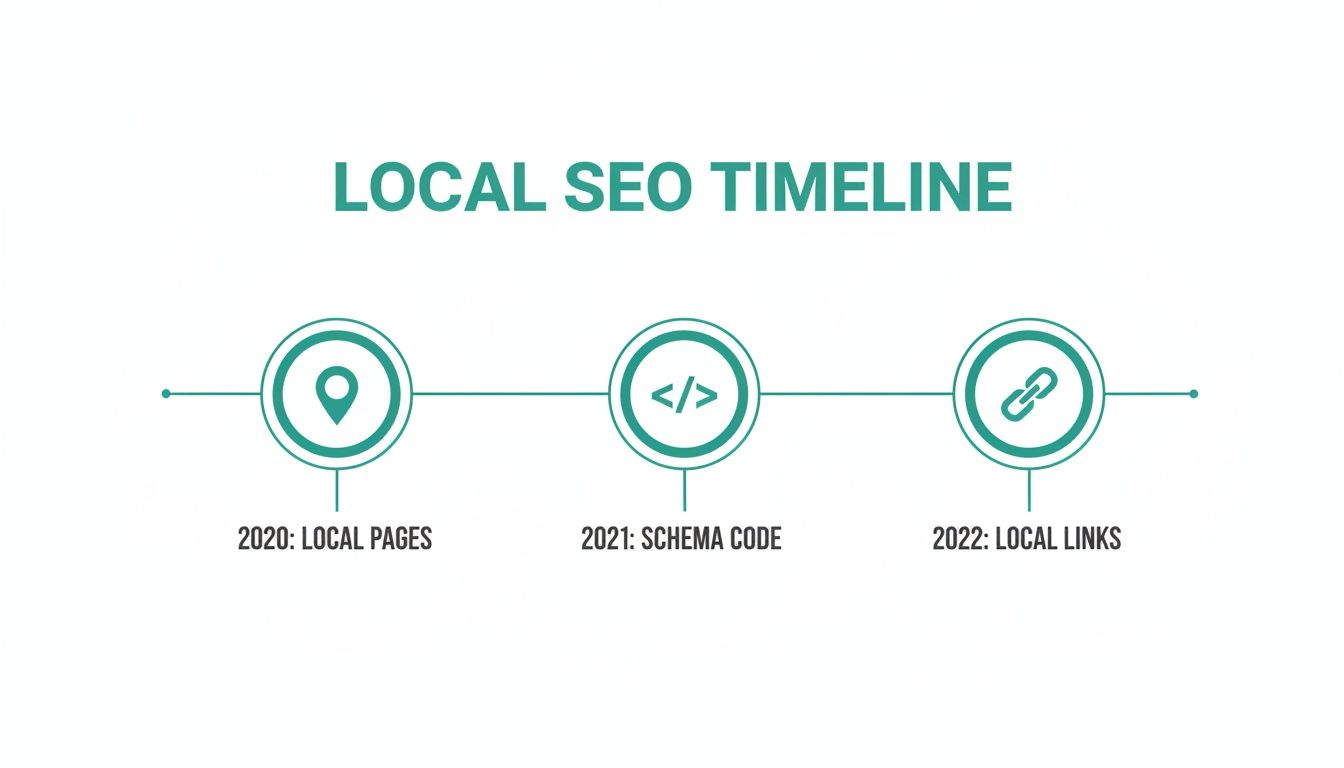
Building authority is a layered process. Your website content, schema, and links all contribute to your Maps visibility.
Days 31-60: Building Buzz and Reputation
With the foundation established, month two is about building momentum. The focus shifts to building prominence and trust through reviews and content.
The objective is to create a steady stream of activity that shows Google your business is active, engaged, and valued by customers.
- Weeks 5-6: Implement a system for generating reviews. Set up an automated email or text message that politely asks satisfied customers for feedback on your GBP. Make the process simple for them.
- Weeks 7-8: Establish a routine of responding to 100% of new reviews, ideally within 24-48 hours. Continue the content flow by publishing one new Google Post each week and adding another 3-5 fresh photos to your profile.
Days 61-90: Advanced Moves and Analysis
The final 30 days are for increasing your efforts and sophistication. You will begin building authority beyond your own website with local links while monitoring performance data to reinforce successful strategies.
This phase moves from execution to strategic refinement based on data.
- Weeks 9-10: Launch your on-site content strategy. Publish your first hyperlocal blog post or create a new service page for a specific neighborhood.
- Weeks 11-12: Begin local link building. Reach out to potential partners such as local charities, neighboring businesses, or community events. Simultaneously, analyze your GBP Insights to understand search queries, popular photos, and user actions.
90-Day Google Maps Ranking Action Plan
This table simplifies the 90-day plan into a clear checklist.
| Timeframe | Primary Focus | Key Tasks |
|---|---|---|
| Days 1-30 | Foundational GBP Cleanup | • Claim & verify profile • Conduct full NAP audit & cleanup • Complete 100% of GBP fields • Upload initial batch of photos (10+) |
| Days 31-60 | Reputation & Content Engine | • Implement a review generation system • Respond to all new reviews • Publish Google Posts weekly • Add new photos weekly |
| Days 61-90 | Advanced Authority Building | • Publish hyperlocal on-site content • Start local link building outreach • Analyze GBP Insights for performance • Refine strategy based on data |
Following this plan removes guesswork. It creates a rhythm of consistent, focused effort that builds upon itself.
Frequently Asked Questions
As you delve into local SEO, questions will arise. This section addresses some of the most common issues business owners face.
How Long Until I See Results From My Google Business Profile Work?
While some changes, like updating business hours, appear almost instantly, significant ranking improvements take time.
After a thorough Google Business Profile optimization, you can expect to see some movement in the Google Map Pack within 4 to 6 weeks. This is not a one-time task; your ranking requires consistent effort. Market competitiveness and the frequency of new reviews are major factors.
A 90-day period is a realistic timeframe to see measurable results, such as more phone calls, direction requests, and website clicks.
Will Responding to Negative Reviews Hurt My Ranking?
No. Responding to a negative review promptly and professionally is a positive signal for Google. The algorithm interprets this as a sign of an engaged and customer-focused business, which can help your ranking.
A thoughtful response shows potential customers that you take feedback seriously and are committed to resolving issues. This action can turn a negative experience into a public demonstration of customer service. Ignoring negative reviews is what causes harm.
Do I Need a Physical Storefront to Rank on Google Maps?
You do not always need a customer-facing storefront. Google has a category for service-area businesses (SABs), such as plumbers or consultants who travel to their clients.
When setting up your profile, you will define your service area by specifying the cities, postal codes, or regions you cover. You have the option to hide your physical address if it is a home office. Your business will still appear on the map for relevant searches within your designated service area. The key is to accurately represent how your business operates.
How Many Photos Should I Add to My GBP?
There is no specific number. The focus should be on quality and consistency. Start with a foundation of 10-15 high-quality images that provide a comprehensive view of your business.
Cover these essentials:
- Exterior: Clear shots of your entrance, sign, and building.
- Interior: Provide a sense of your space.
- Team: Authentic photos of your staff.
- In-Action: Show your team working or customers using your products.
After establishing this base, aim to add 2-3 new photos every week. This steady stream of fresh content signals to Google that your business is active.
What Makes a "Good" Local Backlink?
Not all links have equal value in local SEO. A "good" local backlink comes from a source that is both geographically relevant and respected within your community.
Examples of good local backlinks include links from:
- Your local Chamber of Commerce directory.
- A sponsorship page for a local event or charity.
- A feature on a blog run by a well-known local influencer or community news site.
- A partnership mention from a non-competing business in your area.
A link from the local newspaper is more valuable than many links from unrelated blogs. It signals to Google that you are a legitimate, authoritative part of that specific community, which directly impacts your "prominence," a core local ranking factor.
At Ascendly Marketing, we convert these strategies into measurable results for businesses. If you are ready to move from guessing to dominating your local market, we can create a plan to achieve that. Explore our digital marketing services and let's discuss how to grow your business.
