
TL;DR:
- Regular website maintenance is essential to improve SEO, security, and user experience, preventing traffic loss and vulnerabilities. Updating high-velocity content every 60 to 90 days and evergreen pages every 6 to 12 months keeps your site competitive and credible. Consistent, intentional updates—supported by audits and assigned ownership—are key to sustaining your online growth.
Your website isn’t a one-time project. It’s a living business asset that degrades the moment you stop maintaining it. If you haven’t asked yourself why you haven’t updated your website recently, the answer is quietly showing up in your analytics: lower rankings, higher bounce rates, and a security posture that’s one unpatched plugin away from disaster. This guide breaks down exactly what’s at stake, what the data says, and how to build a sustainable update routine that protects your investment and grows your visibility.
Table of Contents
- Key takeaways
- Why updating your website matters for SEO
- How refreshed content and design improve user experience
- Security risks from neglecting website maintenance
- When and how to update effectively
- Common pitfalls when updating your site
- What I’ve learned from watching sites go stale
- Let Ascendly Marketing handle your website updates
- FAQ
Key takeaways
| Point | Details |
|---|---|
| SEO depends on freshness | Static content loses nearly 50% of organic traffic within six months without updates. |
| Core Web Vitals are ranking factors | Sites meeting 2025 performance thresholds rank 24% higher and earn 67% more engagement. |
| Security can’t wait | Attackers exploit plugin vulnerabilities within 5 hours of disclosure, making fast patching non-negotiable. |
| Update cadence should match topic velocity | High-traffic topics need refreshes every 60 to 90 days; evergreen content every 6 to 12 months. |
| Cosmetic edits don’t count | Google only rewards substantive content changes, not date stamps or minor formatting tweaks. |
Why updating your website matters for SEO
Most business owners assume their website is “fine” as long as it loads. But Google’s ranking systems are far more granular than that. Since 2021, Core Web Vitals have been baked into Google’s ranking algorithm, and the 2025 thresholds are stricter than ever. To meet the standard, your site needs an LCP (Largest Contentful Paint) of 2.0 seconds or less, an INP (Interaction to Next Paint) under 200 milliseconds, and a CLS (Cumulative Layout Shift) score no greater than 0.05 on mobile.
Here’s what makes this urgent: only 42% of websites currently meet those thresholds. That means the majority of SMB sites are already leaving ranking potential on the table. Sites that do meet the standard rank 24% higher and see 67% more user engagement. Those aren’t marginal gains. That’s the difference between page one and page two.
Content freshness compounds the problem. Static pages lose nearly 50% of their organic search traffic within six months of going untouched. And as AI-driven search tools like Google’s AI Overviews pull citations, pages updated every 90 days earn a 67% citation advantage over dormant ones. Updating the website for SEO isn’t optional anymore. It’s the price of staying visible.
Pro Tip: Before you update content for freshness, run a Core Web Vitals check in Google Search Console. Technical performance issues can cancel out even the best content updates if your site is too slow to rank.
| Metric | 2025 Threshold | Impact of Failing |
|---|---|---|
| LCP (load speed) | ≤ 2.0 seconds | Lower rankings, visitors leave before content loads |
| INP (responsiveness) | ≤ 200ms | Poor interactivity, higher bounce rate |
| CLS (layout stability) | ≤ 0.05 | Jarring experience, reduced conversions |
| Content freshness | Updated every 60 to 90 days | Up to 50% organic traffic loss within 6 months |
Understanding these technical SEO factors and how they interact with your update schedule is what separates sites that grow from sites that quietly decay.
How refreshed content and design improve user experience
Users form opinions about a website in under a second. An outdated design, broken link, or product page with 2022 pricing doesn’t just look careless. It signals that you may not be trustworthy. That’s a conversion problem before it’s ever a ranking problem.
The most common UX issues on neglected sites include:
- Broken internal and external links that damage crawl budget and erode visitor trust
- Slow load times from unoptimized images or bloated plugin stacks, causing more than 50% of visitors to leave before the page loads
- Outdated service descriptions or contact info that confuse prospects and increase support overhead
- Non-mobile-optimized layouts that create a frustrating experience on the devices most of your visitors now use
The business case for fixing these is concrete. Optimizing Core Web Vitals through targeted design updates increases engagement by 67% and conversions by up to 19%. That’s not a hypothetical. That’s documented performance data.
One practical example: a regional service company refreshes its “About” page annually and updates its case studies quarterly. Visitors who land on recent case studies convert at nearly twice the rate of those who land on older ones. The content isn’t drastically different in quality. It’s just current, and current reads as credible.

Pro Tip: Run a broken link audit every 90 days using a tool like Screaming Frog or Ahrefs. Even a handful of 404 errors can quietly signal neglect to both users and search crawlers.
Reasons to refresh your site design don’t always require a full rebuild. Updating a hero image, rewriting your headline to reflect current offers, or adding a new testimonial section can move the needle on both trust and conversion without a major project.
Security risks from neglecting website maintenance
Security is where website neglect stops being a marketing problem and becomes a liability. If your site runs on WordPress, which powers over 40% of the web, the risk is concentrated in one specific area: plugins.
A 2025 audit found that 59% of WordPress plugins have not been updated for two or more years. That same year, over 11,000 plugin vulnerabilities were disclosed. This isn’t a background risk. It’s an active threat surface.
Here’s the sequence that turns a vulnerable plugin into a compromised site:
- A security researcher or attacker discovers a vulnerability in a popular plugin.
- The vulnerability is disclosed publicly or on hacker forums.
- Attackers begin scanning within 5 hours of disclosure, looking for unpatched sites.
- The average site owner applies a patch 14 days later.
- That’s a 9-day-plus window of active exposure.
The consequences range from defaced pages to stolen customer data to full database access. Beyond the immediate damage, a breach triggers the compliance dimension. Data protection laws, including GDPR and CCPA, require active maintenance of security measures like SSL certificates and plugin patches. Non-compliance can result in substantial fines, not just reputational damage.
“Proactive quarterly audits and immediate patching are the baseline. Automated updates for trusted plugins, combined with staged testing environments, are what eliminate the exposure window.”
The importance of website maintenance isn’t abstract. It protects your customers, your data, and your business from consequences that a neglected plugin had no business creating.
When and how to update effectively
Not every page on your site needs the same attention on the same schedule. The most efficient update strategies are built around topic velocity. Not all content ages at the same rate, and treating it all equally wastes time and misallocates resources.
Content freshness research identifies three categories:
| Content type | Update frequency | Examples |
|---|---|---|
| High-velocity | Every 60 to 90 days | Industry news, pricing pages, service offerings |
| Medium-velocity | Every 3 to 6 months | Blog posts, how-to guides, FAQs |
| Low-velocity (evergreen) | Every 6 to 12 months | Core service pages, company history, foundational guides |
Quarterly updates yield about 42% better SEO results than annual updates for competitive keywords. That data point alone makes a compelling case for building a rolling content calendar rather than waiting for a site redesign to trigger your refresh cycle.
A few practical principles for executing this well:
- Audit before you update. Identify which pages are losing traffic, not just which ones feel outdated.
- Make substantive changes. Google only rewards meaningful content additions or revisions, not cosmetic tweaks or date changes.
- Automate where safe. Trusted plugin updates and security patches can run automatically in a staging environment before going live.
- Document your update log. A simple spreadsheet tracking what changed, when, and why makes future audits much faster.
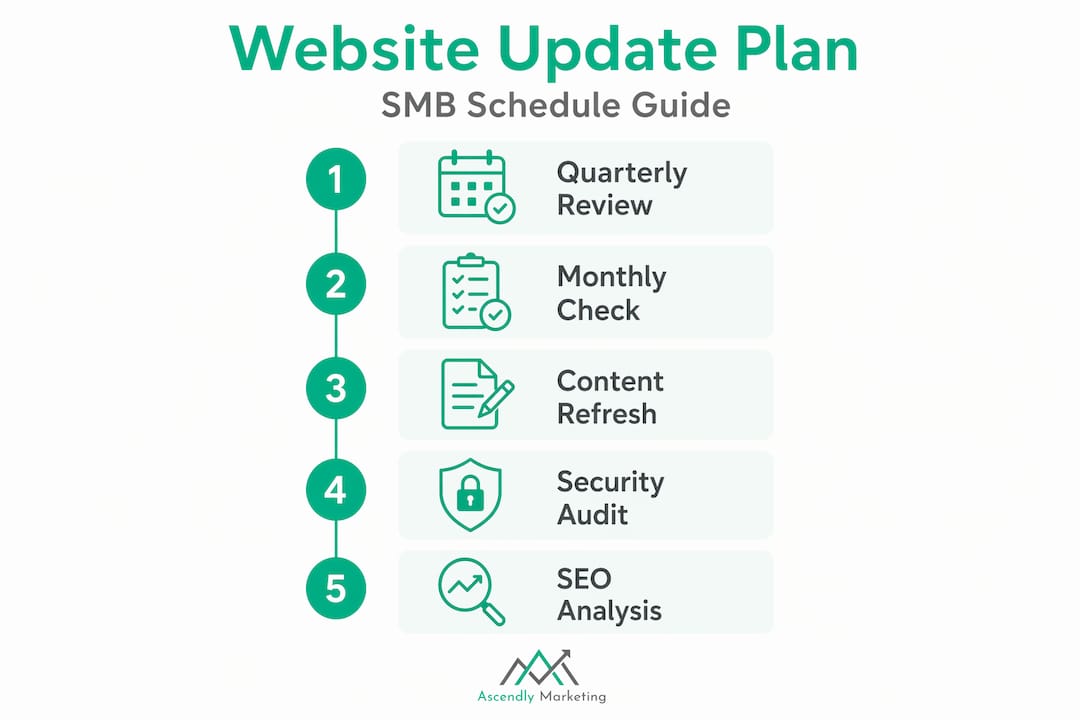
The goal is a schedule you’ll actually maintain. A quarterly review of your top 10 traffic pages, monthly security checks, and annual design evaluations covers most SMB sites without requiring a full-time team.
Common pitfalls when updating your site
The most dangerous update mistakes aren’t the ones that break your site. They’re the ones that look fine on the surface but quietly undermine your performance.
Changing a publication date without editing the content is a good example. It signals freshness to site visitors but not to Google. The algorithm evaluates substantive content changes, not timestamps. You get zero SEO benefit and a small hit to credibility if a reader notices the page hasn’t actually changed.
Another common mistake is treating all plugin updates as low priority. Most WordPress site owners install a plugin, forget about it, and rely on the platform to flag critical issues. But plugin abandonment is rampant, and an abandoned plugin doesn’t get security patches. It just sits there, vulnerable, until someone exploits it.
A few more traps worth avoiding:
- Ignoring Core Web Vitals monitoring. Most business owners check these once during a redesign and never again. Set a recurring monthly reminder to review your Search Console performance report.
- Bulk-updating all content at once. This can trigger spam filters and confuse crawlers. Stagger your updates across weeks.
- Neglecting the content relevance connection. Fresh content that no longer matches search intent hurts more than it helps. Update with the current query in mind, not just the original topic.
Pro Tip: Before publishing any content update, check the current top-ranking pages for your target keyword. If their structure or depth has changed significantly since you first wrote your page, your update should match or exceed that standard.
The importance of content refresh is real, but only when the refresh is done with intention. A disciplined, documented process beats sporadic bursts of activity every time.
What I’ve learned from watching sites go stale
I’ve worked with dozens of SMBs over the past decade, and the pattern is almost always the same. A business invests in a solid website launch, sees good early results, and then stops treating the site as an ongoing responsibility. Six months later, traffic plateaus. A year later, it drops. By the time someone raises the alarm, the site is 18 months behind on plugin patches, the content references outdated pricing, and the mobile experience looks like it was designed for a 2019 screen.
The frustrating part is that none of this happens dramatically. There’s no single moment where the site “fails.” It just quietly becomes less competitive, less secure, and less convincing to every visitor who lands on it.
What I’ve found actually works is treating website updates the same way you treat financial reporting. Not as a project. As a process. Monthly security checks, quarterly content reviews, annual design evaluations. It’s not glamorous, and it’s not the kind of work that gets celebrated in a meeting. But it’s what separates sites that compound their value over time from those that require expensive emergency rebuilds every few years.
The businesses I’ve seen get this right also tend to have a clear owner for the task. Not a committee. One person or one agency is accountable for the schedule. When everyone owns it, no one does.
— Ascendly Marketing
Let Ascendly Marketing handle your website updates
If your site is overdue for a refresh, you don’t have to figure out the technical side alone. Ascendly Marketing has been helping small and medium-sized businesses maintain, optimize, and grow their web presence since 2013. From web design services that modernize your user experience to ongoing SEO and content maintenance that keeps your rankings moving in the right direction, the team handles the details so you can focus on running your business.
Whether you need a full site overhaul or a monthly maintenance plan that covers security, speed, and content freshness, Ascendly Marketing’s digital marketing services are built around measurable results and long-term relationships. Book a consultation with the Ascendly Marketing team and find out exactly what your site needs to compete in 2026.
FAQ
Why update your website regularly?
Regular updates protect your SEO rankings, security, and user experience. Static sites lose nearly 50% of organic traffic within six months, and outdated plugins expose your site to active security threats.
How often should website content be updated?
High-velocity content like pricing and service pages should be refreshed every 60 to 90 days. Evergreen content like core service pages typically needs updates every 6 to 12 months.
What happens if you don’t update your website?
Outdated websites lose search rankings, suffer security breaches from unpatched vulnerabilities, and push visitors away with slow load times and stale information. These problems compound silently over time.
Does updating website content improve SEO?
Yes, but only if the updates are substantive. Google rewards genuine content improvements and structural changes. Simply changing a publication date without editing the content provides no SEO benefit.
How do I know if my website needs updating?
Check Google Search Console for Core Web Vitals failures and traffic drops on key pages. Run a broken link audit and review your plugins for security patches. If any page still references outdated services, pricing, or imagery, it’s time to update.
