
Your site probably isn’t broken. It’s just not doing a job.
A lot of San Marcos business owners have a website that technically exists, loads well enough, and shows the logo in the right place. Then the phone stays quiet. Contact forms sit untouched. Service pages describe the business without moving anyone toward a call, a quote request, or a purchase.
That’s the main issue behind most san marcos tx website design projects. The problem usually isn’t that the site looks old. The problem is that it acts like a brochure instead of a salesperson.
Your Website Should Be Your Best Salesperson
A common situation goes like this. A business owner launches a site, checks it off the list, and gets back to running operations. Months later, they realize the site isn’t helping much. People visit, but they don’t take action. The homepage says what the company does, but it doesn’t guide a visitor toward the next step.
That gap matters in San Marcos because this isn’t a tiny market. One local source describes San Marcos as a regional hub with 67,553 residents and ties that scale to real demand for professional web design in Central Texas (Netfinity on San Marcos website design). When you’re competing in an active local market, a passive website leaves money on the table.

What a working site actually does
A strong site handles the first part of the sales process without needing your staff involved. It filters casual visitors, answers obvious questions, and pushes qualified people toward action.
That usually means:
- Clear positioning: Visitors understand what you do and who you help within seconds.
- Useful page flow: Service pages answer questions in the order buyers ask them.
- Visible next steps: Calls, quote requests, bookings, or product purchases are easy to find.
- Mobile usability: The experience works on the phone your customer is already holding.
A website earns its keep when it reduces friction between interest and action.
If your business also sells visually, content around the site matters too. Real estate is a good example. The same principle applies to many local businesses. Better visuals don’t exist for decoration. They move a buyer closer to trust. That’s why resources like these effective real estate video strategies are useful. They show how media can support conversion instead of just filling space.
The difference between presentable and profitable
A presentable website says, “We’re open.”
A profitable website says, “Here’s why to choose us, here’s what to do next, and here’s how to do it now.”
That’s the standard you should use when judging any san marcos tx website design proposal.
Why a Strategic Partner Beats a DIY Builder
A DIY builder can publish pages quickly. That part is true. It can’t think through your sales process, your search visibility, or your buyer’s hesitation.
That’s the distinction people miss. A template gives you a layout. A strategic partner gives you a business system.
The industry itself has moved in that direction. Providers in this market now talk about data-driven strategies, analytics, and conversions, which reflects a shift from visual branding alone to measurable performance work (Thrive’s San Marcos web design page). If the market has matured, your decision criteria should mature too.
What DIY tools usually miss
Most cheap builders make the same promise. Pick a theme, swap the photos, write a few lines, and go live. That sounds efficient until you need the site to support actual growth.
Here’s where those tools often fall short:
- Message hierarchy: They don’t tell you what belongs above the fold and what should move lower.
- Conversion planning: They don’t decide where forms, trust signals, or calls to action should sit.
- Search structure: They don’t map service pages in a way that supports crawlability and local relevance.
- Decision logic: They don’t know which content should attract, qualify, or close.
Practical rule: If your website decisions are based on what looks nice in the editor, you’re designing for yourself, not for buyers.
What you’re really buying
You’re not paying for rectangles, fonts, and stock photography. You’re paying for judgment.
A good partner looks at your revenue model first. They ask how leads enter the business, what customers need before they contact you, and which pages should do the heavy lifting. Then they build around that.
If you’re weighing the difference between a cheap build and a professional engagement, this breakdown on why to work with a professional web design agency is worth reading. The value isn’t “prettier design.” The value is sharper decisions.
A DIY site may be enough if you need a temporary placeholder. It’s the wrong move if you need a site that helps generate business.
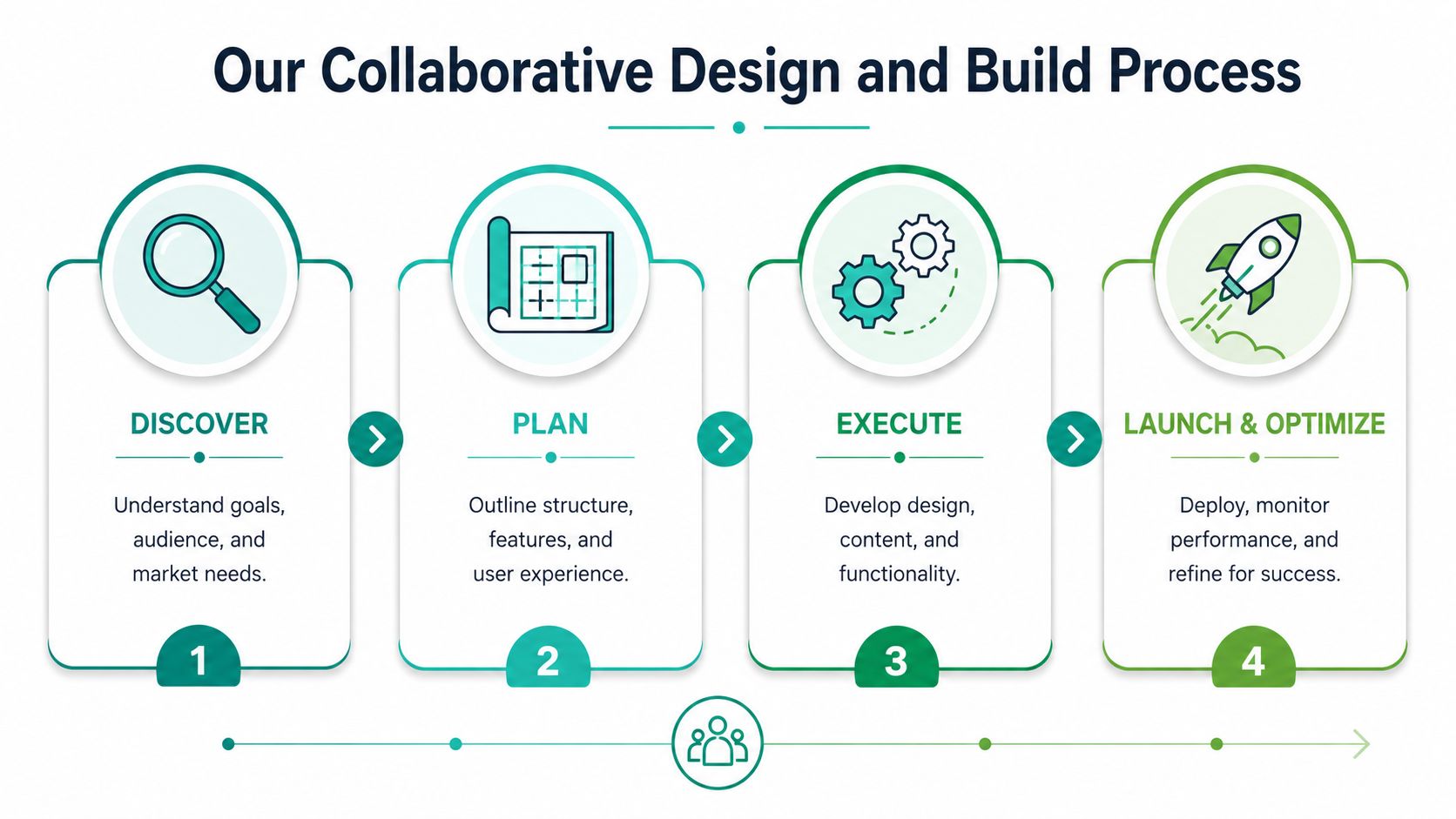
Our Collaborative Design and Build Process
Most website projects go sideways for one reason. The client and the team start building before they agree on what the site needs to do.
A cleaner process solves that. The work should move from business goals to page structure, then from structure to design, then from design to measurement.
Discover
The first step is diagnosis. Before anyone picks colors or layouts, you need a real understanding of the business, the audience, and the action the site should produce.
That means looking at questions like these:
- What brings in revenue: Lead generation, e-commerce sales, bookings, calls, or a mix
- Who the buyer is: Fast-moving shopper, careful evaluator, procurement contact, or local homeowner
- Where friction shows up: Weak service pages, confusing navigation, poor mobile flow, or thin trust signals
When this step is done right, the project stops being subjective. The site no longer revolves around internal opinions.
Plan
Planning turns business goals into a blueprint. During this stage, page hierarchy, navigation, and user paths are decided before development starts.
A solid plan covers:
- Site architecture so visitors and search engines can move through the site cleanly
- Content roles so each page has a job instead of repeating generic company language
- Feature decisions like forms, maps, e-commerce elements, logins, or pop-ups only where they support a clear action
This stage prevents expensive revisions later.
Execute
Now the project becomes real. Designers shape the interface. Developers build the pages. Content gets written or refined to match the intent of each section.
This is also where the technical choices matter. CMS setup, mobile responsiveness, page templates, image handling, and analytics installation all need to support performance, not just launch.
One option businesses use for this kind of work is Ascendly Marketing, which structures projects around a discover, plan, execute, report model and combines website design with broader digital marketing support. That’s useful when the site needs to connect with SEO, paid traffic, or lead generation instead of living in isolation.
A short walkthrough helps make that process concrete.
Launch and optimize
Launch isn’t the finish line. It’s when the site starts producing real user behavior that you can study.
After launch, you watch how people move. Which pages attract attention? Where do they stop? Which calls to action get ignored? Then you adjust.
The first version of a site is a baseline. The useful gains come from what you improve after real visitors start using it.
That’s the process clients should expect. No mystery. No design theater. Just clear steps tied to business outcomes.
What Your New Website Project Includes
Most clients ask the right question. What do I get?
You should get more than design files and a homepage mockup. A real San Marcos, TX, website design project includes the technical pieces that affect visibility, usability, and lead flow after launch.
The core deliverables
A modern site needs fast load times, responsive rendering across devices, and strong builds to avoid bloated features that slow down interaction (Hammani Tech on web design in San Marcos). That technical work isn’t extra. It’s part of the product.
Here’s what should be in scope for most business websites:
- Custom page layouts: The pages fit your offer, not a generic theme’s assumptions.
- Responsive design: The layout adapts cleanly across phones, tablets, and desktops.
- CMS access: You can update text, swap images, add pages, and manage content without calling a developer for every change.
- Foundational on-page SEO: Titles, page structure, headings, and internal organization support search visibility.
- Analytics setup: You can see what traffic is doing instead of guessing.
- Conversion elements: Forms, click-to-call actions, quote requests, product pages, or booking paths match the business model.
What each item does for the business
A deliverable only matters if it changes something practical.
| Deliverable | Business outcome |
|---|---|
| Responsive design | Fewer mobile drop-offs and cleaner browsing on any device |
| CMS access | Faster updates without waiting on outside help |
| On-page SEO setup | Better alignment between page topics and search visibility |
| Analytics installation | Clearer decisions about what pages help or hurt |
| Conversion-focused layouts | More direct paths from page visit to inquiry or sale |
If you’re comparing providers, use this guide on website design for local businesses as a benchmark for what should be included. If a proposal skips performance, SEO setup, or tracking, it’s incomplete.
Timeline depends on complexity
A simple brochure-style site moves faster than an e-commerce build with layered navigation, product logic, and custom functionality. The right timeline comes from scope, content readiness, revision cycles, and platform needs.
The wrong approach is rushing the launch and fixing the mess later. A slower, cleaner build usually saves time overall because it avoids avoidable rebuild work.
Designing for Search Engines and Human Visitors
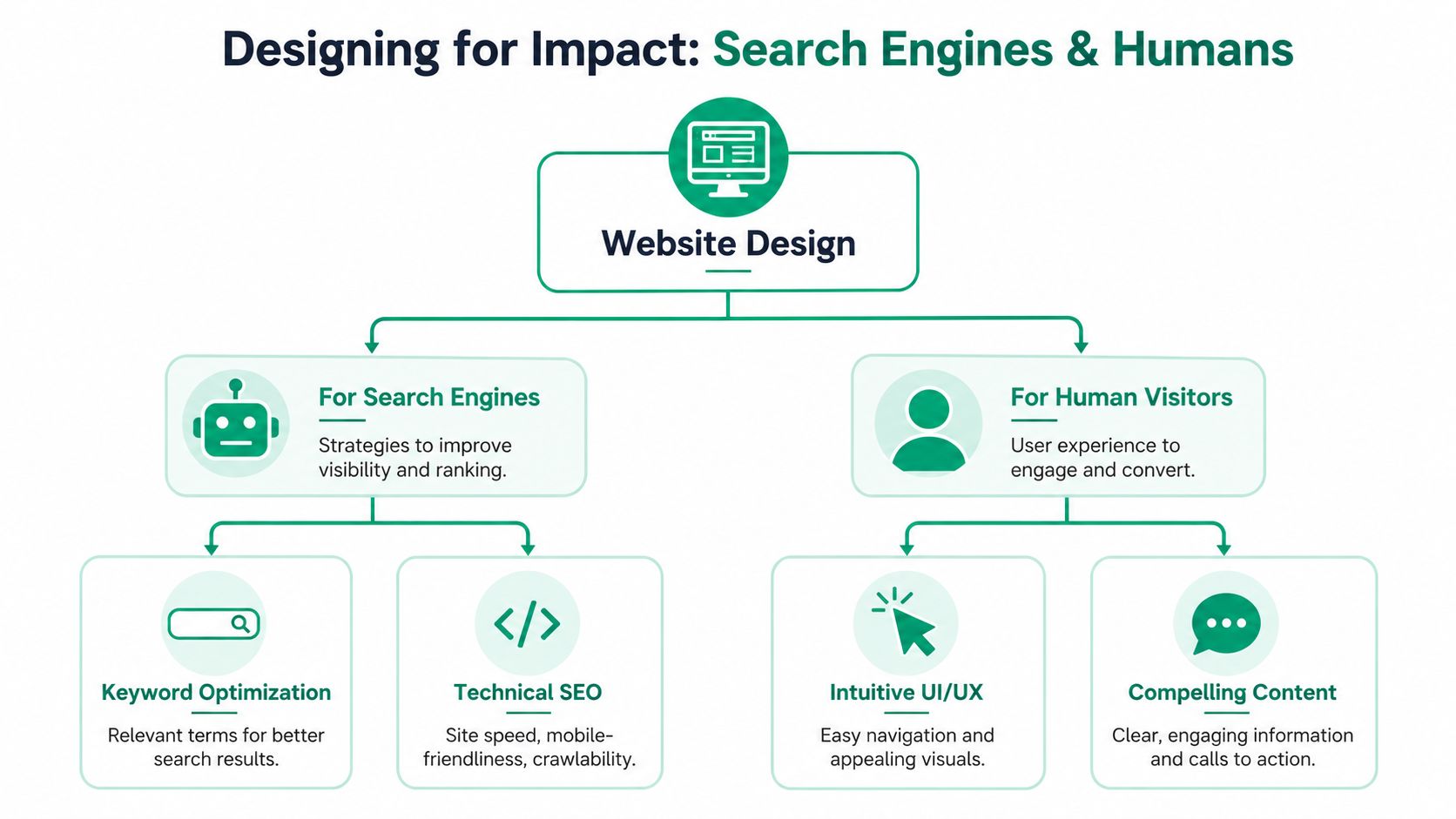
A website has two jobs at once. Search engines need to understand it. Human visitors need to trust it.
Most weak sites fail one side of that equation. Some are readable but structurally messy, so they’re hard to crawl. Others are technically organized but feel cold, vague, or confusing once a person lands on the page.
Build the structure first
Good performance starts with how the site is organized. Local agencies in this space often pair web design with tools like Google Analytics, Hotjar, and SEMrush, and they tie information architecture to SEO and conversions from the beginning (Creative Webs 2U on San Marcos website design). That approach is correct.
When page hierarchy, metadata, and user flow are planned together, two things happen:
- Search engines crawl the site more easily
- Visitors reach action points with less friction
What helps search engines
Search engines respond well to clarity. They need clean signals about what each page covers and how pages relate to one another.
That usually means:
- Logical service-page structure: Each core service gets its own focused page.
- Clean metadata: Titles and descriptions support page intent.
- Useful internal linking: Related pages connect naturally instead of randomly.
- Technical stability: Mobile rendering, page speed, and crawl access don’t create friction.
If local visibility matters, this guide to optimizing for local SEO for SMBs is a practical next read.
What helps human visitors
People don’t convert because your H tags are clean. They convert because the site makes the decision easier.
A strong page for humans does a few simple things well:
- It answers the first question fast
- It shows proof or credibility in the right place
- It removes confusion around the next step
- It keeps forms and calls to action close to buying intent
If a visitor has to hunt for what you do, who it’s for, or how to contact you, the design is failing.
Search and usability aren’t separate tracks. They reinforce each other. Cleaner structure supports rankings. Better page flow supports action. That’s why san marcos tx website design should be planned as a performance system, not a visual exercise.
See Our Impact on Texas-Based Brands
The clearest proof of good web strategy is simple. The site starts solving a business problem instead of adding one.
One Texas-based service company came in with pages that described its work in broad, flat language. Visitors could land there, but they had no obvious reason to inquire. The fix wasn’t flashy. The service pages were rewritten around buyer questions, the navigation was tightened, and the contact path was reduced to fewer decisions. After launch, the site did a better job filtering serious prospects from casual traffic.
Another Texas business had the opposite problem. Its brand looked polished, but the site buried the action points. Key calls to action were too far down the page, the mobile layout felt awkward, and important trust signals were scattered. The redesign focused on page hierarchy, mobile flow, and simpler paths to contact. The result was a site that supported sales conversations instead of slowing them down.
A third brand needed a website that could support broader marketing activity. Paid traffic, organic traffic, and repeat visitors were all landing on the same weak templates. The rebuild gave each major audience a cleaner path. That made campaign traffic more usable because people no longer hit a generic page and stall out.
That’s the pattern worth paying for. Not “nice design.” Better business behavior from the people who land on the site.
Frequently Asked Questions
Business owners usually ask the same three things. How much does this cost? Should I use AI, and what happens after launch? Here are direct answers.
Website Design Investment Tiers
| Tier | Best For | Key Features | Typical Investment Range |
|---|---|---|---|
| Starter | Businesses that need a clean, credible web presence | Core pages, mobile-friendly design, CMS access, contact form, basic analytics | Varies by scope |
| Growth | Service businesses focused on lead generation | Custom page layouts, stronger conversion paths, on-page SEO setup, expanded service pages, analytics and user tracking | Varies by scope |
| Advanced | E-commerce brands or firms with more complex functionality | Custom workflows, deeper architecture, catalog or product structure, integrations, advanced tracking, ongoing refinement | Varies by scope |
If someone gives you a price before discussing scope, content, functionality, and business goals, they’re guessing.
Should I use AI or go custom?
Many businesses often get stuck. AI tools are faster. That part is real. They can help with draft content, page outlines, basic layout suggestions, and repetitive production tasks.
The tradeoff is differentiation. One verified source notes that 69% of marketers report AI use in their companies, while also pointing to risks like generic layouts and weaker local positioning (My Tek Rescue on AI and web development). That’s the decision frame you should use.
AI makes sense when:
- You need speed: Early-stage pages or temporary campaign support
- Your content changes often: Repetitive updates or draft assistance
- You have a human editor: Someone still needs to shape the message and quality
Custom design makes more sense when:
- The website needs to sell your difference
- Local trust matters
- Your buyer journey has nuance
- You need tighter control over layout, compliance, and conversion flow
Use AI to accelerate production. Don’t let it make strategic decisions your business depends on.
What happens after launch
The site should be monitored, updated, and improved. That includes content edits, plugin or platform maintenance, analytics review, and conversion testing. A launch without follow-through creates a static asset. Ongoing support turns the website into a working channel.
If your current site looks acceptable but doesn’t produce enough calls, leads, or sales, talk with Ascendly Marketing. A direct review of your pages, structure, and conversion paths will tell you quickly whether you need a rebuild, a strategic refresh, or a simpler fix.
