Your website probably looks acceptable in a stakeholder meeting and underperforms everywhere else. Sales says leads are weak. Operations says updates take too long. Marketing says traffic lands and disappears. The agency you hired years ago is gone, your developer answers when they can, and now you're trying to choose a website design agency california businesses can rely on.
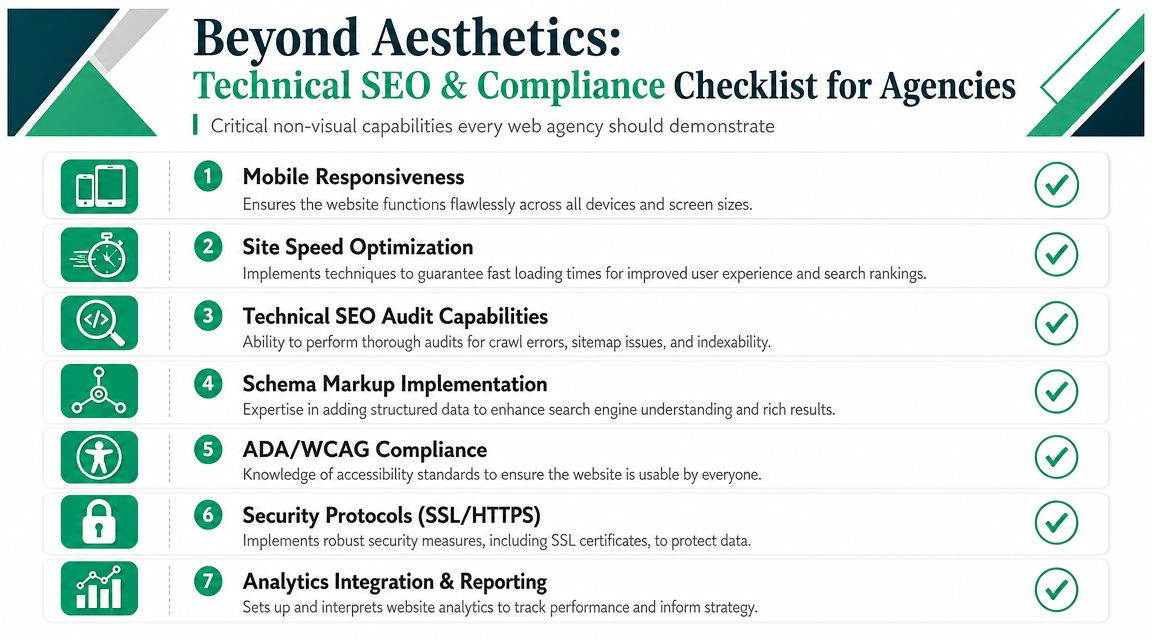
That decision gets harder in a market with too many options and too little clarity. A polished homepage tells you almost nothing about how an agency handles search visibility, conversion paths, migration risk, accessibility, or post-launch support. Those are the details that decide whether a redesign fixes the business problem or just replaces one attractive liability with another.
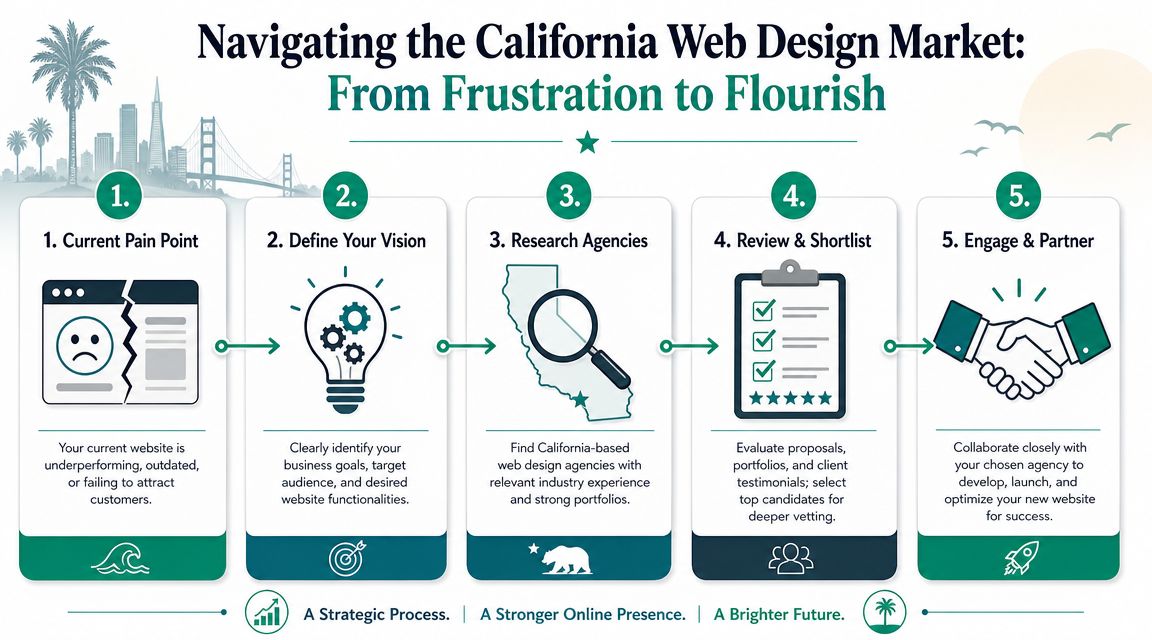
Navigating the California Web Design Market
California gives buyers range, but range creates noise. A 2026 California web design market overview describes the state as one of the largest web design markets in the United States. The same overview says California's graphic design industry, which includes web design services, generates about $2.14 billion in annual revenue, while the national web design services industry has grown at a 2.2% CAGR over the last five years.
That scale changes how you should shop. The same source says DesignRush tracks nearly 1,600 California-based web design agencies out of 18,500+ firms nationwide, which puts California at about 8.6% of all tracked agencies. It also notes the state has more than 25,300 specialized firms. Buyers get more specialization, more competition, and more variation in process quality.
What that market size means for you
A crowded market sounds good until you start taking calls. One firm sells aesthetics. Another sells code. A third says they “do everything,” which usually means you need to ask harder questions.
Use this market to your advantage:
Look for specialization: In a dense market, general claims aren't enough. If you need lead generation, complex integrations, ecommerce, or accessibility remediation, ask for direct examples of that work.
Expect process maturity: Agencies in a competitive state should already have a documented discovery, design, development, QA, and launch workflow.
Compare on operational fit: A strong vendor isn't just creative. They handle revisions, approvals, technical handoff, and launch risk in a way your team can manage.
Practical rule: Don't start with "Who has the nicest portfolio?" Start with "Who can solve the problem that's costing us revenue or creating risk?"
If you want a second framework before you contact firms, this guide on how to find your ideal web partner is a useful companion because it helps narrow agencies by fit rather than style alone.
For businesses that depend on local discovery, your website choice also affects visibility beyond the site itself. A weak structure, poor location pages, or thin conversion paths will hold back map performance too. This overview of how to rank higher on Google Maps helps show why web design and local search can't be treated as separate projects.
The common mistake
Many buyers treat the search like a creative procurement exercise. They collect proposals, react to visuals, and choose the team that feels most modern.
That approach misses the primary issue. You're not buying a homepage. You're buying a system that has to attract qualified traffic, guide visitors, reduce friction, support sales, and remain usable after launch. In California, there are plenty of agencies that can make a site look current. Fewer can build one that performs under pressure.
Define Your Project Before You Search
Most agency searches go off track before the first call. The buyer asks for “a new website,” the agency fills in the blanks, and three weeks later everyone is discussing features that don't connect to the business goal.
Write the project brief first. Keep it short, direct, and specific enough that an agency can price and scope the work without guessing.
Start with the business objective
A website can support many goals, but one of them needs to lead. If everything is a priority, nothing gets designed properly.
Use questions like these:
What has to improve first Are you trying to generate more qualified leads, support sales conversations, improve online purchasing, reduce support requests, or reposition the brand?
What action should a visitor take Book a call, request a quote, complete a purchase, submit a form, call a location, download a document, or visit a store.
What happens after conversion If a lead form goes nowhere or sales follow-up is slow, a redesign won't fix the underlying bottleneck.
Define audience and buying context
An agency can't build convincing pages if you haven't defined who those pages are for. “Small businesses,” “homeowners,” and “enterprise clients” are too broad to guide design or messaging.
Build your brief around:
Primary buyer: Who signs off
Secondary influencer: Who researches options
Decision context: Urgent need, planned purchase, compliance requirement, comparison shopping
Top objections: Price, trust, timeline, complexity, disruption
If your team can't name the buyer, the agency will design for everyone. Pages built for everyone rarely convert anyone well.
A formal request process helps here. If you need a starting point, this marketing request for proposal guide makes it easier to define scope before vendors start steering the conversation.
Separate must-haves from nice-to-haves
Budgets break and timelines slip. Teams mix critical requirements with ideas that can wait, then act surprised when the proposal grows.
Video library, long-form guides, interactive content
Post-launch
Training, bug fixing process, analytics access
Ongoing experimentation program
Set operating constraints
Good agencies ask about internal realities because those realities shape the build. Bad agencies assume you'll adapt later.
Include the following in your brief:
Who approves work: One decision-maker or a committee
Who owns content: Internal team, freelancer, or agency
What systems already exist: CRM, ecommerce platform, booking software, analytics tools
What can't break during launch: Existing rankings, lead flow, customer access, tracked forms
A solid brief doesn't need to be long. It needs to remove ambiguity. Once you've done that, you can eliminate agencies quickly. The right firms will respond with sharper questions. The wrong ones will send generic packages and stock timelines.
How to Evaluate an Agency Portfolio
A portfolio should answer one question. Can this agency solve problems like yours in a disciplined way? If you're only looking at color palettes, typography, and animation, you're reviewing art direction, not business capability.
Start with the visible work, then press into the reasoning behind it.
Look for evidence of decision-making
Strong portfolios explain why the site was built the way it was. Weak portfolios show screenshots and move on.
A useful portfolio review checks for:
Clear page purpose: Can you tell what the homepage, service page, and contact path are supposed to do?
Audience fit: Does the messaging sound like it was written for a specific buyer?
Mobile behavior: Are layouts still clear on smaller screens, or does the design collapse into clutter?
Calls to action: Do key pages ask the visitor to do something specific?
Judge UX, not just surface polish
A literature review on website design and user engagement identifies seven UX elements that show up most often in the research: navigation, graphical representation, organization, content utility, purpose, simplicity, and readability. In that review, navigation (62.86%) and graphical representation (60%) led the list.
Those findings give you a practical checklist when you review portfolio examples.
A sharper portfolio checklist
Navigation Can a first-time visitor understand where to go next without hunting through menus?
Organization Are related pages grouped logically, or does the site rely on clever labels that hide basic information?
Readability Is the text scannable? Dense copy, low contrast, and weak hierarchy often look refined in mockups and perform poorly in real use.
Purpose Every featured page should have a visible job. Brand storytelling matters, but not at the expense of clarity.
Content utility Does the page help a buyer act, compare, trust, or decide?
A portfolio earns more trust when the agency can explain what they removed, simplified, or reorganized. Restraint usually signals maturity.
Here's a useful way to observe design critique in action before your agency interviews.