
TL;DR:
- Most business owners think SEO only involves keyword-optimized content and backlinks, but a solid technical foundation is essential for search visibility. Technical SEO optimizes website infrastructure to ensure search engines can crawl, render, and index content effectively, making site discoverability possible before content quality matters. Prioritizing core aspects like crawlability, page speed, security, and architecture prevents hidden barriers that can silently block rankings and traffic growth.
Most business owners assume SEO means writing keyword-rich blog posts and getting other sites to link back to them. That thinking isn’t wrong, but it’s dangerously incomplete. Beneath every high-ranking website is a layer of technical infrastructure that determines whether search engines can even find, read, and serve your content to the right people. Skip that layer, and your best content may never surface in search results at all.
Table of Contents
- Technical SEO explained: More than keywords and links
- Core pillars of technical SEO
- Technical SEO in action: How search engines crawl, render, and index
- Performance, security, and user experience: The ranking factors you control
- How to get started: Practical technical SEO for SMBs
- Beyond the checklist: The uncomfortable truth about technical SEO for SMBs
- Ready to unlock growth with smart technical SEO?
- Frequently asked questions
Key Takeaways
| Point | Details |
|---|---|
| Technical SEO is essential | It lays the groundwork for search engines to find, understand, and rank your site. |
| Focus on the basics first | Address crawlability, speed, security, and mobile responsiveness before advanced tactics. |
| Regular audits prevent issues | Review your technical SEO health routinely to catch hard-to-see problems early. |
| Performance affects rankings | Google uses user experience and Core Web Vitals when ranking your site. |
| Practical steps yield big results | Simple changes—like enabling HTTPS or fixing crawl errors—can significantly boost visibility. |
Technical SEO explained: More than keywords and links
When people talk about SEO, they usually picture content. Blog posts, product descriptions, keywords placed just right. Some also think about backlinks, which are external sites pointing to yours to signal authority. Both matter. But neither one works reliably without a solid technical foundation underneath.
Technical SEO is the work of optimizing a website’s infrastructure, so search engines can crawl, render, index, and serve the content correctly and efficiently. In other words, it’s everything that makes your site legible and accessible to a search bot before a human reader even enters the picture. Think of it like plumbing. You can design the most beautiful kitchen in the world, but if the pipes don’t work, nothing flows.
Technical SEO differs from content SEO and link building because it focuses on how the site works at the backend infrastructure level, rather than what the site says or who links to it. That distinction is important. You can have great writing and strong backlinks and still rank poorly if your site structure is broken, your pages aren’t indexable, or your load times are too slow.
Here’s a quick side-by-side view:
| SEO type | Focus area | Example tasks |
|---|---|---|
| Technical SEO | How the site works | Crawlability, page speed, HTTPS |
| Content SEO | What the site says | Keyword research, on-page copy |
| Off-page SEO | Who links to the site | Link building, PR outreach |
Core technical tasks include making sure bots can crawl every important page, that those pages render correctly, and that the site is structured in a way that supports both discovery and usability. You can learn more about SEO strategies for SMBs that layer technical fixes alongside content and off-page efforts.
The takeaway here is simple: infrastructure matters as much as content for search rankings. If your foundation is cracked, everything you build on top of it is at risk. Marketers who understand content authenticity for marketers also recognize that trustworthy, discoverable content starts with a technically sound site.
Core pillars of technical SEO
Having established what technical SEO is, it’s time to look at its main components so you can prioritize where to start.

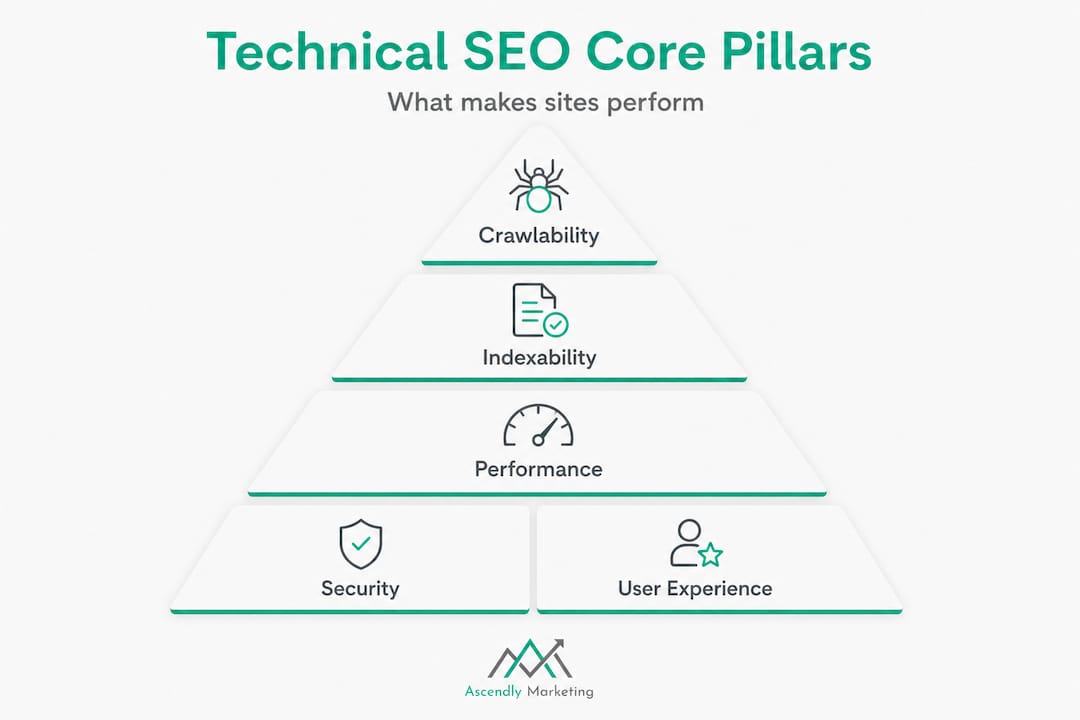
A practical technical SEO methodology is to audit in layers: crawlability and indexability (can bots find and add pages to the index), rendering (can they run and understand JavaScript), performance (page experience signals), security, and architecture (URL structure and internal linking). That’s six pillars, and each one has a direct business impact for SMBs.
| Pillar | What it covers | Business impact |
|---|---|---|
| Crawlability | Can bots access your pages? | Invisible pages = zero traffic |
| Indexability | Are pages added to search index? | Content that can’t rank |
| Rendering | Does the page load for bots? | JavaScript issues cause blank results |
| Performance | How fast and stable is the page? | Slow sites lose rankings and users |
| Security | Is the site on HTTPS? | Trust signals and ranking boost |
| Architecture | URL structure and internal links | Helps bots and users navigate |
Layered audits help surface hidden barriers that you’d never catch by just looking at keywords or traffic. A broken robots.txt file, for example, can silently block your entire site from being indexed without triggering any obvious alarm. Follow a solid process using a detailed technical SEO audit guide to stay systematic.
Here’s a step-by-step view of a typical technical SEO audit process for non-technical managers:
- Crawl the site using a tool like Screaming Frog or Sitebulb to map all URLs
- Check crawlability by reviewing your robots.txt file and XML sitemap
- Audit indexability by running a site: search in Google and checking Google Search Console
- Review rendering by testing JavaScript-dependent pages with Google’s URL Inspection Tool
- Measure performance using PageSpeed Insights and the Core Web Vitals report
- Verify security by confirming HTTPS is active and certificates are valid
- Assess architecture by reviewing internal linking, URL structure, and duplicate content issues
You can also explore the technical site audit steps Ascendly recommends to prepare before engaging an agency. For a broader context on search marketing, understanding these pillars ties directly into building effective search marketing strategies.
Pro Tip: Always fix issues that block search bots before optimizing for speed or JavaScript rendering. A bot that can’t enter your site gains nothing from a fast load time.
Technical SEO in action: How search engines crawl, render, and index
Once you know the main areas to address, it helps to see how technical SEO shapes what Google and Bing actually see on your site.
Search engine bots, often called crawlers or spiders, visit your site by following links. They start with known URLs, then discover new ones by reading your sitemap and chasing internal links. After visiting a page, they render it, which means they process the HTML, CSS, and JavaScript to understand what the page actually says and shows. Then they decide whether to index it, adding it to the pool of content that can appear in search results.
Technical SEO optimizes infrastructure so each of those steps- crawl, render, and index- happens without friction. When any step breaks down, pages go invisible. They exist on your server, but no one searching for your services will ever find them.
Common technical mistakes that cause pages to vanish include:
- Robots.txt errors that accidentally block crawlers from entire sections of the site
- Noindex tags left on live pages from development or staging environments
- Crawl traps such as infinite pagination or session ID URLs that waste crawl budget
- Broken internal links that prevent bots from discovering key pages
- Duplicate content created by URL parameters without canonical tags
- JavaScript rendering failures where page content only loads after scripts run, and bots give up before seeing it
Edge cases technical SEO practitioners watch for include crawl traps and parameterized URL permutations, pages that are crawlable but not indexable, and rendering failures in JavaScript-heavy architectures. That last point is especially relevant for modern sites built on React, Vue, or Angular frameworks.
“The difference between a page that ranks and a page that doesn’t is often not the content quality. It’s whether Google could see the content in the first place.”
Consider a real-world example: a regional home services company had been publishing consistent blog content for two years with zero organic traffic growth. An audit revealed that their staging site’s robots.txt file had been copied to production. Every page was blocked. After a single line fix, Google indexed over 400 pages within three weeks, and organic traffic grew by 60% within two months. No new content was written. The fix was purely technical.
For e-commerce businesses especially, e-commerce SEO best practices require careful attention to crawl paths and product page indexability. Understanding the broader search algorithm insights behind how bots evaluate content helps frame why technical hygiene is so essential.
Performance, security, and user experience: The ranking factors you control
Beyond being discoverable, your site has to perform well and keep users safe, another pillar of technical SEO that directly influences your rankings and revenue.
Google is transparent about the fact that page experience matters for rankings. This includes load speed, visual stability, interactivity, mobile-friendliness, and HTTPS security. These aren’t just signals for search engines. They reflect what your actual visitors experience. A slow, insecure, or visually broken page pushes users away, and Google notices that too.
Core Web Vitals are part of technical SEO’s performance scope and are measured using real-user field data. Google’s ranking systems use Page Experience signals, with Core Web Vitals derived from the Chrome User Experience Report (CrUX). That means the scores Google sees aren’t from a lab test you ran once. They reflect how thousands of real users experience your site every day.
The three Core Web Vitals you need to understand are:
- LCP (Largest Contentful Paint): How quickly the main content of the page loads. Target under 2.5 seconds.
- INP (Interaction to Next Paint): How responsive the page is when a user clicks or taps. Target under 200 milliseconds.
- CLS (Cumulative Layout Shift): How much the page visually shifts while loading. Target a score under 0.1.
Here are the top ways SMBs can improve page speed and security right now:
- Compress and convert images to WebP format
- Enable browser caching and use a content delivery network (CDN)
- Minimize CSS, JavaScript, and HTML file sizes
- Eliminate render-blocking scripts that delay page display
- Move to HTTPS if you’re still on HTTP (this is non-negotiable)
- Use a reliable, fast web hosting provider rather than budget shared hosting
- Regularly update your CMS, plugins, and themes to patch security vulnerabilities
Pro Tip: Use Google Search Console’s Core Web Vitals report alongside PageSpeed Insights to compare lab and field data. If your lab scores look great but field scores are poor, the issue is likely with real-world device performance or third-party scripts running on the page.
These performance improvements don’t just help search bots. They directly improve the experience for your customers. Faster sites convert better, build trust faster, and reduce bounce rates. If you’ve recently redesigned your website or are planning one, the SEO’s role in site redesign should be part of your planning conversation from day one. And pairing technical improvements with strong content is well explained in these digital marketing content tips.
How to get started: Practical technical SEO for SMBs
Now that you know what to prioritize, here’s how to jump in and make real progress, even without a huge team or advanced tech skills.
The best place to start is always the issues that directly block search bots. Crawl errors come first. If bots can’t access your pages, nothing else matters. From there, you move to indexability, speed, and security. Here’s a simple numbered process to follow:
- Set up Google Search Console (free) and submit your XML sitemap
- Review the Coverage report in Search Console to find excluded or errored pages
- Run a site crawl with a free or trial version of Screaming Frog to map broken links and redirect chains
- Test your robots.txt at yourdomain.com/robots.txt to confirm important pages aren’t blocked
- Run PageSpeed Insights on your most important pages and note your Core Web Vitals scores
- Check for HTTPS across the whole site, including mixed content warnings
- Review your sitemap to ensure it includes all live, indexable pages and excludes redirects or error pages
For more structured guidance on this process, SEO audit services can help you prioritize what to fix based on actual impact rather than guesswork.
One often-overlooked step is server log analysis. Server log file analysis provides ground truth about how crawlers actually interacted with your server, including the exact URLs requested, timestamps, and response status codes. This helps detect issues that may not appear in aggregated SEO tools like Search Console or third-party crawlers.
Pro Tip: Most popular SEO tools show you what they discovered during a crawl. Server logs show you what Google’s bot actually visited and how often. These can be very different. A page that appears healthy in a crawl tool might be getting crawled hundreds of times per day due to a parameter loop, wasting crawl budget.
“Regular audits aren’t a sign that something is wrong. They’re how you stay ahead of issues before they silently tank your rankings over months.”
Beyond the checklist: The uncomfortable truth about technical SEO for SMBs
Here’s something we’ve seen repeatedly working with small and medium businesses since 2013: most SEO problems aren’t about clever strategy. They’re about invisible basics that were never set up correctly or were broken at some point and never noticed.
Business owners often chase trending SEO tactics, structured data, AI-generated content, and semantic keyword clustering, while their robots.txt is blocking half the site. 90% of gains we see come from getting the fundamentals right: clean crawl paths, HTTPS, accurate sitemaps, and page speeds that don’t punish mobile users. These aren’t exciting fixes, but they’re the ones that move the needle for SEO strategy results in the real world.
We’ve seen sites stuck on page 4 for years, not because their content was poor, but because a single noindex tag was blocking their most important service pages. One change, immediate movement. Not a six-month content campaign.
The other uncomfortable truth is that not everything in a technical SEO checklist applies to every business equally. A five-page service business website doesn’t need to obsess over crawl budget the way an e-commerce store with 50,000 SKUs does. Focus ruthlessly on what affects discoverability, usability, and trust. Fix what blocks bots, what slows down real users, and what signals that your site is secure and professional.
Our perspective at Ascendly is this: SEO gains start with making your site findable and usable. Work on clever tricks only after you secure the basics. The businesses that skip the fundamentals and jump to advanced tactics are the ones that spend money without seeing results.
Ready to unlock growth with smart technical SEO?
If the technical side of SEO feels like a foreign language, you’re not alone. Most SMBs don’t have in-house developers or dedicated SEO staff, and that’s exactly where Ascendly Marketing steps in.

We’ve helped businesses across industries identify and fix the technical roadblocks holding their sites back, from crawl errors and speed issues to full site architecture reviews. Whether you need a one-time SEO service agency audit to diagnose your biggest issues or ongoing support through our full suite of digital marketing services, Ascendly brings the expertise to make your site work harder for you. Book a consultation today and find out what’s actually holding your rankings back.
Frequently Asked Questions
What is the main goal of technical SEO?
The main goal of technical SEO is to help search engines efficiently crawl, render, and index your site so that your content can actually appear in search results.
How is technical SEO different from content SEO?
Technical SEO focuses on how a site works at the infrastructure level, while content SEO focuses on what the site says and how well it communicates with human readers.
What are some easy technical SEO fixes for SMB websites?
Quick wins include enabling HTTPS, fixing broken links, submitting an XML sitemap, and improving page speed. Auditing in layers, starting with crawlability and indexability, helps you prioritize what to fix first.
Do Core Web Vitals impact search rankings?
Yes. Google uses Core Web Vitals and real-user Page Experience signals as part of its ranking systems, making performance a direct factor in where your site appears in search results.
What is server log analysis in technical SEO?
It’s the process of examining raw server logs to see exactly how search engines accessed your site, including which URLs were crawled, when, and with what response codes, revealing issues that standard SEO tools often miss.
