
TL;DR:
- A customer feedback loop is a four-stage cycle involving collecting, analyzing, acting on, and closing the feedback. Running a constrained 30-day pilot with clear KPIs and ownership helps teams improve retention and loyalty effectively. The hardest part is closing the loop with customers, which drives trust and future engagement.
A working customer feedback loop is a four-stage system you can pilot in 30 days if you limit scope to one event, assign a single owner to every action, and track three program KPIs from day one. According to Perspective AI’s 2026 guide, most programs fail not at collection but at the act and close stages — which means the fastest way to prove value is to skip the grand rollout and run a constrained pilot that forces follow-through.
Your 30-day starter checklist:
- Pick one lifecycle event to instrument (onboarding completion, first feature use, or renewal window)
- Wire the capture trigger to that event
- Run your first synthesis session within 72 hours of the first responses
- Assign a named owner to every action item that surfaces
- Ship at least one visible change before day 30
- Tell the customers whose feedback drove that change
Three KPIs to track from day one: response rate (are people engaging?), time-to-insight (how fast does raw feedback become a decision?), and close-the-loop rate (what percentage of feedback threads get a follow-up to the customer?). Everything else is secondary until these three are healthy.
Table of Contents
- What is a customer feedback loop and why does it have to close?
- How the four stages of a feedback loop actually work
- How to run a 30–90 day implementation pilot
- Which channels should you use to collect feedback?
- How to turn raw feedback into decisions you can act on
- Templates for closing the loop with customers
- Key Takeaways
- The part most teams get wrong about feedback loops
- How Ascendly Marketing can help you run your first pilot
- Useful sources for going deeper
What is a customer feedback loop and why does it have to close?
A customer feedback loop is a four-stage operating cycle: collect input, analyze it for patterns, act on what you find, and close the loop by telling customers what changed. The four-stage lifecycle is well-established, but the “close” stage is where most programs quietly die.
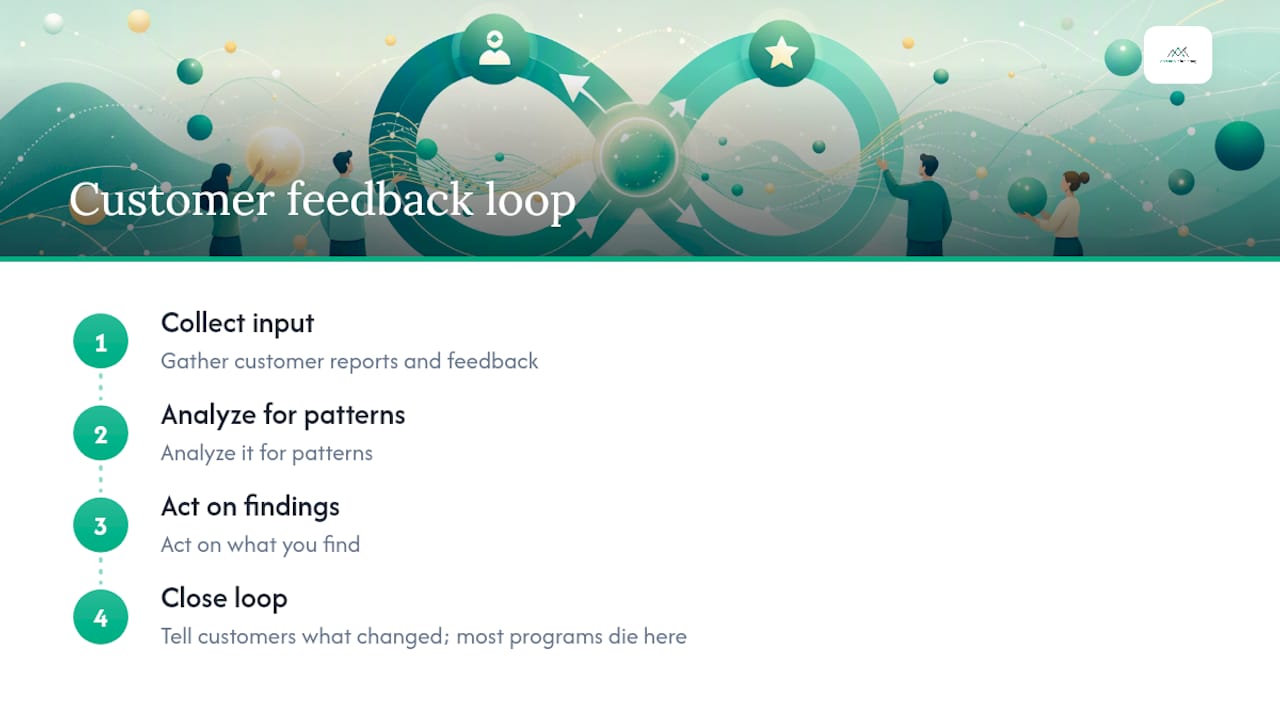
Two types of loops run in parallel. The inner loop handles individual issue resolution: a customer reports a bug, a support agent fixes it, and the customer hears back within 24 hours. The outer loop addresses systemic changes: a pattern of complaints about onboarding friction gets routed to the product team, triaged, and eventually shipped as a redesigned flow, with a follow-up message to the cohort that flagged it.
Both loops matter, but the outer loop is where customer retention and loyalty compound. Customers who see their input acted on tend to become stronger advocates. The service recovery effect is real: closing a detractor’s feedback quickly can flip a churning account into a renewed one. The inner loop keeps customers from leaving today; the outer loop keeps them from wanting to leave at all.
How the four stages of a feedback loop actually work
The four stages are not a linear checklist you run once. They are a continuous cycle, and each stage has specific operational requirements.
1. Collect: Capture context, not just ratings
A number without context is nearly useless. A 3-star rating tells you something is wrong; a 3-star rating attached to “the export function broke my workflow on day two of onboarding” tells you exactly where to look. Design capture around lifecycle events, not arbitrary time intervals.
Event-triggered, conversational capture outperforms static surveys on both response quality and relevance. Trigger a micro-survey when a user completes onboarding, hits a downgrade signal, or reaches a renewal window. Keep the ask tiny: one scale item plus one open-ended question. A sample in-app prompt:
That is the whole survey. Mobile-friendly, under 10 seconds, and anchored to a specific moment. UserVoice’s collection best practices reinforce this: make requests discoverable but unobtrusive, keep micro-surveys short, and always include at least one open question. For feedback collected by customer-facing staff, route it through a simple proxy form so it enters the same pipeline as direct responses.
2. Analyze: Classify, cluster, and surface what matters
Raw responses need a taxonomy before they become useful. Build a two-level tag structure: a top-level category (onboarding, billing, performance, feature request) and a sub-tag (export, payment failure, load time). Every response gets at least one tag.
AI-assisted theme detection compresses what used to take a week of manual analysis into hours. Tools like Perspective AI, Dovetail, and Thematic can cluster open-ended responses by topic and surface representative quotes automatically. The catch: AI accuracy needs human-in-the-loop review, especially for edge cases and emotionally charged feedback. Set a weekly checkpoint where a human reviewer spot-checks 10–15% of AI-tagged responses. Model drift is real, and a miscategorized theme can quietly distort your prioritization for months.
4. Close: Tell customers what changed
Closing the loop is the stage that builds loyalty. The PROBE framework, detailed in Perspective AI’s closed-loop program guide, names this final phase “Echo” — the outbound communication that connects a customer’s original input to a visible outcome. Echo is the single most correlated activity with increased customer loyalty in feedback programs.
A closing cadence that works: send an acknowledgment within 24 hours of receiving feedback, an in-progress update if resolution takes more than 72 hours, and a final “here’s what changed” message when the action is complete. Templates for each of these are in the section below.
How to run a 30–90 day implementation pilot
The pilot-first approach works because constraints force discipline. One event, one team, one owner. Here is the full timeline.
Days 1–30: Build and validate
- Days 1–5: Select one lifecycle event (onboarding completion is the most common starting point). Define the trigger condition in your CRM or product analytics tool. Assign a synthesizer and an action owner before you write a single survey question.
- Days 6–10: Design the capture: one scale item, one open-ended question, mobile-friendly format. Wire the trigger. Test it on five internal users.
- Days 11–20: Go live. Collect the first 25–50 responses. Run your first synthesis session using a tagging taxonomy you built in advance. Surface the top three themes.
- Days 21–25: Hold the first weekly action review. Assign owners to the top themes. Set SLAs. Identify one change you can ship before day 30.
- Days 26–30: Ship the change. Send a close-the-loop message to the customers whose feedback drove it. Measure your three pilot KPIs.
Sample weekly action review agenda (30 minutes):
- 5 min: synthesizer presents top themes from the past week
- 10 min: owners report on open action items
- 10 min: new assignments with named owners and deadlines
- 5 min: Echo queue review (which customers need a follow-up this week?)
Days 31–60: Stabilize and measure
The goal here is a repeatable cadence, not expansion. Run the weekly action review every week without skipping. Track time-to-insight (target: under 72 hours from response to themed summary). Measure close-the-loop rate (target: at least 50% of action items closed with customer follow-up by day 60).
If the synthesis pipeline is taking longer than 72 hours, add AI-assisted tooling or reduce the response volume by tightening the trigger condition. If the action owner is missing deadlines, escalate to the governance board before day 45.
Days 61–90: Graduate or expand
Graduation criteria before expanding to a second event:
- Time-to-insight consistently under 72 hours
- At least one shipped artifact tied directly to pilot feedback
- Weekly action review running without prompting
- Close-the-loop rate above 50%
Once those four conditions are met, add a second lifecycle event and a second owner. Replicate the same structure. Do not add a third event until the second one is stable.
Which channels should you use to collect feedback?
Channel selection depends on where the customer is in their lifecycle and what kind of insight you need. Combining survey signals with behavioral data gives fuller coverage than surveys alone, especially given that average survey response rates are about 12.4%.
| Channel | Best use case | Response quality | Fatigue risk |
|---|---|---|---|
| In-product micro-survey | Feature adoption, onboarding friction | High (contextual) | Low if triggered well |
| Transactional NPS/CSAT | Post-support, post-purchase | Medium | Medium |
| Customer interviews | Deep discovery, churn reasons | Very high | None (opt-in) |
| Support tickets | Bug reports, workflow blockers | High | None |
| App store / G2 reviews | Brand perception, competitive signals | Medium | None |
| Social listening | Sentiment trends, emerging issues | Low (noisy) | None |
| Behavioral signals | Engagement drop, feature abandonment | High (passive) | None |
Behavioral and passive signals deserve special attention. Engagement drops, skipped features, and shortened session times predict dissatisfaction 30–60 days before a customer explicitly complains. Wire these signals into your feedback pipeline alongside survey data so you catch problems before they become churn.
Capture design rules:
- Keep every survey to one scale item plus one open-ended question
- Trigger in context, not on a timer
- Cap outreach at one survey per customer per 30-day window
- Always test on mobile before going live
- Route staff-collected feedback through a proxy form into the same pipeline
Pro Tip: If your response rate is below 10%, the problem is rarely the survey itself. Check the trigger timing first. A survey that fires three days after an event captures a memory, not an experience.
How to turn raw feedback into decisions you can act on
The synthesis workflow has four steps: classify, cluster, quantify, and surface representative quotes. Run them in order every time.
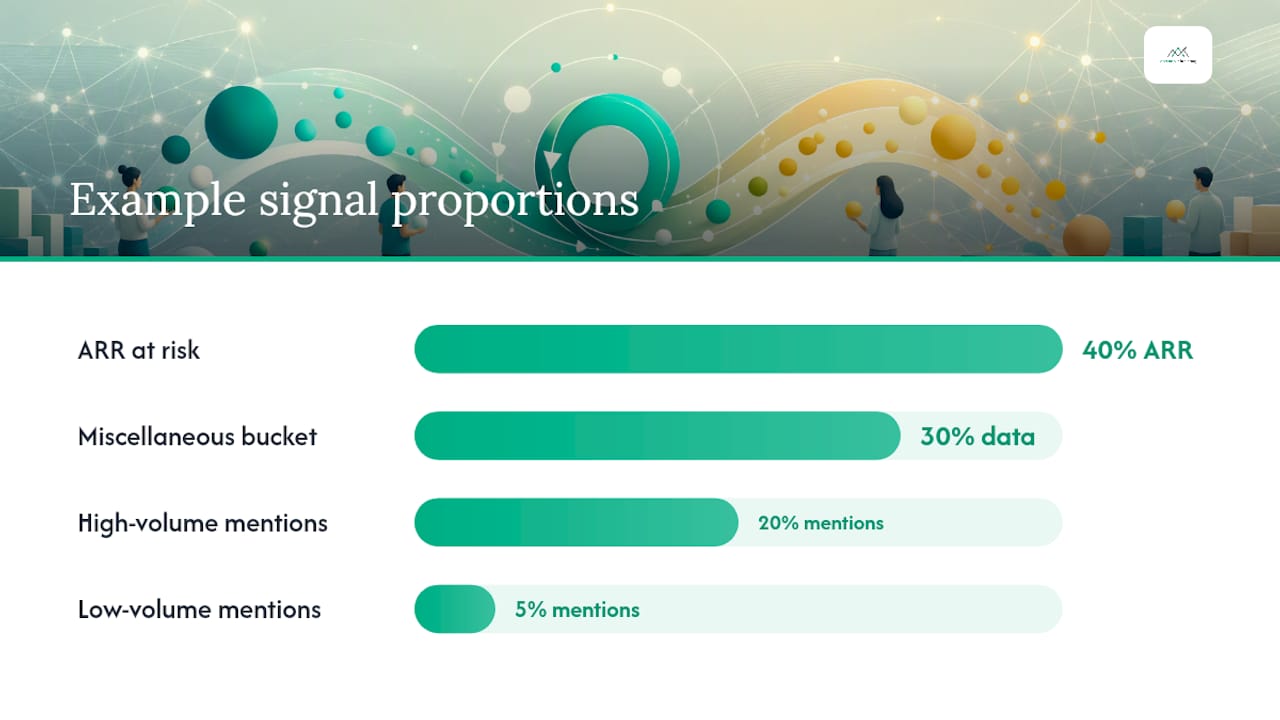
Classify: Apply your two-level taxonomy to every response. If a response does not fit an existing tag, flag it for taxonomy review rather than forcing it into the wrong category. Taxonomy drift is how you end up with a “miscellaneous” bucket that swallows 30% of your data.
Cluster: Group tagged responses by theme. AI tools like Thematic, Dovetail, or Perspective AI can do this automatically for open-ended text. Review the clusters before acting on them. A cluster labeled “performance” might contain both load-time complaints and export errors — two different problems that need different owners.
Quantify: Count the frequency of each theme. Then weight it by customer value at risk. A theme mentioned by 5% of respondents who represent 40% of ARR outranks a theme mentioned by 20% of respondents who are all on free plans.
Surface representative quotes: Pull two or three verbatim quotes per theme. These go into the weekly action review and the roadmap brief. A product manager who reads “the export broke my workflow on day two” makes a different decision than one who reads “export issues: 12 mentions.”
Prioritization rubric (score each theme 1–5 on each dimension, sum the scores):
- Frequency: How many customers mentioned it?
- Customer value at risk: What is the ARR or LTV of affected accounts?
- Severity: Does it block a core workflow or is it a minor annoyance?
- Feasibility: Can the team address it within the current sprint or quarter?
The highest-scoring theme gets the first owner assignment. HBR’s argument for a focused growth metric applies here too: resist the temptation to act on everything at once. A short list of high-scoring themes with named owners beats a long list of themes with no one accountable.
Pro Tip: High-volume signals are not always high-impact signals. A feature request that 200 free-tier users mention every month may score lower than a billing confusion that three enterprise accounts flagged once. Weight by value at risk, not just count.
Templates for closing the loop with customers
Four message types cover every scenario. Keep them short. Customers do not want an essay — they want to know you heard them and did something about it.
Template 1: Acknowledge receipt (send within 24 hours)
Subject: We got your feedback — thank you
Hi [Name], thanks for sharing your experience with [specific feature/moment]. We’ve logged it and a member of our team will follow up within [X] business days. Your input goes directly into our review process.
Template 2: In-progress update (send if resolution takes more than 72 hours)
Subject: Update on your feedback
Hi [Name], we’re still working on [issue]. We wanted to let you know it’s actively being reviewed by [team/owner name]. We’ll follow up by [specific date].
Template 3: Change implemented (send when the fix ships)
Subject: We made a change based on your feedback
Hi [Name], you mentioned [specific issue] on [date]. We’ve shipped a fix: [one-sentence description of what changed]. You can see it in [release notes / feature / setting]. Thank you for flagging it.
Template 4: Declined or not planned (send with rationale)
Subject: An update on your suggestion
Hi [Name], you suggested [feature/change]. After reviewing it, we’ve decided not to build it in the near term because [honest one-sentence reason]. We’re keeping it logged and will revisit if priorities shift. We appreciate you taking the time.
Timing and personalization notes:
- Attach a screenshot or release note link in Template 3 whenever possible
- Use the customer’s exact words from their original feedback in Templates 3 and 4 — it signals you actually read it
- For email follow-ups, keep subject lines under 50 characters and send from a named person, not a generic support alias
- In-app microcopy version of Template 3: “You asked for faster exports. We shipped it. [See what changed →].”
Key Takeaways
A working customer feedback loop requires a named owner for every action, a synthesis pipeline that delivers insights in under 72 hours, and a closing message to every customer whose input drove a change.
| Point | Details |
|---|---|
| Pilot scope first | Constrain to one lifecycle event and one team before expanding to avoid governance collapse. |
| Three KPIs from day one | Track response rate, time-to-insight, and close-the-loop rate before adding any other metrics. |
| Single owner per theme | Assign one named person to every action item; shared ownership means no ownership. |
| Close the loop explicitly | Send a follow-up message to customers when their feedback drives a change — this is the stage most tied to retention. |
| Ascendly Marketing pilot support | Ascendly Marketing designs and runs 30-day feedback loop pilots for product and marketing teams, from trigger wiring to weekly action review facilitation. |
The part most teams get wrong about feedback loops
The conventional wisdom says the hard part of a feedback loop is getting customers to respond. It is not. Getting responses is a design problem, and it is largely solved: trigger in context, keep the ask small, and response rates follow. The hard part is what happens after the data arrives.
Most teams treat synthesis as a reporting function. Someone compiles a monthly summary, presents it to leadership, and the deck gets filed. Nothing ships. No one tells the customers who responded what happened to their input. The loop never closes, and the next survey gets a lower response rate because customers have learned, correctly, that their feedback goes nowhere.
The shift that actually works is treating synthesis as a routing function. The synthesizer’s job is not to produce a report. It is to produce a list of named owners with deadlines. That reframe changes the entire downstream dynamic. Weekly action reviews stop being status updates and start being accountability sessions. Owners stop waiting for permission and start shipping.
There is also a subtler trap: over-investing in the sophistication of the capture layer while under-investing in governance. A conversational AI survey with 15 branching questions and sentiment analysis is worthless if the themes it surfaces sit in a shared inbox for three weeks. A simple two-question in-app prompt with a named owner and a 48-hour SLA will outperform it every time.
The teams that run the best feedback programs in 2026 are not the ones with the most advanced tooling. They are the ones who have made “who owns this?” a question that always has an answer before the meeting ends.
How Ascendly Marketing can help you run your first pilot
Running a feedback loop pilot while managing a product roadmap and a customer success queue is genuinely hard to do without outside structure. Ascendly Marketing works with product and marketing teams to design and run 30-day pilots that produce a working loop, not just a survey.
A typical pilot engagement includes: selecting the right lifecycle event for your business, wiring the capture trigger to your CRM or product analytics stack, building the synthesis pipeline with AI-assisted tagging, facilitating the first four weekly action reviews, and writing the closure templates your team will use to tell customers what changed. The output at day 30 is a functioning loop with at least one shipped change and a close-the-loop rate you can measure.
No long contracts. No vendor lock-in. The pilot is scoped to 30 days with clear graduation criteria, so you know exactly what you are getting before you commit to a longer engagement. If you want to connect feedback outcomes to your broader digital marketing strategy, Ascendly Marketing can extend the engagement to cover activation, retention messaging, and content updates driven by what the loop surfaces.
Book a discovery call to scope your pilot. The first conversation takes 30 minutes and ends with a written pilot brief you can take back to your team.
Useful sources for going deeper
These sources back the claims in this article and are worth bookmarking for specific subtopics.
- Customer feedback: The complete 2026 guide to collecting, analyzing and acting on it — Perspective AI
- How to build a closed-loop customer feedback program that actually closes | Perspective AI
- Customer feedback loops — 73% of B2B SaaS run continuous AI-driven loops in 2026 — Perspective AI
- Customer feedback management — Sogo (Sogolytics)
- Customer feedback management — Stravito
- Voice-of-Customer program — CustomerGauge
- The one number you need to grow — Harvard Business Review
- Customer feedback best practices — UserVoice