
TL;DR:
- Launching a website involves careful planning, building, testing, and ongoing maintenance to ensure effective performance. Small businesses typically use website builders or managed CMS platforms for faster, controlled launches, focusing on essential setup tasks like domain registration and sitemap creation. Regular testing and post-launch updates are crucial to prevent errors, improve SEO, and foster long-term growth.
Launching a website is the structured process of planning, building, and publishing your business online so customers can find you, trust you, and buy from you. The industry term for this process is “web publishing,” though most small business owners simply call it going live. Knowing how to launch a website correctly means more than pressing a publish button. It means aligning your domain, hosting, content management system (CMS), and SEO settings so your site works from day one. Done right, a website launch becomes your most productive sales tool, running 24 hours a day without extra staff.
What are the essential prerequisites before launching a website?
The most important decision you make before building is choosing your website approach. Three main approaches exist: website builders, managed CMS platforms, and custom coding. Website builders offer drag-and-drop simplicity with minimal setup time. Managed CMS platforms like WordPress give you more control over design and SEO. Custom coding delivers maximum flexibility but requires a developer and significantly more time.
For most small business owners, a managed CMS or website builder covers every need. 70–80% of small business needs are met by these two approaches, which also reduce launch time compared to custom development. That time savings matters when you are trying to get to market quickly.
Before you touch a single template, lock in three things: your domain name, your hosting provider, and a basic sitemap. A sitemap is a simple outline of your site’s pages, such as Home, About, Services, and Contact. It acts as a blueprint that keeps your build focused and prevents scope creep. Register your domain early because popular names disappear fast, and domain propagation (the time it takes for your address to go live across the internet) can take up to 48 hours.

| Approach | Ease of use | Flexibility | Typical time to launch |
|---|---|---|---|
| Website builder | High | Low to medium | 1–3 days |
| Managed CMS | Medium | High | 3–7 days |
| Custom coding | Low | Very high | 4–12 weeks |
Pro Tip: Register your domain and hosting together from a single provider to simplify DNS management and reduce setup errors on launch day.
Your branding assets also belong in this phase. A logo, a defined color palette, and a basic style guide prevent you from making inconsistent design decisions during the build. Skipping this step leads to a site that looks patched together, which erodes visitor trust immediately.
How to build your site step by step
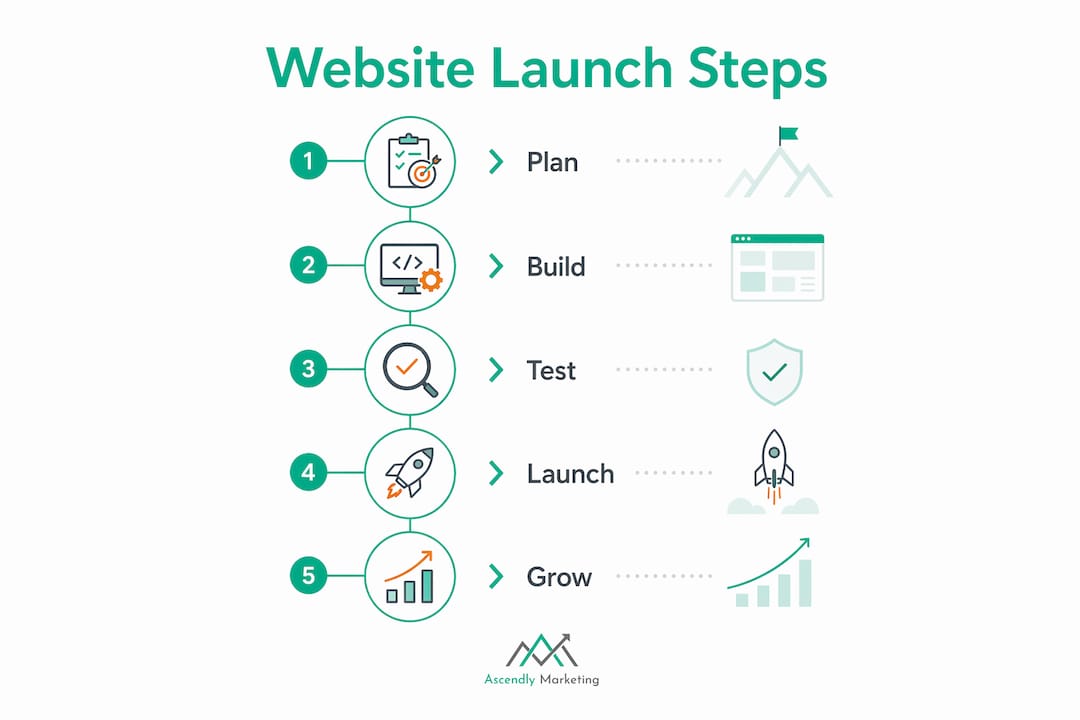
A focused weekend is enough to complete a basic website launch when you follow a clear workflow. Day one covers planning, domain registration, hosting setup, and CMS installation. Day two covers content creation, theme configuration, testing, and publishing. That structure keeps you moving without getting lost in details.
Follow these steps in order:
- Install your CMS or activate your website builder. Connect it to your hosting account and complete the initial configuration, including setting your site title and time zone.
- Choose and install a theme or template. Pick one that matches your industry and brand colors. Avoid themes with excessive animations or heavy scripts, as they slow your load time.
- Customize your layout. Adjust fonts, colors, and header structure to match your style guide. Keep the layout simple. Visitors decide whether to stay within three seconds of landing on your page.
- Build your core pages. Every business site needs at minimum: Home, About, Services or Products, and Contact. Each page should answer one clear question for the visitor.
- Write your copy. Lead every page with the benefit to the customer, not a description of your company. Your homepage headline should state what you do and who you serve in one sentence.
- Add essential features. Install a contact form, connect Google Analytics, and activate an SSL certificate. SSL is the security protocol that puts “https” in your URL. Without it, browsers flag your site as unsafe, and visitors leave.
- Set up your navigation menu. Keep it to five items or fewer. Cluttered navigation confuses visitors and increases bounce rates.
Pro Tip: Build and test your site on a staging environment before going live. A staging site is a private copy of your site where you can test changes without affecting the live version. This prevents costly errors and downtime.
Good website design for small businesses is not about visual complexity. It is about guiding the visitor toward one clear action, whether that is calling you, filling out a form, or making a purchase.
What critical testing steps must you complete before launch?
Testing is where most small business owners cut corners, and it is exactly where expensive mistakes happen. Small errors in core user paths can cause a 20–50% drop in lead conversions after launch. A broken contact form or a missing checkout step costs you real customers.
Run through this checklist before you make your site public:
- Test every form. Submit each contact, quote, and signup form yourself. Confirm the submission goes to the right email address.
- Check all links. Broken internal links hurt both user experience and SEO rankings.
- Test on multiple browsers. Chrome, Safari, Firefox, and Edge all render pages slightly differently.
- Test on mobile devices. Google uses mobile-first indexing, meaning it ranks your mobile version first. A site that looks great on desktop but breaks on a phone will not rank.
- Verify your SSL certificate is active. Your URL should show “https,” not “http.”
- Submit your sitemap to Google Search Console. This tells Google your site exists and which pages to index.
- Check your search engine visibility setting. CMS platforms default to “discourage search engines” during development. You must switch this to public before launch, or Google will not index your site.
- Run Google PageSpeed Insights. This free tool scores your page load speed and lists specific fixes. Slow pages lose visitors before they even see your content.
Pro Tip: Set up Google Analytics before you go live, not after. You want data from your very first visitor, including where they came from and what they did on your site.
Review your SEO checklist for businesses before publishing to confirm your metadata, page titles, and image alt text are all in place. These details take 30 minutes to set up and pay dividends for years.
How to execute launch day and manage post-launch growth
Going live is a process, not a single event. The most reliable launches follow a “technical freeze” rule: stop making structural changes to your site 24–48 hours before going live. DNS propagation and database syncing take time, and last-minute edits introduce errors that are hard to trace.
Follow this launch day sequence:
- Remove all placeholder content, dummy text, and test images.
- Switch your search engine visibility setting from private to public.
- Point your domain to your live hosting server.
- Do a final walkthrough of every page on both desktop and mobile.
- Announce your launch on your social media channels and email list.
Once you are live, the work shifts from building to maintaining and growing. Neglecting post-launch maintenance creates long-term technical debt. Dedicate 2–4 hours monthly to keep your site secure and performing well. That small time investment prevents the kind of security breaches and performance drops that can take a site offline for days.
Your monthly maintenance tasks should include:
- Update your CMS, themes, and plugins to the latest versions.
- Back up your site files and database.
- Review Google Analytics for traffic trends and high-exit pages.
- Check for broken links using a free crawler tool.
- Publish at least one new piece of content to signal activity to search engines.
Website analytics tell you which pages drive leads and which ones lose visitors. Use that data to make decisions, not guesses. The business owners who grow fastest after launch are the ones who review their numbers monthly and make small, consistent improvements.
Ongoing SEO and content marketing are what separate a website that grows from one that sits idle. Aligning your website’s purpose with clear business goals drives measurable results rather than just giving you an online brochure. Define what success looks like before launch, whether that is 50 contact form submissions per month or 500 product page views, and measure against that target every 30 days.
Key Takeaways
Launching a website successfully requires completing four distinct phases: planning, building, testing, and post-launch maintenance, each with specific technical and strategic requirements.
| Point | Details |
|---|---|
| Choose your approach early | Website builders and managed CMS platforms meet most small business needs and launch faster than custom code. |
| Build a sitemap first | A page outline prevents scope creep and keeps your build focused before you touch a template. |
| Test before going live | Check all forms, links, mobile display, and SSL to avoid a 20–50% drop in lead conversions. |
| Fix your visibility setting | Switch your CMS search engine setting from private to public before launch, or Google will not index your site. |
| Maintain monthly | Dedicate 2–4 hours monthly to updates, backups, and analytics review to prevent technical debt. |
What I have learned after years of watching businesses launch websites
The biggest mistake I see small business owners make is treating launch day as the finish line. They spend weeks perfecting the design, then go live and never touch the site again. Six months later, they wonder why the phone is not ringing.
Technical skill is far less of a barrier than most people assume. The business owners who struggle most are not the ones with limited coding knowledge. They are the ones who launched without a clear goal. A website built to “have an online presence” does not convert visitors into customers. A website built to generate 20 qualified leads per month has a purpose, and every design and content decision flows from that purpose.
The other pattern I see constantly is skipping the testing phase. Owners rush to announce their launch, then discover the contact form sends submissions to a dead email address, or the checkout breaks on iPhone. Those errors cost real money and real trust. Thirty minutes of testing before launch saves hours of damage control after it.
Post-launch is where the real opportunity lives. The businesses that grow consistently are the ones treating their website as a living asset. They publish content, review analytics, run paid campaigns, and refine their pages based on what the data shows. A website is not a brochure you print once. It is a sales system you build over time.
— Ascendly Marketing
Ascendly Marketing’s approach to website launch and growth
Ascendly Marketing has helped small businesses and entrepreneurs build and grow their online presence since 2013. Getting your site live is step one. Getting it found, trusted, and converting visitors into customers is where the real work begins.

Ascendly Marketing’s team of SEO specialists and web designers works with you to make sure your site is built on a foundation that search engines reward and visitors trust. From professional website design that converts to organic SEO services that drive long-term traffic, every service is built around your specific business goals. If you are ready to turn your website into a growth engine, Ascendly Marketing is ready to help you get there.
FAQ
How long does it take to launch a website?
A basic website can go live in a single weekend with focused effort. The typical workflow allocates day one to planning, domain registration, and hosting setup, and day two to content, design, and publishing.
What do I need before I start building my site?
You need a registered domain name, a hosting plan, a chosen CMS or website builder, and a basic sitemap outlining your core pages. Having your logo and brand colors ready before you start saves significant time.
Why is my website not showing up on Google after launch?
The most common cause is a CMS setting that blocks search engines during development. Switch your search engine visibility from private to public and submit your sitemap to Google Search Console to trigger indexing.
What is a staging site and do I need one?
A staging site is a private copy of your website where you test changes before applying them to the live version. It prevents errors and downtime that occur when updates go directly to a live site, and any serious business website benefits from one.
How often should I update my website after launch?
Dedicate 2–4 hours monthly to updates, backups, and performance reviews. Regular maintenance prevents security vulnerabilities, keeps your site fast, and signals to search engines that your content is current.