

TL;DR:
- Web maintenance keeps your website secure, fast, and effective, preventing costly issues like slow load times and security breaches. Neglecting routine checks and updates can lead to higher costs, lost leads, and declining search rankings, damaging your business growth. Outsourcing maintenance ensures consistent performance, saves money, and preserves your site as a valuable marketing asset.
A 1-second delay in page load time reduces conversions by 7%, and most small business owners have no idea their site is slowing down until a customer tells them. Web maintenance is the ongoing process of keeping your website secure, fast, and working the way it should — and it is something most SMBs dramatically underestimate. If you launched your site and moved on, you are not alone. But that mindset is quietly costing you leads, search rankings, and customer trust every single day. This guide breaks down exactly what web maintenance involves and what you should be doing about it.
Table of Contents
- What is web maintenance and why it matters for your business
- How much does web maintenance cost and what returns can you expect?
- Essential web maintenance tasks broken down by frequency
- Common pitfalls and expert tips for effective web maintenance
- How regular web maintenance boosts your SEO, user experience, and business growth
- Why many SMBs undervalue web maintenance and how you can get ahead
- Ascendly Marketing: helping your business succeed with expert web maintenance and digital marketing
- Frequently asked questions
Key Takeaways
| Point | Details |
|---|---|
| Ongoing upkeep | Web maintenance is a continuous process essential for website security, performance, and user experience. |
| Five key areas | Maintenance focuses on security, performance, content, SEO, and technical updates on scheduled intervals. |
| Cost vs returns | Typical SMB maintenance costs $50-$500 monthly but prevents costly downtime and boosts conversions. |
| Scheduled tasks | Daily to annual maintenance tasks keep your website healthy and compliant with business growth needs. |
| Expert strategy | Testing updates, verifying backups, and monitoring uptime are critical expert practices for reliability. |
What is web maintenance and why it matters for your business
Web maintenance is the practice of continuously monitoring, updating, and improving your website to keep it secure, fast, and effective. Think of it like maintaining a physical storefront. You would not open a shop and then never clean it, fix a broken sign, or restock shelves. Your website deserves the same attention.
According to a detailed maintenance breakdown, website maintenance covers five core categories: security, performance, content, SEO, and technical updates, with tasks ranging from daily to annual. Each category affects something your customers care about directly.
Here is what each category actually covers:
- Security: Updating software, installing patches, managing SSL certificates, and scanning for malware
- Performance: Monitoring site speed, compressing images, cleaning up databases, and testing load times
- Content: Refreshing product descriptions, updating blog posts, fixing outdated information, and adding new pages
- SEO: Auditing for broken links, updating metadata, checking keyword rankings, and fixing crawl errors
- Technical updates: Updating your CMS (content management system), plugins, themes, and server configurations
Neglect any one of these and the damage compounds. A plugin that goes unpatched for six months becomes a security hole. Outdated content signals to Google that your site is inactive. Slow load times push visitors to a competitor before they even see what you offer. The good news is that website design for small business done right sets a solid foundation, and consistent maintenance keeps it performing long after launch.
How much does web maintenance cost and what returns can you expect?
The cost question is usually the first thing SMB owners ask, and the honest answer is: it depends on what your site needs, but it is almost certainly less than the cost of ignoring it.

Website maintenance for SMBs typically runs $50 to $500 per month. Unplanned outages can cost between $140 and $540 per hour in lost business, and even small speed issues trim conversion rates by 7%. Here is a realistic cost breakdown by service tier:
| Service level | Monthly cost | What is included |
|---|---|---|
| Basic | $50–$100 | Backups, uptime monitoring, minor updates |
| Standard | $100–$250 | Security patches, content updates, performance checks |
| Full-service | $250–$500+ | SEO audits, A/B testing, technical support, reporting |
The ROI case is clear when you frame it this way: a $200/month maintenance plan that prevents one outage saves you $540 in lost revenue immediately. And that does not count the leads that bounced from a slow, broken, or hacked site before you even knew there was a problem.
What maintenance costs you less to fix proactively:
- Restoring a hacked site: $1,000 to $5,000+ in recovery costs
- Recovering from a Google penalty for outdated or low-quality content: months of lost traffic
- Fixing a broken checkout page discovered by a frustrated customer: immediate lost sales
Pro Tip: If you want to improve conversion rates without spending on new ads, start with a maintenance audit. Fixing speed, broken links, and outdated calls to action often delivers faster results than any paid campaign.
Essential web maintenance tasks broken down by frequency
Knowing what to do is half the battle. The other half is doing it on a schedule. Small businesses benefit most from daily uptime checks, weekly software updates, monthly audits, quarterly reviews, and annual compliance checks. Here is what that looks like in practice:
- Daily: Monitor uptime using automated tools that alert you via SMS or email if your site goes down. Check that critical forms like contact and checkout are working.
- Weekly: Run software, plugin, and theme updates. Back up your full site. Review basic analytics for unusual drops in traffic or high bounce rates.
- Monthly: Audit for broken links and 404 errors. Test backup restores to confirm they actually work. Review page speed scores and identify anything that has slowed down.
- Quarterly: Conduct a full SEO audit. Check for content that needs refreshing. Review security logs and user access permissions. Test your site on new browser versions and mobile devices.
- Annually: Review your hosting plan and server performance. Check legal compliance including privacy policy, cookie notice, and accessibility standards. Evaluate whether the overall site design still reflects your brand and serves your customers well.
The key insight here is that the hardest maintenance tasks are the ones people skip because they feel optional. A monthly backup restore test feels unnecessary until the day your backup file is corrupted and you have no working copy of your site.
Pro Tip: Connect your site health to website optimization goals so maintenance tasks feel purposeful. When you see that a monthly audit caught three broken links hurting your SEO, it stops feeling like chores and starts feeling like wins.
Common pitfalls and expert tips for effective web maintenance
Even business owners who understand the importance of web maintenance make the same costly mistakes. Knowing them ahead of time saves real money and headaches.
Testing updates in a staging environment before pushing them live prevents the kind of multi-day downtime that results from a plugin conflict breaking your homepage. A staging site is a private copy of your website where you test changes before they go public. Every serious maintenance routine uses one.
Key pitfalls to avoid:
- Auto-updating without backups: Automatic updates are convenient, but if an update conflicts with another plugin, you need a clean backup to roll back to. Always back up first.
- Ignoring backup quality: Many business owners assume their backups work. Verifying backups regularly by actually restoring them in a test environment is the only way to confirm they are usable.
- Using a generic maintenance page: When your site is down for updates, a plain “under maintenance” screen erodes trust. A branded page with an estimated return time and contact information keeps visitors confident.
- Missing form failures: A broken contact form can silently fail for weeks without error messages. Check all critical forms weekly.
- Not monitoring for speed regression: A site that was fast six months ago may have slowed significantly due to new plugins or image uploads. Speed needs ongoing attention, not a one-time fix.
“Most website security and performance issues are not dramatic events. They are slow leaks that start small, go unnoticed, and grow into serious problems over months. The businesses that catch them early are the ones running structured, scheduled maintenance.”
The businesses that invest in smart website design tips from the start tend to have leaner, easier-to-maintain sites. Simpler architecture means fewer points of failure and faster update cycles.
How regular web maintenance boosts your SEO, user experience, and business growth
Here is where the investment truly pays off in ways you can measure. Regular website upkeep directly improves SEO, user experience, and security, while neglect creates a compounding drag on traffic and conversions.
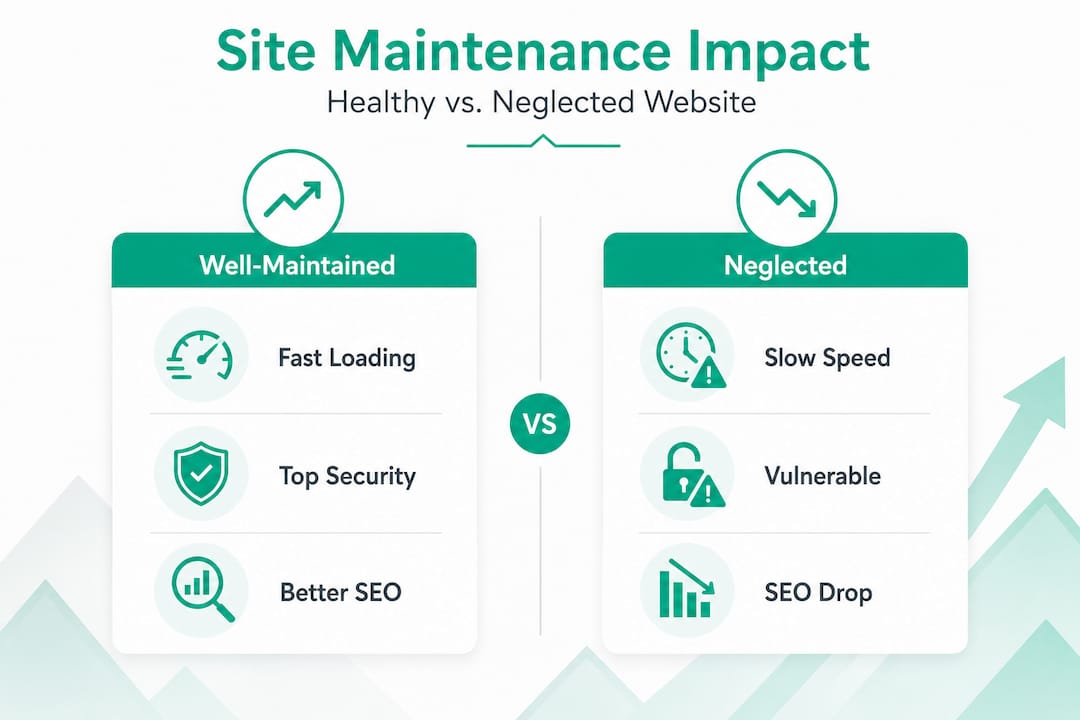
Consider how a well-maintained versus neglected site performs over 12 months:
| Metric | Well-maintained site | Neglected site |
|---|---|---|
| Page load speed | Consistent 1–2 seconds | Degrades to 4–6+ seconds |
| SEO ranking stability | Stable or improving | Declining due to broken links, errors |
| Security incidents | Rare, quickly resolved | Vulnerable, potentially blacklisted |
| Conversion rate | Maintained or growing | Drops due to trust and performance issues |
| Customer trust | High, consistent experience | Eroded by errors, outdated content |
The role of SEO in website maintenance is especially powerful for SMBs because organic search is often the highest-ROI traffic channel. Broken links send crawlers in the wrong direction. Outdated page titles miss keyword opportunities. Slow pages get de-prioritized in rankings. Regular maintenance addresses all three.
The benefits of consistent website upkeep stack over time:
- Faster pages mean lower bounce rates and more pages visited per session
- Fresh, accurate content signals authority to Google and builds reader trust
- Regular security updates prevent blacklisting, which can wipe out months of SEO progress overnight
- Fixing broken paths through the site keeps users moving toward conversion, which is exactly what you want to increase conversion rates
Why many SMBs undervalue web maintenance and how you can get ahead
Here is the uncomfortable truth we have seen play out with dozens of small business clients: most business owners treat their website like a brochure, not a business asset. They invest heavily in the launch and then mentally check the box. Website done. Move on.
The problem is that a website is more like a sales rep than a brochure. A brochure just sits there. A sales rep needs training, tools, and ongoing support to keep performing. When you stop investing in your website, you are essentially ignoring your best-performing employee.
Neglecting web maintenance turns a website into a depreciating asset, quietly losing conversions every week. The costs are invisible at first. A few leads that did not come through a broken form. A few ranking positions lost to a competitor with a faster, cleaner site. A vulnerability that gets exploited on a Tuesday morning and takes your entire site offline.
What makes this especially tricky for SMBs is that these losses are easy to miss. You are not watching your site’s metrics daily. You do not know a form failed unless someone calls to tell you. You do not see the ranking slip until you search your own keywords three months later and notice you are on page two.
The mindset shift that actually moves the needle is this: stop treating maintenance as a cost and start treating it as the system that protects your marketing investment. Every dollar you spend on SEO, ads, or content is only as effective as your website’s ability to convert visitors. A digital marketing audit that includes your site’s technical health is often the fastest way to see where you are hemorrhaging returns without realizing it.
Start small. Pick one maintenance habit this week, whether that is setting up uptime monitoring or scheduling a monthly backup test. Build from there. The compounding value of consistent website upkeep is one of the most underrated growth levers available to small business owners.
Ascendly Marketing: helping your business succeed with expert web maintenance and digital marketing
You now have a clear picture of what web maintenance involves and what it costs to skip it. Putting that knowledge into practice is a different challenge, especially when you are running a business at the same time.

Ascendly Marketing works with small and medium-sized businesses to keep their websites secure, fast, and built to convert. Our digital marketing services include hands-on website maintenance and optimization as part of a broader strategy that ties your site’s health directly to your growth goals. Whether you need a full audit of your current website’s design and performance or an ongoing partner to handle maintenance so you can focus on running your business, we handle it. Ready to see what your site is actually costing you? Let’s talk about conversion optimization and a maintenance plan built for your goals.
Frequently asked questions
What exactly does web maintenance include?
Web maintenance is the ongoing process of keeping a website healthy, secure, and performing well, covering software updates, fixes, uptime monitoring, and data backups.
How often should I perform website maintenance for my small business?
Small businesses should perform daily uptime checks, weekly software updates, monthly audits, quarterly reviews, and annual compliance checks to ensure optimal performance and security.
What are the costs associated with maintaining a small business website?
Website maintenance for SMBs typically ranges from $50 to $500 per month, depending on site complexity, hosting, and the level of technical support required.
Can poor website maintenance affect my search engine rankings?
Yes. Neglecting maintenance leads to broken links, slow load times, and outdated content that signal problems to search engines, resulting in ranking drops and lost traffic.
Is it better for SMBs to handle web maintenance in-house or outsource it?
Most SMBs find outsourcing more practical because professional services provide consistent, expert-level upkeep without pulling the business owner away from their core work, though simple tasks like content updates can stay in-house.
