

You approved the site. It looks modern, the brand colors are right, and the homepage hero photo shows your facility in the best light. Then the months pass.
Sales still hears that prospects “couldn’t find the specs.” Engineers ask for PDFs that were already on the site, but buried. Procurement teams land on a product page and leave because they can’t tell whether the part meets their requirements. The website exists, yet it doesn’t carry its share of the sales process.
That usually happens when an industrial company buys a brochure site instead of a working business tool. In industrial markets, the website isn’t there to entertain. It has a job. It needs to help technical buyers confirm fit, reduce risk, and move one step closer to a quote, a call, a sample request, or a vendor shortlist.
Your Website is More than a Digital Brochure
A lot of industrial websites fail in a very specific way. They look polished, but they make visitors work too hard.
A plant manager lands on the homepage looking for a product line. An engineer wants dimensional data. A buyer needs compliance documents before sending out an RFQ. Instead of getting direct access to those answers, they get slogans, stock photos, and a navigation menu built for someone who already knows the company. That’s when the site turns into a digital brochure. It presents the business, but it doesn’t help the visitor make progress.
Why does this problem keep happening
Industrial companies often inherit design habits from general business websites. The result is familiar. A homepage talks about quality and service. Product pages stay shallow. Technical resources get pushed into a hidden library. The contact page becomes the main conversion path, even though many visitors aren’t ready to talk yet. They’re still validating.
That’s not how technical buying works. Engineers and procurement managers move through a process of elimination. If the site gives them fast access to data, it stays in consideration. If it slows them down, they leave and check another supplier.
Web design itself has been moving toward specialization for a long time. The introduction of CSS in 1996 separated content from presentation, which changed how websites were built and styled. That shift came at the same time the web expanded fast, with the number of websites rising from 25,300 to over 250,000 in that year, according to VisualFizz’s history of web design. Once websites had to do more than sit online, design became less about display and more about function.
What a working industrial site actually does
A strong industrial web design approach treats the website like part of operations and sales support. It should:
- Answer technical questions quickly so engineers can confirm fit without hunting
- Reduce friction in research by organizing spec sheets, CAD files, certifications, and product details clearly
- Support multiple buying roles because the person researching is often not the only decision-maker
- Create next steps that match buyer intent, whether that’s a document download, quote request, or product comparison
A brochure says, “Here we are.”
A working industrial website says, “Here’s the exact information you need to decide.”
You can see a similar shift in other product-heavy industries. The discussion around transforming furniture marketing with AI is useful because it shows how digital presentation changes when buyers need clearer product context, not just prettier visuals.
The core issue isn’t that your current website looks old or new. The issue is whether it helps a technical buyer take the next step without calling your team to translate the page.
The Great Divide Between Industrial and Consumer Web Design
An industrial buyer doesn’t behave like a retail shopper. That’s where many redesigns go off track.
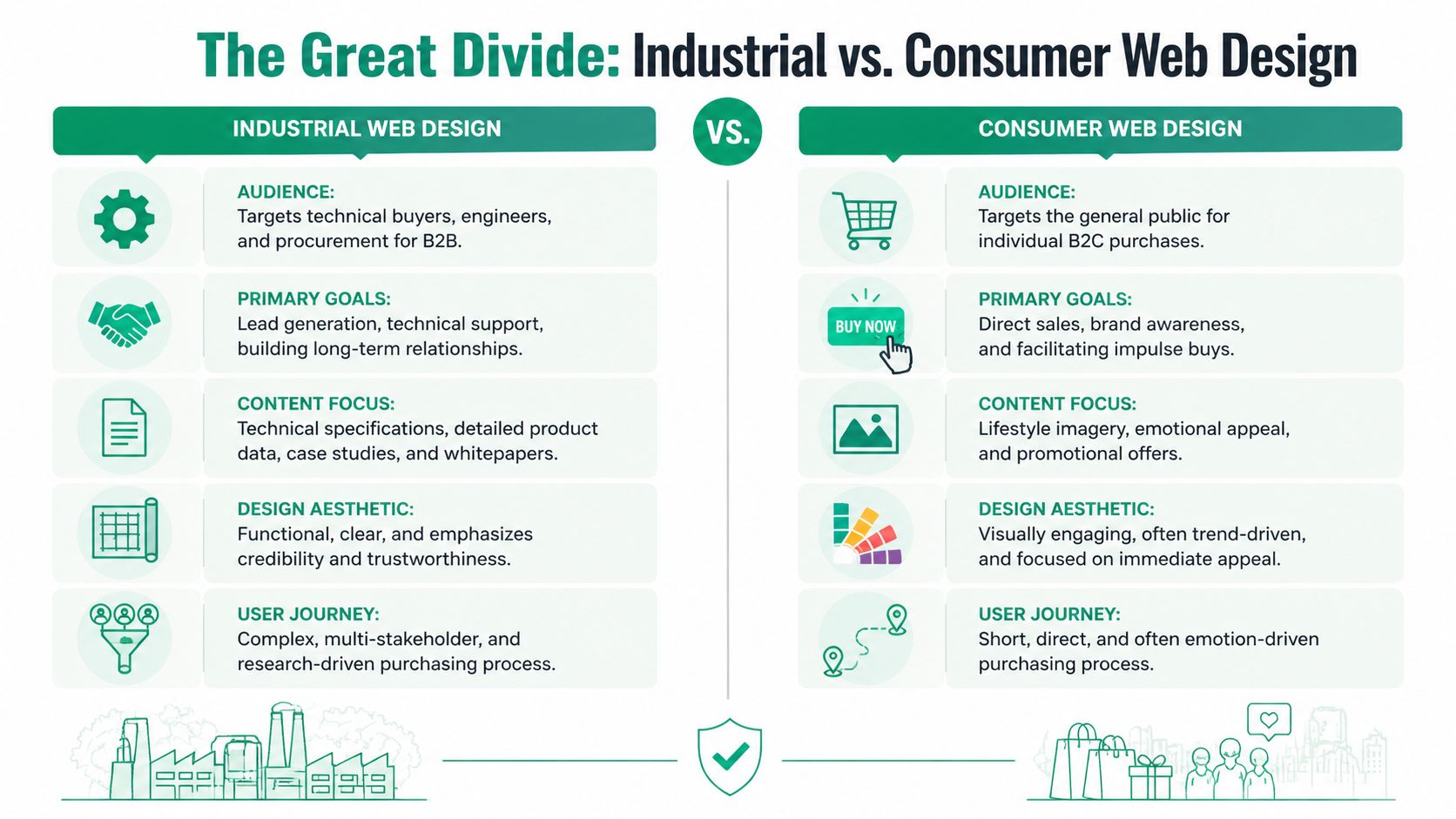
Consumer websites are built to reduce hesitation around a fast purchase. Industrial websites serve people who are trying to avoid a bad decision. They need proof, documentation, compatibility details, and enough clarity to defend their choice internally. The emotional tone is different. The content depth is different. The path to conversion is different.
What each audience is trying to do
A consumer buying headphones may compare a few models, read reviews, and check the price. An engineer sourcing a valve, enclosure, fastening system, or control component is doing a different kind of work. They’re checking tolerances, materials, compliance, environmental conditions, installation constraints, and service life.
A procurement manager has a different lens again. They may care about documentation, supplier stability, ordering clarity, and whether your site helps them move quickly through an approved vendor process. One site has to support both.
Here’s the cleanest way to see the split:
| Attribute | Industrial Web Design (B2B) | Consumer Web Design (B2C) |
|---|---|---|
| Audience | Engineers, technical buyers, procurement teams, operations staff | General consumers |
| Primary goal | Generate qualified leads, support evaluation, reduce friction in complex buying | Drive direct sales, promotions, and quick decisions |
| Content priority | Specifications, technical documents, application details, certifications | Lifestyle visuals, product benefits, pricing, offers |
| Design style | Clear, functional, credibility-focused | Trend-driven, visually stimulating, emotionally persuasive |
| User journey | Research-heavy, often involves multiple stakeholders | Shorter and more individual |
| Conversion path | RFQ, consultation, download, shortlist inclusion, repeat ordering support | Add to cart, checkout, newsletter signup |
Where companies get confused
The confusion usually starts with visual inspiration. Leadership reviews polished consumer brands, likes the clean design, and asks for something similar. There’s nothing wrong with visual clarity. The problem starts when the website copies B2C priorities.
For example, consumer sites often hide details until late in the journey because too much information can slow an impulse purchase. Industrial websites need the opposite. Detail earns trust. A technical buyer doesn’t see a spec table as clutter. They see it as evidence.
Practical rule: If your best prospect arrives with a part number, a standards requirement, or a dimensional question, your site should help them faster than your sales inbox can.
The role of trust in industrial web design
Consumer trust is often built with reviews, social proof, and brand feel. Industrial trust comes from structure. A site feels credible when information is easy to verify and easy to retrieve.
That means a strong industrial site tends to include:
- Documented product data that can be scanned without downloading five separate PDFs
- Plain navigation labels such as Products, Industries, Resources, Certifications, Support
- Context around use cases so buyers understand fit by application, not just by model name
- Visible next actions matched to intent, like “Download CAD,” “Request Quote,” or “Talk to Engineering.”
A buyer who has to decode your menu or guess where the compliance information lives will assume post-sale support may be just as difficult.
Why pretty alone doesn’t convert
Good design still matters. Poor typography, weak layout, and outdated visuals create doubt. But on industrial websites, appearance is only the wrapper around usability.
A consumer site can win with desire. An industrial site wins with confidence.
That’s why industrial web design usually looks calmer. Fewer distractions. Stronger hierarchy. More room for tables, files, and technical language. Less emphasis on novelty. More emphasis on helping someone make a defensible business decision.
If your current website was designed to impress at first glance but not to support serious evaluation, the mismatch will show up in lead quality. You may get casual inquiries while missing the buyers who were ready to move, if only the site had made their job easier.
Building Blocks of a Powerful Industrial Website
The strongest industrial websites share a simple trait. They reduce work for the visitor.
That doesn’t happen because a designer adds enough pages. It happens because the site is organized around the jobs that technical buyers are trying to complete. Can they find the right product family? Can they compare options? Can they get the spec sheet, CAD file, or compliance document without opening a support ticket? Can they do that from a phone while standing on a job site?

Product discovery has to be built for real search behavior
A product catalog isn’t just a list. It’s a decision tool.
When industrial buyers arrive, they often know one of three things. They know the exact part number. They know the application. Or they know the technical requirement but not the model name. Your catalog should support all three paths.
That usually means:
- Search that handles technical input such as part numbers, dimensions, or product family names
- Filters based on real buying criteria like size, material, performance rating, compatibility, or compliance class
- Category pages with context so buyers understand what belongs in each group
- Comparison-friendly layouts that keep key attributes visible
If the only route to information is clicking through a deep menu tree, the site is forcing users to think like your internal org chart instead of their own workflow.
Downloads should be one click away
Many industrial sites treat technical files like secondary content. They aren’t secondary. For many visitors, they are the product.
A CAD file, installation guide, certification sheet, or performance table often does more sales work than a polished paragraph on the homepage. Put those assets where they belong. On the relevant product and category pages. Easy to find, easy to label, and grouped logically.
A useful product page often includes:
| Element | Why it matters |
|---|---|
| Technical specifications | Helps engineers confirm fit quickly |
| CAD or drawing files | Supports design and planning workflows |
| Compliance documents | Helps procurement and regulated buyers validate requirements |
| Application notes | Shows where the product works best |
| Quote or contact path | Gives the user a next step once fit is confirmed |
Mobile in industrial web design means field access
Many executives still assume mobile matters less in industrial sectors because purchases are complex. That misses how often research happens away from a desk.
Industrial website design has to account for field teams accessing product information from job sites. Responsive design needs to adapt content and optimize images because poor mobile responsiveness increases visitor drop-off rates. When field teams can quickly access CAD files and specifications from mobile devices without excessive load times, the purchase cycle accelerates, as noted by Grand Apps on industry-appropriate website design.
That changes how pages should be designed. On mobile, the buyer shouldn’t need to pinch and zoom through dense tables that weren’t built for a smaller screen.
A field technician using a phone doesn’t need a miniature desktop page. They need the same answer, formatted for speed.
Structure matters more than decoration
A powerful industrial website usually puts more effort into page architecture than into visual effects. The right structure lowers friction at every step.
Focus on these areas:
Navigation labels people already use
Avoid clever menu wording. Use the language your buyers would expect in a catalog or RFQ process.Resource placement tied to product context
Don’t isolate all documents in one giant library. Link assets from the product and category pages where buyers need them.Content hierarchy that surfaces decision data first
General brand statements can sit higher on the page, but technical proof has to appear before interest fades.Conversion options matched to readiness
Some visitors want to request a quote. Others want to download a drawing or ask a technical question. Offer more than one path.
A practical benchmark for planning these components is this guide to website design practices for growth-oriented businesses. The useful takeaway isn’t style. It’s structure and usability that create the conditions for conversion.
Integration changes the quality of the experience
Industrial websites often break down because content and data live in too many places. Marketing owns the pages. Sales owns pricing. Operations owns inventory. Engineering owns the files. Customers see the seams.
A stronger setup connects systems where it makes sense. Product information management, ERP-connected availability, portal access, and document libraries can all make the website more useful. Even when full integration isn’t possible, the website should present information in a way that feels consistent and current.
That’s the standard technical buyers apply. They don’t care which department owns the answer. They care whether your website gives it to them.
Attracting Engineers and Buyers with Precision SEO
Industrial SEO isn’t a volume game. It’s an accuracy game.
A manufacturer doesn’t need random traffic from broad searches that never convert. The goal is to appear when someone searches for a part family, a dimensional requirement, an application problem, or a standards-related need. Those visits may be fewer, but they carry intent. They often come from someone already deep in evaluation.
Search behavior in industrial markets is narrower and stronger
Technical buyers rarely type vague searches for fun. They search with purpose. Sometimes the query includes a product type and an application. Sometimes it includes a model code or a specific performance requirement. Procurement teams may search for suppliers tied to documentation, compliance, or category terms.
That means your SEO strategy should line up with how your catalog is built. A page called “Solutions” may sound polished internally, but it won’t help much if buyers search by product class, material, environment, or certification need.
Strong industrial web design supports SEO because page structure affects what search engines can understand and what users can find after they land.
Technical SEO gives search engines the same clarity buyers need
Industrial websites with large catalogs need more than keywords. They need strong technical SEO. That includes semantic HTML, structured data markup, indexable URLs, and XML sitemaps so search engines can crawl and index resources like spec sheets and part numbers correctly. When engineers and procurement professionals can rapidly locate specifications through stronger search visibility, conversion likelihood rises because those buyers rely on detailed technical comparisons, according to DBS Interactive’s guidance on industrial web development.
That sounds technical because it is, but the business impact is straightforward. Search engines can’t rank what they can’t interpret. Buyers can’t convert on pages they can’t find.
Here’s what that usually looks like in practice:
- Clean page structure so product families, categories, and resources have their own indexable pages
- Schema.org markup where appropriate to clarify product attributes and page meaning
- Consistent specification tables with clear labels and units
- Searchable file access so resources support visibility instead of living in dead-end uploads
Content should answer engineering questions, not just describe products
A product page can rank for direct product searches. It usually won’t answer every question that comes up during research. That’s where supporting content does real work.
Useful content types include:
| Content type | What it helps with |
|---|---|
| Application pages | Connect products to industry or environment-specific use cases |
| Technical articles | Explain selection criteria, limitations, or design considerations |
| Specification guides | Help buyers compare options with confidence |
| Resource hubs | Keep supporting documents and topic clusters organized |
This kind of content works when it stays precise. A general blog post about “innovation in manufacturing” won’t do much for visibility or conversion. A focused page on selecting the right material or reading a performance chart gives buyers something they can use.
Buyers search the way they work. Your SEO strategy should follow that pattern, not fight it.
Page experience affects search and sales at the same time
A ranking is only the first step. Once a visitor lands, the page has to carry the search promise through to the answer.
If the search query suggests someone wants a spec, give them the spec early. If the query suggests they need application guidance, don’t bury it under a hero banner and three paragraphs of company messaging. Precision in SEO has to continue into page layout.
That’s one reason technical and content teams need to work together. The SEO team may identify the query pattern. The engineering or product team often knows which details the page must contain. When those groups stay separate, rankings may improve while conversions stay flat.
For teams thinking through that connection, this resource on SEO for B2B marketing is a practical place to start because it frames search around business intent rather than vanity traffic.
What to watch for on your current site
You can spot weak industrial SEO without running a full audit. Check for these signs:
- Product pages with thin copy and no real specifications
- PDFs do all the informational work while HTML pages stay empty
- Category pages that list products but provide no context
- Search tools that don’t recognize part numbers or technical terms
- URLs and page titles written for internal teams, not external buyers
Each of those issues weakens discoverability and forces more work onto sales.
The broader point is simple. Industrial SEO doesn’t begin with blogging. It begins with making your product and technical information understandable to both search engines and the people who rely on detail to make a purchasing decision.
Industrial Web Design in Action
The easiest way to understand good industrial web design is to stop looking at websites as pages and start looking at them as job aids.
A strong site helps a visitor complete a task. Find the right component. Confirm a rating. Download a file. Check whether a supplier looks credible enough to shortlist. When the page supports that task, the design feels smart. When it interrupts that task, the design feels ornamental.
Example one: The product page that acts like a sales engineer
Consider a manufacturer with a broad catalog. A weak product page gives a short description, one image, and a generic contact form. A stronger page does more. It shows the exact specification set, relevant downloads, application notes, and a clear path to the next action.
That page addresses questions a sales engineer would otherwise answer by email. Is this product suitable for this use? What file can I send to my design team? Is there supporting documentation for compliance review? The website starts carrying part of the workload.
Example two: The category page that reduces shortlist friction
Category pages are often treated as simple archives. That wastes an opportunity.
A high-functioning category page can explain selection criteria, define differences between product groups, and expose key filters immediately. That matters because many visitors don’t arrive ready for one exact SKU. They arrive knowing the problem they need to solve.
A category page should help them narrow intelligently, not dump them into a long list.
The best industrial pages feel less like advertising and more like organized assistance.
Example three: Personalization for returning engineer buyers
Industrial web design is starting to get more interesting. Not louder. More useful.
A key opportunity is AI-driven personalization for engineer buyers. A 2023 State of Marketing to Engineers report notes that 70% of engineers abandon sites lacking personalization, and 2025 Gartner data says AI-personalized industrial B2B sites boost conversions by 25%, while only 15% of manufacturers currently implement it, as summarized by Lovable’s industrial website design analysis.
Those numbers matter because they point to a practical design choice. If a returning visitor previously viewed a product family, downloaded a spec sheet, or explored a certain application page, the site can surface the most relevant next content. That might be a certification document, a related product, or a technical article tied to the same problem.
What this looks like without becoming intrusive
Personalization in industrial settings shouldn’t feel flashy. It should feel accurate.
Useful examples include:
- Returning visitors see relevant resources first based on prior product interest
- Search suggestions prioritize technical terms that match known catalog behavior
- Category pages surface related application content for the industries that the buyer appears to be researching
- Resource sections highlight recent files connected to previously viewed products
The test is simple. Does the personalization reduce effort, or does it just try to look advanced?
Many teams hear “AI” and think chatbot first. That can help in some contexts, but for engineering and procurement audiences, personalization often works better when it quietly improves navigation, content relevance, and search support.
If your current site treats every visitor the same, even after they’ve shown clear product interest, you’re leaving useful context on the table. In industrial buying, relevance builds trust because it shows the website understands the task at hand.
Your Pre-Flight Checklist for an Industrial Website Redesign
A redesign gets expensive when the team starts with colors and layout. It gets useful when the team starts with buyer tasks, content gaps, and technical structure.
Use this checklist before you approve a sitemap, choose a platform, or hire a development partner. The point isn’t to create a perfect scorecard. The point is to stop common problems before they get designed into the new site.
Audience and decision paths
Start with the people who use the site. Not “the customer” in general. The actual roles.
Ask these questions:
Engineer workflow
Can an engineer move from search to product fit to file download without calling your team?Procurement workflow
Can a buyer find documentation, supplier credibility signals, and quote paths without reading through marketing copy?Field access
Can someone on a phone get the same key data they’d expect on desktop, without awkward tables or hidden downloads?Repeat visitors
Does the site recognize that returning users often want faster access to previously researched information?
If one page is trying to serve every role with the same message, it will probably satisfy none of them well.
Product and content readiness
Many redesigns fail because the team underestimates content preparation. Design won’t fix missing product data.
Review these items before build-out:
| Checkpoint | What to verify |
|---|---|
| Product data quality | Attributes are complete, named consistently, and ready for filters or tables |
| Technical files | CAD, specs, compliance documents, and guides are current and mapped to the right pages |
| Category logic | Product groupings reflect how buyers search and compare |
| Page intent | Each page has a clear job, such as compare, validate, download, or request a quote |
A good redesign often begins with a content inventory, not a mood board.
Technical structure and performance
A strong industrial website needs a technical base that supports discovery and usability.
Check whether the redesign plan includes:
-
Search-friendly architecture
Product, category, and resource pages should be indexable and clearly structured. -
Specification tables built in HTML
If core information only exists inside PDFs or images, both users and search engines lose. -
Structured data and crawl support
Search engines need machine-readable context for complex product information. -
Performance planning
Slow pages, oversized images, and clumsy file delivery create friction fast. -
Integration thinking
If ERP, PIM, or portal access matters, define the website’s role early.
For leadership teams weighing build options, this overview of strategic web development outsourcing is useful because it helps frame what should stay internal versus what a specialized partner can handle better.
ESG and trust content
Industrial buyers increasingly look beyond the product itself. A frequently missed question in redesign planning is how to present sustainability and ESG information without making it feel vague or promotional.
That deserves a real plan. A 2025 McKinsey global survey found that 62% of procurement managers prioritize supplier sustainability, and HubSpot’s 2026 Industrial Buyer Report showed ESG can drive 18% higher lead generation in B2B, with some firms seeing a 30% traffic uplift from dedicated sustainability pages, as summarized by Tiecas on industrial website redesign.
That doesn’t mean every manufacturer needs an ESG microsite. It does mean procurement teams may actively look for this information.
Use these questions:
- Can buyers find sustainability information from the main navigation or relevant pages?
- Are certifications, policies, or compliance details presented clearly and specifically?
- Does the site avoid vague environmental language with no supporting detail?
- Is ESG content connected to product pages, industries, or buyer concerns where relevant?
If procurement cares about supplier standards, burying that information in the footer creates unnecessary doubt.
Vendor and planning questions
Before signing off on a redesign, ask your internal team or agency partner direct questions:
- How will the site handle technical filtering and search?
- Where will CAD files, specs, and compliance documents live on the page?
- Which pages are designed for engineers, and which for procurement?
- How will the site support SEO for product and application searches?
- What happens when content owners in sales, engineering, and marketing disagree?
- How will success be measured in terms of qualified inquiry quality, not just appearance?
If you want a practical benchmark for what a redesign process should account for, review this guide to industrial website redesign planning.
A redesign should give buyers fewer reasons to hesitate. That’s the standard. Not whether the homepage gets compliments in the boardroom.
If your current site looks fine but doesn't help engineers, buyers, and field teams move forward, Ascendly Marketing can help you turn it into a stronger industrial web design system built for qualified leads, clearer product discovery, and shorter research cycles.
