

TL;DR:
- Effective website optimization requires measuring baseline performance with tools like Google Search Console and PageSpeed Insights before making technical changes.
- Prioritizing fixes based on impact, effort, and risk, especially for Core Web Vitals, ensures consistent progress and avoids regressions over time.
Website optimization steps are the structured actions that turn a slow, underperforming site into a measurable growth engine for your business. For small to medium-sized businesses, the gap between a site that ranks and converts and one that quietly loses visitors often comes down to execution on a handful of technical and content fundamentals. Tools like Google Search Console, PageSpeed Insights, and Lighthouse give you the data to act precisely, not on guesswork. This guide walks you through every stage of the process, from gathering baseline data to fixing Core Web Vitals and sustaining performance over time.
What website optimization steps you actually need before you start
Before touching a single line of code or rewriting a page title, you need reliable data. Skipping this step is the single most common reason optimization efforts stall or backfire.
Google Search Console is your first stop. It surfaces real user data, flags crawl errors, and reports Core Web Vitals directly from Chrome users visiting your site. The URL Inspection tool tells you exactly how Google sees any given page, which matters more than how it looks in your browser. Connect it to Google Analytics 4 for a complete picture of traffic behavior alongside technical health.
PageSpeed Insights layers two types of data on top of each other. Lab and field diagnostics come from Lighthouse simulations and real Chrome User Experience Report (CrUX) data collected over a 28-day rolling window. Lab data helps you debug specific issues. Field data is what Google actually uses for ranking signals. Both matter, but they serve different purposes.
Lighthouse runs locally in Chrome DevTools or via the command line and gives you a scored audit across performance, accessibility, SEO, and best practices. It is a diagnostic tool, not a ranking predictor. Use it to identify what to fix, not to chase a score.
Once your tools are connected, do the following before writing a single optimization task:
- Identify your five to ten highest-traffic pages using Google Search Console’s Performance report. These are your priority targets.
- Record baseline scores for each page in PageSpeed Insights, noting LCP, CLS, and INP values separately for mobile and desktop.
- Set a performance budget per page type. A product page and a blog post have different performance profiles and should not share the same threshold.
- Run a quick on-page audit using a tool like Semrush to flag missing title tags, duplicate meta descriptions, and broken internal links before you start technical work.
| Tool | Primary use | Data type |
|---|---|---|
| Google Search Console | Crawl errors, Core Web Vitals, search performance | Real user field data |
| PageSpeed Insights | Speed diagnostics, CrUX scores | Lab + field data |
| Lighthouse | Detailed audits, accessibility, SEO checks | Synthetic lab data |
| Semrush | On-page SEO analysis, keyword gaps | Crawl + database data |
How do you analyze performance and prioritize your optimization workflow?
Raw data without a prioritization framework produces a to-do list that never gets done. The right approach is to rank every identified issue by three factors: impact on user experience or rankings, effort required to fix it, and risk of introducing new problems.
Baseline measurement and prioritization using an impact × effort × risk matrix separate quick wins from larger structural projects. A quick win looks like compressing an oversized hero image or removing an unused JavaScript plugin. A larger project looks like migrating to a new server infrastructure or rebuilding navigation for mobile.
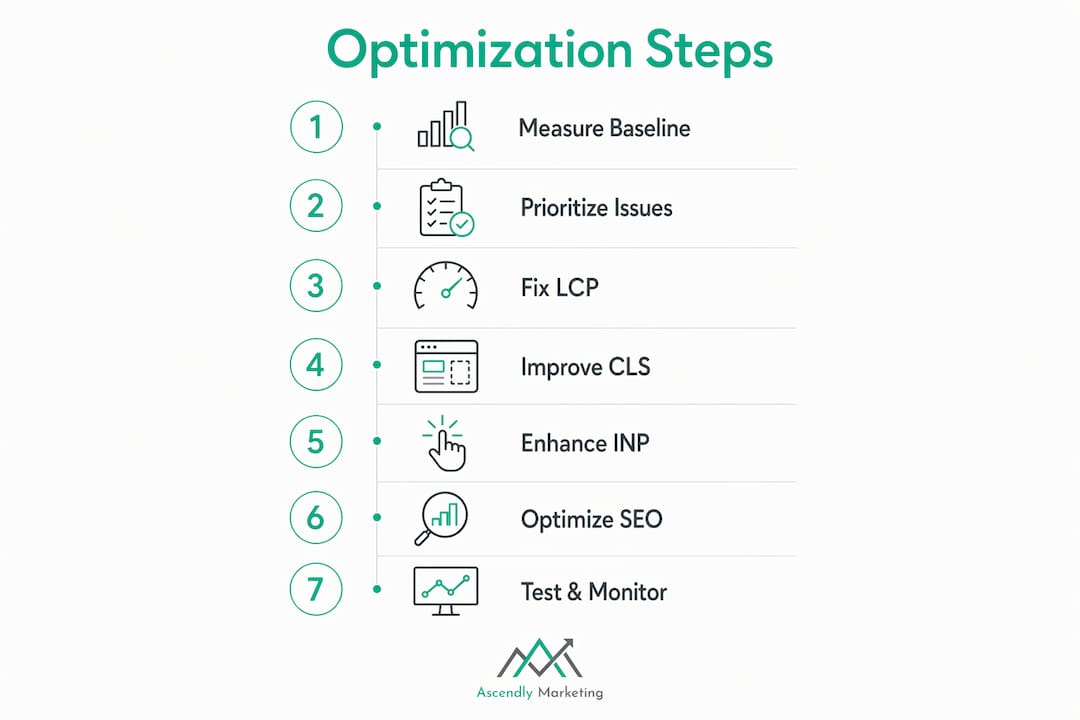
Interpret your Core Web Vitals results against Google’s 2026 benchmarks. Good performance thresholds are LCP at or below 2.5 seconds, INP at or below 200 milliseconds, and CLS at or below 0.1. Pages scoring in the “Needs Improvement” or “Poor” range on any of these metrics are your highest-priority targets, especially if they receive significant organic traffic.
Group pages by issue type rather than fixing them one at a time. If twelve pages all have unoptimized hero images, batch that fix. If eight pages have a layout shift caused by ads loading without reserved space, fix the ad configuration once and apply it across all affected templates. Batching reduces deployment risk and makes post-fix measurement cleaner.
Pro Tip: Never deploy more than one significant change to a page at a time. If you compress images and rewrite the title tag simultaneously, you cannot attribute a ranking or speed change to either fix specifically. Controlled, single-variable deployments are the only way to learn what actually works.
Step-by-step execution of core website optimization steps
This is where the work happens. The following steps address the three pillars of site performance: speed, SEO, and user experience.
Fixing Largest Contentful Paint
LCP measures how long it takes for the largest visible element on the page, usually a hero image or headline, to fully render. Common LCP fixes include compressing and resizing hero images to the actual display dimensions, adding a ` tag for the LCP image so the browser fetches it earlier, and reducing server response time by enabling caching or upgrading hosting.

For most SMB sites, an unoptimized hero image is the single biggest LCP offender. A 2MB PNG served at 1920px wide to a mobile user viewing a 390px screen is a fixable problem that takes under an hour to resolve. Convert images to WebP format, serve them at the correct dimensions, and use lazy loading only on images below the fold, never on the LCP element itself.
Fixing Cumulative Layout Shift
CLS measures visual instability. When elements jump around as the page loads, users click the wrong thing and trust drops. The most common causes are images without defined width and height attributes, ads that load into the page without reserved space, and web fonts that swap in after the page renders.
Fix CLS by adding explicit width and height attributes to every image and video element. Reserve space for ad slots with CSS min-height declarations. Use font-display: optional or font-display: swap with a size-adjusted fallback font to minimize font-related layout shifts.
Fixing Interaction to Next Paint
INP replaced First Input Delay as a Core Web Vitals metric in 2024 and measures the time from any user interaction to the next visual response. Heavy JavaScript is the primary culprit. Reduce INP by code-splitting large JS bundles so only the code needed for the current page loads initially, deferring non-critical scripts with the defer or async attribute, and removing third-party scripts that run on every page but serve only a subset of users.
On-page SEO execution
On-page SEO best practices from Semrush specify title tags between 50 and 60 characters, URL slugs of three to five words, descriptive alt text on every image, and schema markup for pages where structured data adds context. These are not optional refinements. They are the baseline that determines whether Google can accurately understand and rank your content.
Write title tags that match the exact search intent of the page. A service page targeting “web design for restaurants” should have that phrase in the title, not a clever tagline. URL slugs should be lowercase, hyphen-separated, and free of stop words. Alt text should describe the image accurately, not stuff keywords. For local businesses, add the LocalBusiness schema to your homepage and contact page. For product pages, add Product schema with price and availability.
For a deeper look at on-page SEO for small businesses, Ascendly Marketing has a dedicated guide covering each element in detail.
Mobile responsiveness and accessibility
Mobile-first indexing means Google crawls and indexes the mobile version of your site first. A page that performs well on desktop but poorly on mobile will rank based on its mobile performance. Test every priority page in PageSpeed Insights using the mobile tab, not just the desktop.
Accessibility fixes in checkout and account flows, specifically keyboard navigation and screen-reader compatibility, drive higher conversions and reduce legal exposure. Add focus indicators to all interactive elements, use semantic HTML for navigation and forms, and test with a screen reader like NVDA or VoiceOver at least once per quarter.
Pro Tip: Run your site through the WAVE accessibility tool from WebAIM before your next design update. Most SMB sites have five to ten accessibility errors that take less than a day to fix and directly affect how search engines parse your page structure.
How do you monitor performance and avoid common optimization mistakes?
Optimization is not a one-time project. Every new page, plugin update, or third-party script addition is a potential regression. The businesses that maintain strong performance are the ones that build monitoring into their workflow.
Lighthouse CI with per-template budgets reduces alert fatigue by running three to five test iterations per URL and using the median result to smooth out variance. A single site-wide budget triggers false alarms constantly because a blog post and a checkout page have fundamentally different performance profiles. Set separate budgets for each page type.
The most common mistakes that undo good optimization work:
- Focusing only on the homepage. Google evaluates every page it crawls. A slow product page hurts rankings for that page regardless of how fast your homepage loads.
- Ignoring mobile performance. Desktop scores look better because desktop hardware is faster. Your customers are mostly on mobile.
- Chasing Lighthouse scores instead of Core Web Vitals. A Lighthouse performance score of 90 does not guarantee good field data. Synthetic scores and real user data regularly diverge, and field data from CrUX is what Google uses for ranking.
- Neglecting accessibility. Accessibility failures in key workflows reduce conversions and create legal risk, particularly as enforcement actions increase in 2026.
- Deploying multiple changes at once. This makes it impossible to isolate what caused an improvement or a regression.
Re-test every page after each change and allow a 28-day window before evaluating field data improvements. CrUX data is a rolling average, so a fix deployed today will not show its full impact for several weeks.
After each deployment cycle, return to Google Search Console and PageSpeed Insights to verify that field data is moving in the right direction. Treat the 28-day window as your feedback loop, not your deadline.
Key takeaways
Effective website optimization requires a repeatable workflow: measure baseline performance, fix issues in controlled deployments, and verify improvements with real user field data before moving to the next priority.
| Point | Details |
|---|---|
| Start with real data | Use Google Search Console and PageSpeed Insights before making any changes. |
| Target Core Web Vitals thresholds | Aim for LCP ≤ 2.5s, INP ≤ 200ms, and CLS ≤ 0.1 on both mobile and desktop. |
| Prioritize by impact and effort | Fix high-traffic pages with quick wins first; batch similar issues across templates. |
| On-page SEO is non-negotiable | Title tags, URL slugs, alt text, and schema markup are baseline requirements, not extras. |
| Monitor continuously | Use Lighthouse CI with per-template budgets and verify improvements with 28-day field data windows. |
Why most SMB sites never finish optimizing (and what to do instead)
After working with SMB clients since 2013, the pattern at Ascendly Marketing is consistent. A business owner runs a PageSpeed Insights audit, sees a score of 54, panics, and asks a developer to “fix the website.” The developer improves the score to 82. Everyone celebrates. Three months later, a new plugin is installed, a marketing team adds a third-party chat widget, and the score drops back to 61. Nobody notices until rankings slip.
The real problem is not technical skill. It is the absence of a repeatable process. Optimization treated as a project has a finish line. Optimization treated as a cycle does not. The businesses that consistently outperform their competitors in organic search are the ones that have built measurement and review into their monthly workflow, not their annual one.
The other thing I have seen consistently: Businesses that obsess over Lighthouse scores often have worse real-world performance than businesses that focus on the three Core Web Vitals. A score is a composite. A metric is a specific user experience. Fix the metric, and the score follows. Chase the score, and you end up with a technically impressive page that still frustrates real users on real devices.
Balance matters too. Technical SEO without strong content is a fast site nobody wants to visit. Strong content on a slow site loses to a competitor with both. The businesses that grow through search are the ones that treat speed, content quality, and user experience as a single system, not three separate workstreams.
— Ascendly
Ready to stop guessing and start growing?
Ascendly Marketing has helped SMBs across industries turn underperforming websites into consistent lead-generation assets since 2013. The team combines technical SEO expertise with UX strategy and content development to address every layer of the optimization process, not just the parts that are easy to measure.

If your site is losing traffic to competitors with better-optimized pages, the gap is closeable. Ascendly Marketing’s digital marketing services include full website performance audits, Core Web Vitals remediation, and on-page SEO execution tailored to your business goals. You can also explore the SMB digital marketing guide to see how optimization fits into a broader growth strategy. Book a consultation at AscendlyMarketing.com and get a clear picture of where your site stands and what it will take to move it forward.
FAQ
What are the most important website optimization steps for SMBs?
The highest-impact steps are fixing Core Web Vitals (LCP, INP, and CLS), optimizing on-page SEO elements like title tags and alt text, and improving mobile performance. Start with your highest-traffic pages and address quick wins like image compression before tackling larger structural changes.
How long does it take to see results from website optimization?
Field data from Google’s Chrome User Experience Report updates on a 28-day rolling window, so most performance improvements take three to four weeks to reflect in PageSpeed Insights and Google Search Console. SEO ranking changes may take longer depending on how frequently Google recrawls your pages.
What is the difference between Lighthouse scores and Core Web Vitals?
Lighthouse scores are synthetic lab measurements generated by simulating a page load. Core Web Vitals are real user metrics collected from actual Chrome users visiting your site. Google uses real user field data for ranking, not Lighthouse scores, so field data from CrUX is the authoritative performance indicator.
Why does mobile optimization matter more than desktop for SEO?
Google uses mobile-first indexing, meaning it crawls and ranks pages based on their mobile version. Mobile performance impacts rankings more heavily than desktop performance, so a site that scores well on desktop but poorly on mobile will rank based on the mobile result.
How do I prevent performance regressions after optimizing my site?
Set up Lighthouse CI with per-template performance budgets and run it as part of your deployment process. Running three to five test iterations per URL and using the median result reduces false alerts and catches genuine regressions before they affect real users.
