

You search for your business name. Google returns a forum thread, a directory listing from years ago, and three competitors you know for a fact are weaker than you.
That moment gets under your skin fast. You paid for the site, added your services, maybe even set up a Google Business Profile, and now the most obvious place customers should find you feels empty.
When people ask why my business is not showing up on Google, the answer usually isn’t mysterious. It’s usually a chain of small issues. One blocked page. One unverified profile. One bad category. One service-area setup that breaks Google’s rules. Fix the right issue first, and the problem becomes manageable.
This is a diagnostic, not a pep talk. Work through it in order. Start with local visibility, then check your site, then deal with service-area rules and newer AI-driven ranking behavior.
The Sinking Feeling of Being Invisible on Google
A lot of owners hit the same pattern. They launch, ask a friend to search, and then spiral when nothing appears. Sometimes the business isn’t in Maps. Sometimes the website doesn’t rank. Sometimes the business shows up only when you type the exact brand name, which feels close enough to be visible until you realize customers don’t search that way.
The stress makes people jump to the wrong fix. They rewrite homepage copy when the listing isn’t verified. They buy ads when the contact page has the wrong phone number. They keep editing the profile every day, which often creates more review delays instead of fewer.
Practical rule: Don’t treat Google as one single system. Treat it like a checklist with separate moving parts.
I’ve seen owners lose days on cosmetic updates while the core issue sits untouched in plain sight. A new profile was never claimed. A service business used a home address publicly. A redesigned site carried over a setting that told search engines not to index key pages.
None of that means the business is doomed. It means the business needs triage.
Start by asking a narrower question. Are you missing from Google Maps and the local pack, or are you missing from the organic blue links, or both? Once you know which arena is failing, the next steps get much easier.
Understanding Google’s Two Arenas: Local vs Organic Search
Google shows businesses in two very different places, and each one follows different rules.
The first is local search. That’s the map, the profile panel, and the local pack that appears for queries tied to place or intent, such as “dentist near me” or “marketing agency The Woodlands.” The second is organic search. That’s your website pages showing up as standard search results.
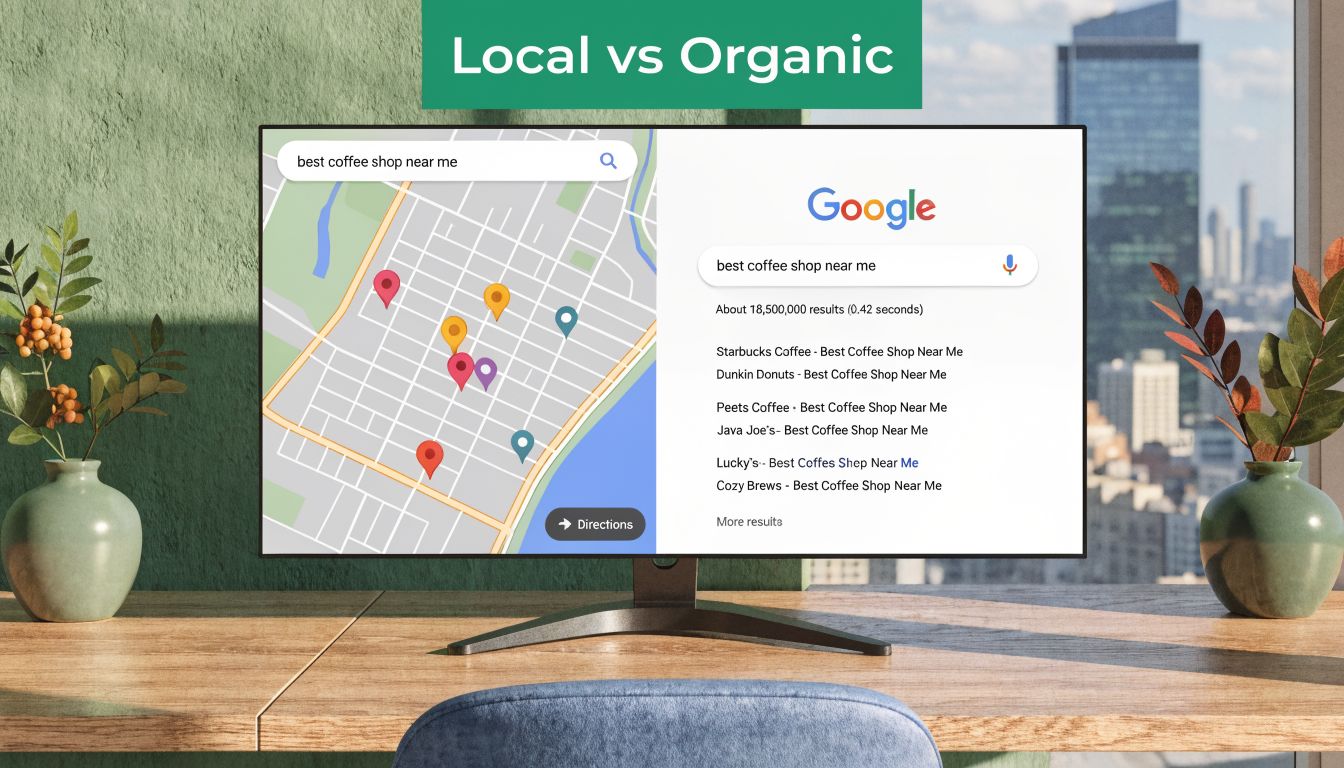
How to tell which one is broken
Run three simple searches:
- Search for your business name exactly
- Search your main service plus your city
- Search your domain with site:yourdomain.com
Those searches tell you different things. A branded search checks whether Google connects your business name to a profile or website. A service-plus-city search checks discoverability. The site search checks whether Google has indexed your pages at all.
Local search is profile-driven
Local visibility relies heavily on your Google Business Profile, your category choices, your business details, and the trust Google has in your location data. If you’re absent from Maps but your site is indexed, the website might not be the main problem.
Think of local search as your storefront on the busiest street in town. If the sign isn’t approved, the shop exists, but passersby won’t see it.
Organic search is website-driven
Organic visibility depends on whether Google can crawl, index, and understand your site. Relevance matters. Technical setup matters. So does page quality.
This is closer to a billboard. A store can be open and real, but if the billboard was never installed, highway traffic won’t know it exists.
A quick comparison helps:
| Search area | What usually controls it | Common failure point |
|---|---|---|
| Local pack and Maps | Google Business Profile, categories, NAP data, service area setup | Unclaimed profile, bad category, inconsistent business info |
| Organic results | Website indexing, page relevance, technical SEO | Noindex settings, weak pages, crawl issues |
| Both | Brand trust, consistent business information, active online presence | Conflicting data, poor setup, recent major edits |
The fix depends on where you’re invisible. A business can rank locally and have a weak website. It can also have a strong site and an unusable local listing.
If you want a clean mental model, use this: Maps is your location signal, organic is your website signal. Don’t mix the two when diagnosing the problem.
Mastering Your Digital Handshake: The Google Business Profile
For local businesses, this is usually the first place to look. A claimed and verified Google Business Profile tells Google that a real business exists, that someone is responsible for the listing, and that the public details can be trusted.
One of the most common reasons a business doesn’t appear is simple: the profile hasn’t been claimed and verified. An unverified listing lacks full feature access and may not appear prominently in Search or Maps. Verification can take up to two weeks via postcard, and until that process is complete, Google can’t confirm legitimacy, which blocks visibility (Lobstr on claimed and verified Google Business Profiles).
Check whether you actually control the listing
Search for your business in Google Maps. If you see a profile with an option like “Own this business?”, you may be looking at an unclaimed listing or one controlled by another account.
That matters because editing a listing you don’t control is not the same as owning it. Ownership gives you access to categories, services, photos, posts, and verification status.
Use this order:
- Find the profile first by searching your exact business name in Google Maps.
- Claim ownership if Google offers the claim option.
- Finish verification using the method Google provides.
- Wait for status confirmation before judging visibility.
Verification isn’t the finish line
Plenty of owners relax as soon as the green check appears. That’s early, not late.
A half-filled profile sends weak signals. Google favors profiles with complete business information, which means your profile should include your core details, current hours, categories, service list, description, and photos that reflect the actual business.
Here’s the minimum clean-up list I use:
- Business name should match the official business name used in the world.
- Primary category should describe the main service accurately.
- Hours should match reality, including any holiday changes you manage.
- Website link should point to the correct page, not an old domain or dead URL.
- Photos should be current and relevant, not stock-looking filler.
- Services or products should reflect what you offer.
For a deeper look at what the profile can do beyond visibility, this overview of the key benefits of Google Business Profile is a useful reference.
After the basics are in place, use the profile like an active business asset instead of a one-time setup form.
What works and what doesn’t
Some actions help fast. Others waste time.
What works
- Completing every field you can verify
- Fixing wrong categories
- Uploading real photos of the business, team, work, or location
- Keeping hours and contact details current
- Making sure the linked website page matches the business details
What doesn’t
- Stuffing city names into the business name
- Rewriting the description every other day
- Choosing broad categories because they seem popular
- Leaving verification pending and expecting rankings anyway
A Google Business Profile is your first handshake with both Google and the customer. If the handshake is weak, Google shows someone else.
Is Your Website Invisible? Common Technical SEO Roadblocks
If the local profile looks healthy but your site still doesn’t show up, stop editing the profile and inspect the website itself.
The quickest test is basic. Search site:yourdomain.com in Google. If no pages appear, Google may not be indexing the site, or it may have discovered very little. That’s not a ranking problem yet. That’s an inclusion problem.
The easy checks that catch a lot
A surprising number of websites disappear for ordinary reasons:
- The page is set to noindex after a redesign or staging migration
- The wrong canonical setup tells Google that another version is preferred
- Important pages are thin or duplicated
- Internal links are weak, so Google has trouble finding core service pages
- The contact page conflicts with the profile, which weakens local trust
That last point matters more than many owners realize. NAP inconsistency between your site and directories confuses Google, and your website contact page acts as the primary source of truth. Even verified profiles with mismatched business details can lose local pack eligibility under Google’s Vicinity update, with some local SEO studies reporting reductions of up to 40% (Schulze Creative on NAP consistency and Vicinity).
Where to look first on your site
Use this short table as a diagnostic map:
| Check | What you’re looking for | Why it matters |
|---|---|---|
| Homepage | Clear business focus and accurate business details | Google uses it to understand the brand |
| Contact page | Exact name, address, and phone consistency | This supports local trust signals |
| Service pages | Separate pages for core services | These give Google actual ranking targets |
| Indexing status | Pages visible in a site: search | This confirms Google knows the pages exist |
If your site has gone through several vendors, ask whether anyone left behind temporary settings from development. That happens more often than owners expect.
Website care affects visibility more than people think
A site doesn't need to be fancy. It does need to stay functional, indexable, and aligned with the business profile. Businesses that don't have internal support often benefit from structured maintenance, especially after redesigns, hosting changes, or plugin-heavy builds. If you need a plain-language overview of that side of upkeep, this primer on website managed services covers the maintenance angle well.
For a full diagnosis, an SEO audit is usually faster than guessing. A proper review checks crawlability, indexing, page targeting, internal links, and conflicts between the site and local profile. If a systematic review is needed instead of piecemeal fixes, SEO audit services are suitable.
If Google can't reliably read your website, it won't rank your website. No amount of profile tweaking fixes that.
The Service-Area Business Dilemma
Here, generic advice starts breaking down.
If customers don't come to your location, you're probably a service-area business, often shortened to SAB. Think consultant, mobile repair company, pressure washing business, or marketing firm that serves clients across a region. These businesses play by different local SEO rules.
The biggest mistake SABs make
They treat themselves like storefronts.
That usually means one of two problems. Either they publish a home address they shouldn't publish, or they define service areas so loosely that the profile sends mixed signals. Both choices create risk.
Google's guidelines require service-area businesses to hide their address and define specific service areas. Violations can lead to suspension, a serious issue given that SABs make up 40 to 50% of local listings, and visibility can drop 70% if unoptimized. The same source notes that 2025 updates tightened rules around service radius, limiting it to 2-hour drive times and contributing to a 25% increase in suspensions in Q1 2025 according to Google Business Profile forum data (Chatmeter on service-area business setup).
What proper SAB setup looks like
For a service-area business, the profile should reflect how the business operates.
- Hide the address if customers don't visit the location
- Set service areas precisely instead of trying to cover an entire state
- Match the website language to the areas you serve
- Avoid virtual office tricks, coworking shortcuts, and borrowed addresses
The trade-off is straightforward. A hidden address can feel less tangible to an owner who wants to look established, but the alternative can get the listing suspended or filtered.
Why SABs often feel invisible
A service-area business may be fully legitimate and still feel absent because Google applies stricter trust checks. If the website suggests one city, the profile lists a broad region, and citations point to a residential address that should be hidden, the local signal gets muddy fast.
That doesn't mean SABs can't rank well. They can. But they usually rank best when their territory is defined, their categories are accurate, and the website backs up those service areas with clear pages and business details.
A broader local SEO framework helps here, especially if you serve multiple areas without a storefront. This guide on what local SEO is for small businesses in 2026 is a useful companion for that setup work.
Most SAB problems aren't caused by a lack of effort. They're caused by following storefront advice that doesn't apply.
Navigating Google’s New AI-Powered Rankings
Even a clean profile and an indexable website don't guarantee immediate visibility anymore.
Google's newer search behavior leans harder on signals tied to experience, expertise, authoritativeness, and trustworthiness, often shortened to E-E-A-T. In plain terms, Google is trying to decide whether your business looks active, credible, and useful enough to surface confidently.
Why businesses feel ghosted
A lot of owners describe the same thing. The profile is verified. The details are accurate. The site is live. Yet the listing barely appears for discovery searches.
That pattern has been reported in newer local search analysis. Following Google's 2025 AI Overviews rollout, newer ranking systems can suppress unoptimized profiles even when they are verified. One cited study of 1,000 profiles found that 35% of SMBs reported "ghosting", and newer profiles may take 4 to 6 weeks to rank. The same source says profiles with fewer than 10 photos or reviews rank 60% lower in AI-generated local packs (Partoo on profiles not showing up).
What AI-driven local visibility seems to reward
One-time setup is no longer sufficient. Google now appears to look for signs that a business is real, current, and useful.
That usually shows up through:
- Recent reviews that reflect real customer activity
- Profile completeness, including photos and services
- Website content that goes beyond a thin homepage
- Regular updates that show the business is still operating and engaged
- Alignment between profile and site so Google's systems don't have to guess
What works better than constant editing
Owners often respond to invisibility by changing everything at once. New category. New description. New service list. New hours. Then they keep checking rankings from the office every few hours.
A steadier approach works better.
| Weak signal | Stronger signal |
|---|---|
| Bare profile with minimal activity | Complete profile with current photos and services |
| Thin site with generic copy | Service pages and clear business information |
| Sporadic updates | Consistent ongoing activity |
| No review process | Real review collection built into operations |
The shift is this. Google isn't just checking whether a listing exists. It is assessing whether the business behind the listing looks trustworthy enough to recommend.
Your Visibility Action Plan and Checklist
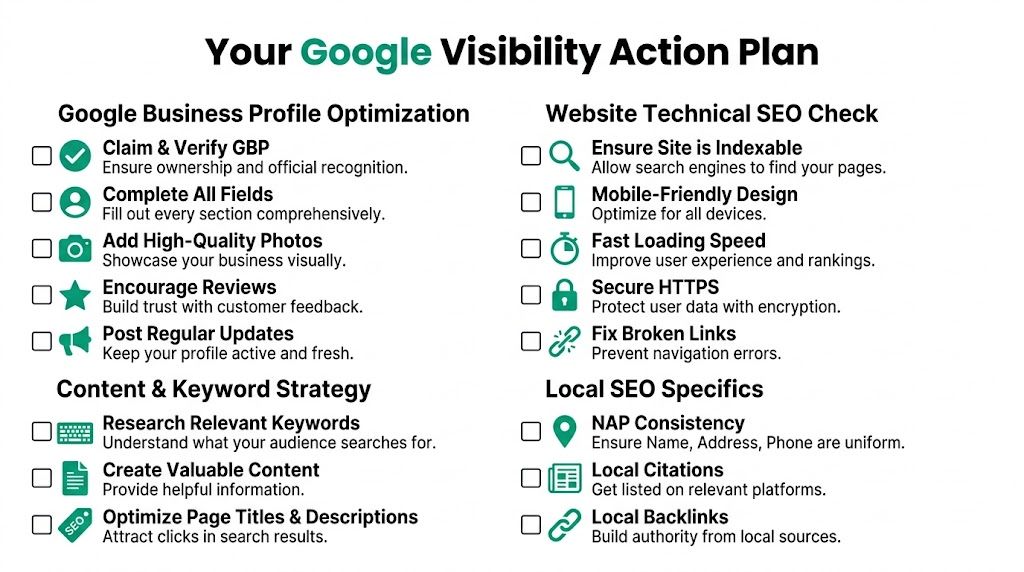
If your head is full at this point, use a strict order of operations. Fix the highest-impact items first. Don't jump ahead because a later task feels more interesting.
Start with visibility blockers
These are the items that can prevent showing up at all:
- Claim your Google Business Profile
- Finish verification
- Check if your website pages are indexed with a site: search
- Confirm your contact details match across your website and main directories
- If you're an SAB, hide the address and define valid service areas
Then improve the profile and website together
Once the blockers are gone, strengthen the actual ranking signals.
- Fill every relevant profile field with accurate information
- Choose the right business category instead of the broadest one
- Add real photos that reflect the business
- Build out core service pages on the site
- Make the contact page exact and current
Build trust signals over time
This is the ongoing layer that many businesses skip:
- Ask for reviews consistently
- Respond to reviews and questions
- Publish updates to keep the profile active
- Track whether visibility is improving instead of relying on memory
For rank tracking, use a process rather than random searches from your own device. If you want a practical walkthrough, this guide on how to track Google rankings gives a clean overview of what to monitor and how to avoid misleading spot checks.
Don't measure success by one search from your office computer. Measure it by whether your business becomes easier to find across branded, local, and service-based searches.
A clean weekly checklist
| Weekly task | Purpose |
|---|---|
| Check profile status | Catch verification or suspension issues early |
| Review site indexing | Make sure important pages still appear |
| Look for NAP drift | Fix business detail mismatches before they spread |
| Add fresh profile activity | Reinforce that the business is current |
| Monitor rankings and calls | Connect visibility to actual business outcomes |
When to Partner with a Pro: Your Next Move
A lot of businesses can fix the basics themselves. If the listing was never claimed, claim it. If the phone number is wrong, fix it. If the site isn’t indexed, start there. That part doesn’t always require an agency.
There are cases where DIY stops being efficient.
Good reasons to bring in outside help
You should seriously consider support if any of these are true:
- Your profile is suspended, and you can’t identify the exact violation
- You’re a service-area business with ongoing visibility drops after setup changes
- The website was redesigned, and traffic or indexing fell off afterward
- You’re competing in a dense market where everyone already has the basics handled
- You manage multiple locations, and consistency keeps breaking
- You’re still asking why my business is not showing up on Google after fixing the obvious issues
Those situations usually need deeper diagnostics, cleaner execution, and less trial-and-error.
What a specialist actually does
A real local SEO review isn’t magic. It’s disciplined troubleshooting.
That work usually includes checking ownership and verification status, reviewing business categories, auditing NAP consistency, finding indexing issues, comparing your setup to competitors, and identifying trust gaps that affect local and organic visibility. In more complex cases, one option is Ascendly Marketing, which provides local SEO, SEO, and website support for businesses that need a structured diagnosis and implementation plan rather than scattered fixes.
The right time to get help is when the cost of guessing becomes higher than the cost of solving the problem correctly.
Use this rule to decide
Handle it yourself if the issue is clear and contained.
Bring in a specialist if the issue is layered, recurring, or tied to visibility loss you can’t explain after basic checks are complete.
If you want a second set of eyes on your Google visibility problem, Ascendly Marketing can review your business profile, website, and local search setup, then map out the fixes in priority order.
