

TL;DR:
- Proper planning and clear goals are essential for building an effective business website.
- Mobile-first design, speed, accessibility, and trust signals are key to user engagement and conversions.
- Ongoing testing, SEO, and focusing on functionality over aesthetics drive long-term success.
Every day you run a website with broken navigation, slow load times, or no clear call-to-action, you’re paying twice: once for the marketing budget driving people there, and again in the customers those visitors become for your competitors instead. A poorly built site doesn’t just underperform. It actively works against you. Non-responsive sites see 60% bounce rates, meaning more than half your visitors leave before you even have a chance to speak to them. This guide walks you through a proven, data-backed framework for planning, designing, building, and optimizing a business website that earns trust and converts visitors into paying customers.
Table of Contents
- Clarify your website’s goals and plan for success
- Design for mobile-first and user experience
- Build for speed, accessibility, and trust
- Launch with strong CTAs, SEO, and ongoing improvement
- Why function trumps looks and what most business owners miss
- Take your next step with expert help
- Frequently asked questions
Key Takeaways
| Point | Details |
|---|---|
| Start with strategy | Set clear goals and requirements before any design work begins. |
| Prioritize mobile and UX | A mobile-responsive, clean interface keeps most visitors engaged. |
| Speed and trust matter | Fast, accessible, secure sites earn visitor confidence and conversions. |
| CTAs and ongoing SEO | Effective calls-to-action and search optimization must be present from launch. |
| Substance over style | Functional, user-friendly sites outperform those focused only on aesthetics. |
Clarify your website’s goals and plan for success
Skipping the planning stage is the most common and costly mistake business owners make. You wouldn’t build a storefront without a floor plan, and you shouldn’t build a website without a clear blueprint either. Discovery—goals, audience, and information architecture—is the essential first step in any professional web design process. Get this right and every design decision afterward becomes cleaner and faster.
Start by writing down exactly what you need your website to accomplish. Different businesses need different outcomes, and your site’s structure should reflect that. Here are the most common website goals for small and medium-sized businesses:
- Generate leads through contact forms, quote requests, or consultation bookings
- Sell products or services directly via an online store or booking tool
- Build credibility using case studies, testimonials, awards, and media mentions
- Support existing customers with FAQs, knowledge bases, or account portals
- Inform and educate through blog content, downloadable resources, or video
Once you know your goals, identify who you’re building for. Your audience shapes everything from the tone of your copy to the complexity of your navigation. A B2B software buyer behaves very differently from someone shopping for a local service. Map out your ideal visitor: what are they searching for, what problems do they have, and what would make them trust you enough to reach out?
Next, list every feature your site needs. Think about contact forms, product listings, testimonials, live chat, scheduling tools, blog sections, and payment gateways. Then create a simple sitemap that outlines your main pages and how they connect. This prevents the “added it later” chaos that makes so many small business websites confusing to navigate. For a deeper look at website design explained, it helps to understand how these planning steps feed directly into your build.
| Website goal | Key features needed | Success metric |
|---|---|---|
| Lead generation | Contact form, CTA buttons, landing pages | Form submissions per month |
| E-commerce | Product pages, cart, payment gateway | Revenue and cart abandonment rate |
| Brand credibility | Portfolio, testimonials, case studies | Time on site, return visitors |
| Customer support | FAQ, knowledge base, live chat | Support ticket volume reduction |
Pro Tip: Map each website goal to a measurable KPI before you touch a design tool. This keeps your project focused and gives you a clear benchmark to measure success once you launch. Your design workflow tips should always begin here.
Design for mobile-first and user experience
With goals and a sitemap in hand, it’s time to start building something visitors will actually enjoy using. And the first design principle to embrace is this: your visitors are on their phones. 67.56% of all web traffic is now mobile, and sites that aren’t designed with that in mind pay a steep price in bounce rates and lost customers.
Mobile-first design means you design the smallest screen version of your site first, then scale up to tablet and desktop. This forces you to prioritize the most essential content and actions, cutting out clutter that confuses visitors. It’s the opposite of the old way, where designers built for desktops and then tried to squeeze everything onto a phone screen afterward.
Beyond responsiveness, user experience (UX) is the single biggest driver of whether visitors stay or leave. 84.6% of users prefer a clean, uncluttered design, which means visual simplicity isn’t just a style preference. It’s a conversion strategy. Clear visual hierarchy, obvious navigation, and generous white space tell visitors where to look and what to do next.
| Approach | Pros | Cons |
|---|---|---|
| Mobile-first | Prioritizes majority of traffic; forces content clarity | Requires more upfront planning |
| Desktop-first | Familiar for many designers; easier for complex layouts | Often results in poor mobile experience |
Follow these steps when choosing and setting up your responsive design:
- Choose a mobile-first framework or theme (WordPress, Webflow, and Squarespace all offer responsive options)
- Test your design on real devices, not just browser simulators
- Ensure tap targets (buttons and links) are at least 44×44 pixels for easy tapping
- Use scalable fonts and fluid image containers that adapt to screen size
- Check load speed on mobile separately from desktop using tools like Google PageSpeed Insights
“Design is not just what it looks like and feels like. Design is how it works.” Good UX makes every visitor feel like your site was built just for them.
Pro Tip: Limit your main navigation to 5 to 7 items. More than that and visitors start second-guessing where to click. If you want to reduce bounce rate effectively, fewer navigation choices almost always win. Explore more website design tips and design best practices to keep your layout working hard.
Build for speed, accessibility, and trust
A gorgeous, mobile-friendly design will still fail if it loads slowly or excludes part of your audience. This is the stage where many business owners cut corners and pay for it later. Speed, accessibility, and trust signals are not optional extras. They are fundamental to whether your site performs.
Load speed is non-negotiable. 40% of visitors abandon sites that take more than 3 seconds to load. To keep your site fast, follow these practices:
- Compress and properly size all images before uploading them
- Choose quality hosting with solid uptime guarantees (shared hosting often bottlenecks speed)
- Minimize plugin bloat and only run scripts that are absolutely necessary
- Use a Content Delivery Network (CDN) to serve your site faster to visitors in different locations
- Enable browser caching so returning visitors load pages almost instantly
Accessibility is about making sure everyone can use your site, including people with visual, auditory, or motor impairments. WCAG accessibility standards reduce bounce rates by 23% and improve SEO rankings because search engines and screen readers read websites in similar ways. Adding descriptive alt text to images, using sufficient color contrast, and choosing readable font sizes are practical places to start. Read more about web accessibility impact and why it matters for your bottom line.
Accessible websites serve more people, rank better in search, and signal to every visitor that your business is thoughtful and professional.
Trust signals tell new visitors they’re in safe hands. Without them, even interested buyers hesitate. Make sure your site includes:
- SSL certificate (your URL shows https not http)
- Clear business contact info including phone, email, and physical address if relevant
- Customer testimonials and reviews with real names and photos when possible
- A visible privacy policy linked in your footer
- Professional headshots or team photos so visitors know a real business is behind the site
Even small improvements here pay real dividends. Better trust elements and faster load times together directly improve conversion rates across your entire site.

Launch with strong CTAs, SEO, and ongoing improvement
You’ve planned, designed, and built a fast, trustworthy, mobile-ready website. Now it’s time to launch well and set up the systems that keep it improving. Many businesses treat launch as the finish line. It’s actually the starting gun.
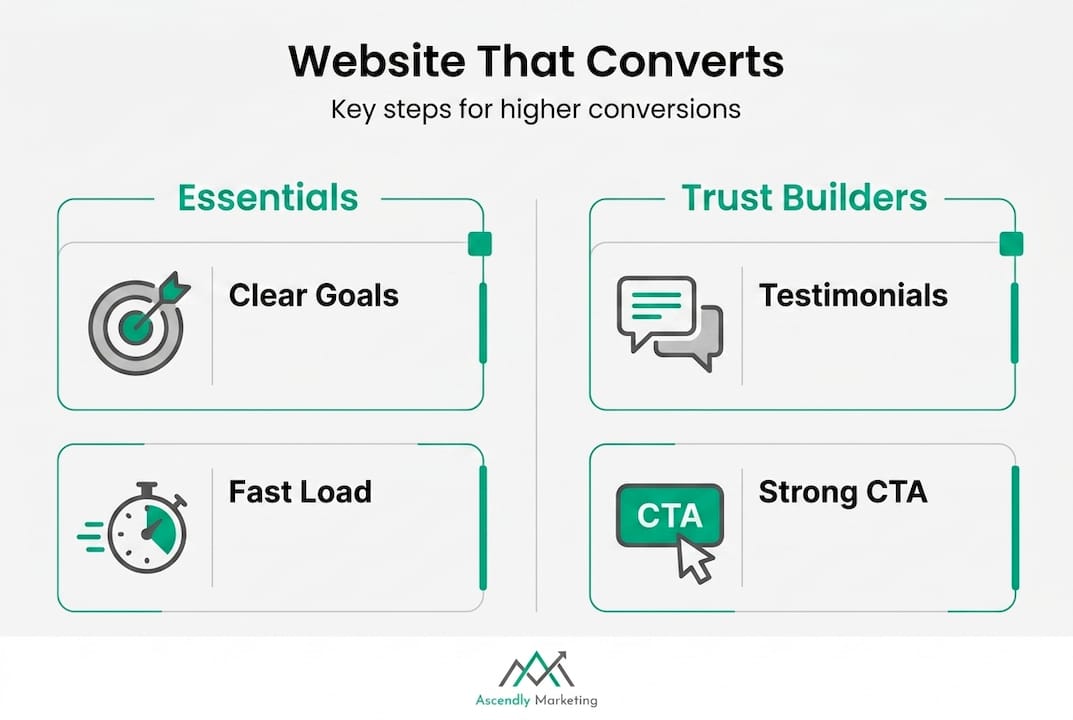
70% of small business websites lack effective CTAs, and well-executed redesigns with strong calls-to-action routinely boost conversions by 20 to 200%. That’s a wide range, but the point stands: CTAs matter enormously. Every page should tell visitors exactly what you want them to do next, whether that’s calling you, filling out a form, or booking a consultation.
Use this pre-launch checklist before you go live:
- Test every form and confirm submissions reach the right inbox
- Check all links for broken pages or redirects
- Install Google Analytics and Google Search Console to track performance from day one
- Set up basic on-page SEO: title tags, meta descriptions, heading structure, and image alt text
- Test load speed on both mobile and desktop
- Confirm your SSL certificate is active and all pages load securely
- Place clear CTAs on every key page, especially your homepage and service pages
A hybrid Agile-Waterfall process is now common for web projects, meaning you plan and structure carefully upfront but continue to iterate and improve after launch rather than waiting for a perfect final product. This matches how the web actually works. Visitor behavior, search algorithms, and customer needs all change, and your site should evolve with them.
Understanding the role of SEO in redesign from the very start protects the search visibility you’ve built and sets you up to grow it. Pair that with a solid organic SEO guide to understand how content and technical SEO work together over time.
Pro Tip: Review your analytics monthly in the first quarter after launch. Look at which pages have high exit rates or low time-on-page. Those are your clearest signals for what to improve first.
Why function trumps looks and what most business owners miss
Here’s an uncomfortable truth we’ve seen confirmed repeatedly since 2013: business owners fall in love with how their website looks, and that love costs them money. A stunning hero image or a custom animation might win internal praise, but visitors don’t buy aesthetics. They buy clarity, speed, and confidence.
We’ve watched businesses with beautiful, award-worthy designs lose consistently to competitors with simpler, faster, and more accessible sites. Why? Because a visitor who can’t find your phone number in three seconds leaves. A visitor on a slow mobile connection who waits five seconds for your homepage to load is gone.
Functionality is the foundation. Speed, mobile responsiveness, clean navigation, and accessibility aren’t constraints on creativity. They are the baseline. Design choices should always serve usability, not the other way around. Form follows function, and in digital marketing, that principle drives real, lasting ROI. If you’re wondering whether investing in design is worth it, it absolutely is, but only when function comes first.
Take your next step with expert help
Building a website that genuinely works for your business takes more than a good-looking template. It takes strategy, technical know-how, and a disciplined process from planning through ongoing optimization.
At Ascendly Marketing, we’ve been helping small and medium-sized businesses build and improve websites since 2013. Our team of designers, SEO specialists, and content creators works with you to make sure every decision serves your business goals. Whether you’re starting from scratch or upgrading an existing site, explore our web design services to see how we approach the work. For businesses ready to think beyond the website itself, our full range of digital marketing services covers everything from SEO to paid advertising and content strategy.
Frequently asked questions
What is the most important first step when designing a business website?
Define your business goals and identify your target audience before touching any design or development tools. Without that foundation, every design decision is just a guess.
How can I make sure my website works well on mobile devices?
Use a mobile-first design approach and choose a responsive theme that adapts to all screen sizes. Since 67.56% of web traffic is mobile, designing for phones first is no longer optional.
Why is website speed so crucial for small businesses?
Slow sites lose visitors fast. 40% of users leave if a page takes more than 3 seconds to load, and those are leads you’ll never recover.
How do I improve my site’s trust with potential customers?
Add a visible SSL certificate, clear contact details, real customer testimonials, and a privacy policy. 70% of small business sites also lack effective CTAs, which are essential for guiding visitors toward a decision.
What are common mistakes to avoid when launching a business website?
Avoid cluttered layouts, slow load speeds, missing calls-to-action, and overlooking accessibility standards. Non-responsive and cluttered sites consistently drive high bounce rates and low engagement across every industry.
