
Your pages are showing up in Google. Your ads are getting impressions. People are opening some of your emails. Yet traffic stays flat, leads feel thin, and the numbers don’t match the effort.
That gap usually comes down to one problem. People see your message, then skip it.
Click-through rate is where attention turns into action. If you improve that one metric, you get more out of the traffic, rankings, ad spend, and subscriber list you already have. No extra platform needed. No new shiny tactic. Just better execution in the places where users decide whether to click or keep scrolling.
This is a channel-by-channel playbook for how to improve click-through rates in search, paid media, email, and on-site journeys. Some fixes take an afternoon. Others need tighter structure and better testing. Both matter.
Understanding Your Click-Through Rate
CTR stands for click-through rate. It tells you how often people click after seeing a link, ad, listing, or email.
The basic formula is simple. Clicks divided by impressions, then expressed as a percentage. In plain English, CTR answers one question: when people see your message, does it earn the click?
A lot of small businesses focus on reach first. More impressions. More opens. More views. That’s fine until you realize those numbers can hide weak performance. Visibility without clicks doesn’t produce pipeline. It just produces reports that look busier than reality.
What CTR tells you about your marketing
CTR is a fast signal of message-market fit. If impressions are deep and clicks are weak, one of these is usually happening:
- The offer feels vague, and users don’t see a reason to act.
- The message doesn’t match intent from keyword to ad to page.
- The visual treatment gets ignored because it blends in.
- The wrong audience is seeing it at the wrong moment.
A weak CTR doesn’t always mean the whole campaign is broken. Sometimes the fix is as small as rewriting a title tag or changing one subject line. Sometimes the issue runs deeper, and you need to rebuild targeting or landing-page alignment.
Practical rule: CTR is one of the few metrics that exposes weak messaging before weak conversion rates show up downstream.
Why businesses should care
Higher CTR means more visitors from the same inventory. The same search impressions can send more traffic. The same ad budget can drive more qualified sessions. The same email list can produce more site visits.
That’s why improving CTR is often the shortest path to better performance. You’re not starting from zero. You’re tightening what people already see.
Boost Organic CTR in Search Results
A small business can sit in position three for a high-intent keyword and still lose traffic to a competitor below it. That usually happens because the listing looks generic, vague, or harder to trust at a glance.
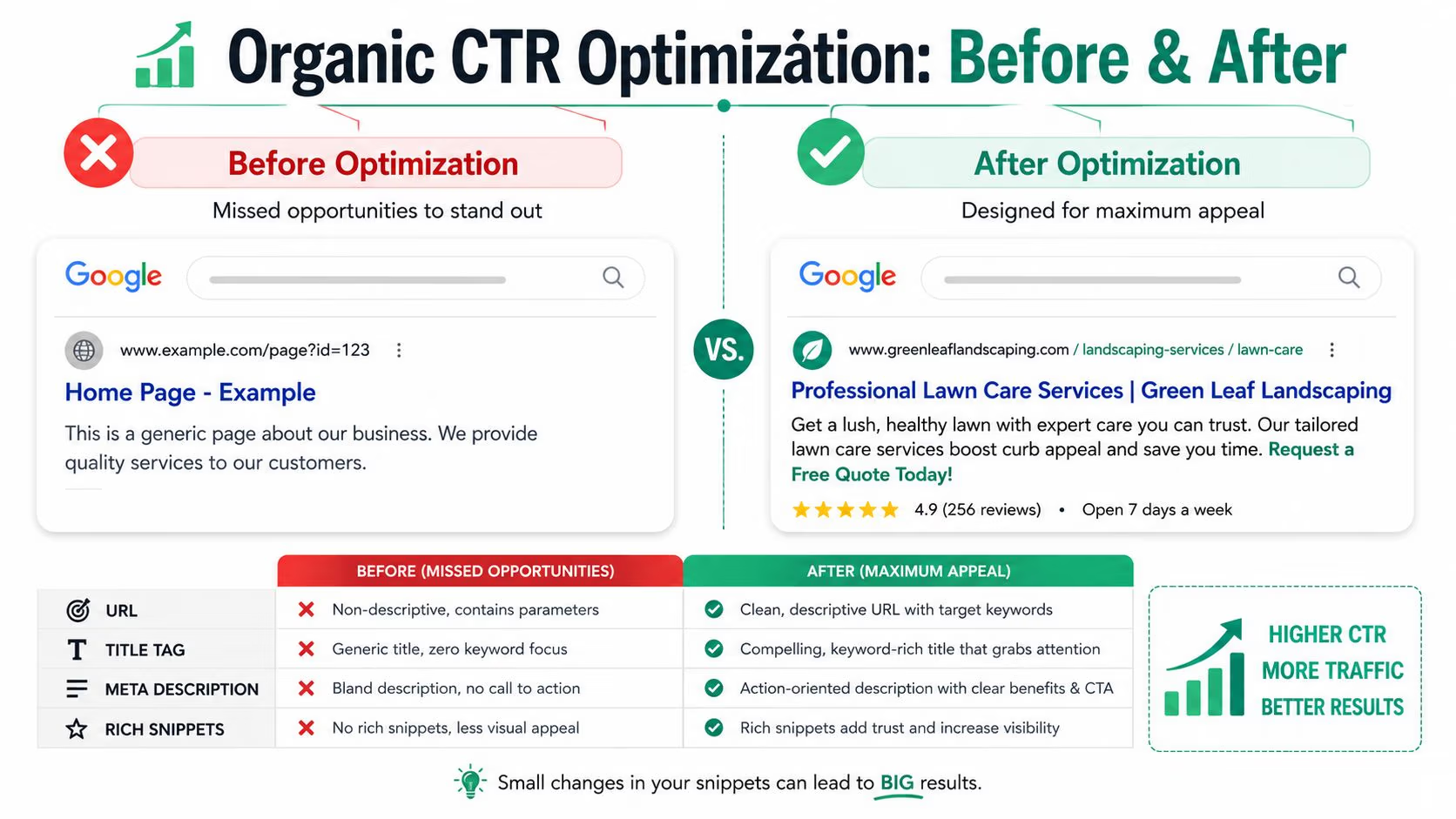
Organic CTR is won before the visit. On the results page, users make a fast comparison between your headline, your snippet, your URL, and the search intent they brought with them. If those pieces do not line up, rankings alone will not carry you.
Write titles for the click, not just the keyword
Title tags need to do two things at once. They need to confirm relevance fast and give the searcher a reason to choose your result over the others.
The strongest titles usually place the primary topic early, then add a concrete angle. That angle might be speed, pricing clarity, a checklist, a comparison, or a location cue. What matters is specificity. Broad wording like “Complete Solutions” or “Expert Services” wastes the most visible part of the listing.
A few title patterns work consistently across SMB sites:
- Lead with the exact topic the searcher expects to see
- Add a useful qualifier such as price, timeline, format, or audience
- Use brackets or numbers only when they clarify the page
- Trim branding if it pushes the useful words too far back
If you want a sharper framework for title and snippet writing, this guide on SEO for SaaS founders is useful because it focuses on search visibility decisions, not vague SEO theory.
Treat meta descriptions like ad copy with one job
A meta description does not need to summarize the whole page. It needs to answer the silent question in the SERP: why click this result right now?
That means writing for action. “Learn more” is weak because it asks for effort without offering a payoff. “See pricing,” “Compare options,” or “Get the checklist” works better because the next step is clear. Keep the description tight enough to reduce truncation and make sure it reflects what the page delivers.
For a more practical breakdown, use this resource on how to write meta descriptions for SEO. It’s helpful when your pages rank but don’t attract clicks.
Search users reward clarity, not effort.
Use schema where it changes the listing
Structured data improves CTR because it can change how your result appears in search, not just the words users read. That is a meaningful difference.
Google Search Central explains how supported structured data can make pages eligible for rich results such as reviews, products, FAQs, and events: Google Search Central on structured data and rich results. Those enhancements often make a listing easier to scan and easier to trust, especially on crowded commercial queries.
Start with the schema types that map to pages already driving buying intent:
- Product schema for product pages with price and availability
- Review schema only where ratings are genuine and visible on the page
- FAQ schema for pages answering specific pre-purchase questions
- Event schema if dates and locations affect the click decision
There is a trade-off here. Markup helps only when the underlying page is strong, and the schema matches visible content. Sloppy implementation can create eligibility issues or leave you with no visible change at all.
Featured snippets deserve attention too. Ahrefs found that featured snippets appeared in a meaningful share of search results in its large-scale SERP study, which you can review here: Ahrefs featured snippets study. For SMBs, the practical takeaway is simple. Pages that answer a query directly, often in a short question-and-answer format near the top of the page, have a better chance of earning more visual real estate.
Clean up the visible URL and match the promise on page
Users scan URLs faster than many teams realize. A short, descriptive slug improves trust because it confirms topic relevance before the click. A messy URL with parameters, dates, or vague folder names does the opposite.
Then check message match. If the title promises pricing, comparison, or a checklist, the page needs to deliver that in the opening screen. Here, many SMB sites lose momentum. They win the click with a strong snippet, then greet the visitor with generic brand copy. That disconnect hurts engagement and makes CTR gains harder to sustain because the page is not earning the next action.
The best organic CTR improvements come from tight alignment across the full search experience. Query, title, snippet, URL, and opening page copy should all point to the same outcome.
Win the Click in Paid Media Campaigns
Your ad shows up for a high-intent search, but the click goes to a competitor. In paid media, that usually happens before anyone reaches the landing page. The account structure is loose, the message is too generic, or the ad is competing in the wrong auctions.
Paid CTR improves fastest when each campaign answers a narrow intent well. SMBs often try to cover too much with one campaign because it feels easier to manage. It is easier to manage. It also hides waste and makes it harder to write ads that feel specific enough to earn the click.

Build tighter ad groups than you think you need
The quickest improvement often comes from restructuring, not writing ten more headline variations.
Google’s guidance on ad relevance points in the same direction. Smaller, intent-focused ad groups make it easier to match keywords, ads, and landing pages closely, which improves expected performance and click potential. If you want the platform view on that setup, review Google Ads’ documentation on ad rank and quality factors.
For a local service business, one mixed ad group for roofing repair, inspections, emergency calls, and metal roofing creates weak relevance across all four. Separate those into their own ad groups, then give each one matching headlines and a landing page built for that service. The trade-off is more setup time and more assets to maintain. The upside is cleaner search term matching, stronger ad relevance, and fewer wasted impressions.
Match intent before you expand reach
Broad targeting can buy volume, but volume is not the goal. Qualified clicks are.
Start with tighter keyword control where intent matters most. Review the Search Terms report on a set schedule, then add negatives based on real queries, not guesses. Write headlines that reflect the words people use. Internal category names rarely win the click.
Google also notes that stronger, more varied Responsive Search Ads tend to perform better because the system has more useful combinations to serve across different queries and contexts. Their guide to creating effective Responsive Search Ads is a practical reference if your ads keep getting boxed into the same weak combinations.
If you want a clearer view of how auction-level delivery works behind these impressions, this explainer on real-time bidding in digital advertising is worth reading.
Use every piece of visible real estate
Extensions increase the size and usefulness of the ad. Sitelinks, callouts, structured snippets, prices, calls, and location assets give a searcher more reasons to choose you before they ever visit the site.
That matters for SMBs because paid search is often a trust contest, not just a copy test. A competitor with seller ratings, pricing, and location details can look safer to click even with similar headline quality. Google’s overview of Search assets explains how these formats help improve visibility and ad usefulness.
Creative discipline matters on paid social, too. One focal point, one offer, one action. If the design asks the eye to process five things at once, CTR usually drops because the user cannot tell what deserves attention first.
This short video gives a useful view of paid campaign thinking from another angle:
What usually fails in paid campaigns
The same problems show up across Google Ads, Microsoft Ads, and paid social accounts:
- One landing page for every keyword, which lowers relevance and weakens message match
- Generic headlines that could apply to any service or offer
- Broad audience settings that chase cheap impressions instead of likely buyers
- Too few negatives or exclusions, which lets irrelevant traffic drain budget
- Extensions left incomplete, which makes the ad smaller and less useful than it should be
Paid CTR goes up when campaigns are built for the query, the audience, and the offer. That takes more planning than a one-size-fits-all setup, but it is usually where small businesses get their best paid media gains first.
Drive Action with Email Marketing
Monday morning. A prospect scans 40 unread emails on a phone, opens two, and clicks one. If your message does not earn that click fast, the rest of the email does not matter.
Email CTR improves when each part of the send does one job well. The subject line gets the open. The preheader adds context. The body removes friction. The CTA gives one obvious next step. Small businesses usually get faster gains here than in paid media because the audience already knows the brand.
Tighten the subject line first
Global email click-through rates are modest across industries, so small changes in relevance can produce meaningful traffic gains from the same list. Campaign Monitor reported that emails with personalized subject lines are 26% more likely to be opened. That does not mean forcing a first name into every send. It means using information that sharpens relevance, such as location, product category, or timing.
Send time affects engagement too. Mailchimp’s guidance on email marketing benchmarks and timing notes that late morning through early afternoon often performs well, but results vary by audience and buying cycle. A restaurant promotion, a B2B quote follow-up, and a seasonal e-commerce drop should not all go out on the same schedule.
Keep subject lines under 50 characters when possible. That supports visibility on smaller screens and forces tighter writing. Bloomreach and this shorter note on email subject line length both point in that direction.

Don’t waste the preheader
Inbox previews are a two-line pitch.
Too many businesses still let the preheader default to “View this email in your browser” or footer copy from the template. That gives away space that could answer the reader’s first question: why click now?
Use the preheader to finish the thought started by the subject line. If the subject is “Houston inventory update,” the preheader can add “See what’s back in stock before the weekend.” If the subject is an offer, the preheader can state the deadline or the main benefit. Curiosity helps, but clarity usually wins more clicks.
Segment by behavior, not just list labels
“Newsletter subscribers” is not a strategy. It is a bucket.
CTR rises when the message matches where the reader is in the buying process. A recent customer needs onboarding or a related offer. A product page visitor who never added to cart needs a reminder or a reason to return. An inactive lead may need a short proof point and a lower-commitment click, not a hard sell.
A practical split might include:
- Recent buyers who need onboarding or cross-sell content
- Browsers who looked at a category but didn’t act
- Inactive contacts who need a re-engagement angle
- Lead-stage prospects who need proof and clarity before they click
For teams building automated sequences, this email drip campaign example is a useful planning reference.
Inbox rule: one email should drive one main action. One primary click target beats three competing options.
Make the click easy once the email opens
The body copy has one job. Support the click.
Place the primary CTA high enough that mobile readers see it without scrolling much. Use button text that describes the outcome, such as “Book My Estimate,” “See Pricing,” or “Shop New Arrivals.” Generic labels like “Read more” lower intent because they hide the payoff.
Trust signals help here, but only if they are close to the decision point. CXL’s research on social proof and conversion optimization explains why reviews, ratings, and client logos can increase response when they reduce uncertainty at the moment of action. A service business can place a short testimonial above the button. An online store can add star ratings near featured products. Apparel brands can also improve click confidence by showing products in context, including visuals created with flatlay to model AI, when that presentation better matches how people evaluate fit and style before they click.
What usually hurts email CTR is simple. Long intros. Multiple equal-weight buttons. Offers buried below brand boilerplate. Clean emails with one clear action tend to outperform clever layouts that make the reader work.
Optimize On-Site Elements for More Clicks
A visitor lands on your site ready to act, then stalls. The offer looks fine, but the next step is buried, the page competes with itself, or the call to action asks for too much too soon. That is where on-site CTR slips for small businesses. The fix is usually simple, but it has to match the page’s job.
Treat each page like a stage in the buying journey. A homepage can send people to the right service, product category, or location page. A service page should push toward a quote, call, or booking. A product page should move the visitor toward add-to-cart or a product detail click. If the page tries to do all three, clicks scatter.
Design the CTA around one action
Strong CTA copy names the outcome. “Get My Quote” beats “Submit” because it answers the visitor’s first question: what happens after I click?
Placement matters just as much. Put the primary CTA where intent peaks. That usually means near the top on service pages, after pricing on offer pages, and again after proof points on longer pages. Repeating the same CTA lower on the page works well when the visitor needs more information before acting.
Use this checklist when reviewing a page:
- Match the CTA to the page goal
- Use button text tied to buyer intent
- Create clear visual contrast between the CTA and surrounding elements
- Keep nearby copy short so the action stands out
- Repeat the primary CTA on longer pages without changing the message
One warning here. More buttons do not automatically create more clicks. For many SMB sites, adding a second equal-priority CTA lowers response because it forces a choice before the visitor is ready.
Guide the eye with visual hierarchy
Click behavior on-page is often a design problem, not a traffic problem.
If every block uses bold colors, badges, icons, and motion, the visitor has to scan the whole page to figure out what matters. Good visual hierarchy removes that work. One dominant headline, one main CTA, and one supporting image usually outperform pages where every section fights for attention.
This matters even more for image-led businesses. E-commerce brands, salons, med spas, home services, and apparel companies all depend on presentation quality to get the next click. If the image does not make the offer clear, the button has to do extra work. For product pages and creative testing, tools like flatlay to model AI can help create cleaner visuals that make the next action easier to spot.
Use internal links to answer the next question
Internal links should reduce friction. They should not exist just to fill a template.
The best internal links appear right when the visitor needs one more piece of information to keep moving. On a service page, that might be a link to pricing, reviews, or project examples. On a product page, it could be shipping details, sizing help, or FAQs. The link earns the click when the anchor text tells the visitor exactly what they will get.
A practical internal linking pattern looks like this:
- Service page to proof page when trust is the blocker
- Blog post to category page when research turns into shopping intent
- Product page to FAQ when objections are likely
- Case study to contact page when purchase intent is already high
If someone has to pause and hunt for the next step, the page is underperforming. Good on-site CTR comes from clarity, not cleverness.
Measure and Test Your CTR Improvements
CTR work falls apart when teams change five things at once and call the result a win. That’s not testing. That’s guessing with extra steps.
The fix is a simple loop. Track the current baseline, identify one weak point, test one change, then keep the winner only if the data holds.
Know where to pull the numbers
Use the platform that owns the impression and click data:
- Google Search Console for organic search CTR by query and page
- Google Ads for campaign, ad group, keyword, and asset performance
- Email platforms for subject line, send time, and click reporting
- Site analytics tools for button clicks, internal link activity, and page path behavior

Run cleaner A B tests
A useful test starts with a specific hypothesis. Not “make this better.” Something like “a clearer subject line with location detail will produce more clicks than a generic promotional line.”
Then limit the change.
| Test area | Change only one thing |
|---|---|
| Search | Title tag or meta description |
| Paid ads | Headline or audience segment |
| Subject line or send time | |
| On-site | CTA copy or CTA placement |
That discipline matters because mixed-variable tests create muddy results. If you change the subject line, send time, and body copy together, you won’t know what produced the lift.
Wait for enough data before deciding
For email subject line testing, at least 1,000 opens or one week of runtime is the benchmark for statistical significance, according to Bloomreach’s guidance on email CTR testing. Teams that stop tests early often read normal volatility as a real trend.
That mistake is common in small businesses because everyone wants a quick answer. Resist that urge.
A clean testing workflow looks like this:
- Pull a baseline from the last stable period
- Pick one variable that directly affects the click
- Write a clear hypothesis before launch
- Run the test long enough to get meaningful data
- Document the result and roll the winning version into the next test
Build a CTR playbook from the winners
Don’t leave winning tests buried in the platform.
Keep a shared record of what improved clicks by channel. That turns isolated wins into operating rules. Over time, you’ll see patterns. Certain title structures get more search clicks. Certain landing page buttons outperform softer language. Certain send windows work better for specific segments.
That’s how to improve click-through rates consistently. Not by chasing hacks, but by building a repeatable process.
Quick CTR Wins for Small Businesses
If you want results this week, start with changes that don’t require a rebuild.
These are the quickest moves with the lowest friction. Most can be done in under an hour if the pages, campaigns, or templates already exist.
Start with the highest-leverage pages and campaigns
Don’t spread effort evenly. Focus on the assets that already get impressions.
- For organic search, rewrite title tags and descriptions on pages that already rank but underperform on clicks
- For paid media, split one broad ad group into tighter segments and add fresh negative keywords after reviewing search terms
- For email, shorten the next campaign’s subject line and personalize it with name or location where appropriate
- For on-site pages, replace weak CTA labels with outcome-based copy and move the primary action higher
Use this list as an afternoon to-do sheet
| Channel | Quick Win Tactic |
|---|---|
| Organic | Rewrite your top three meta descriptions to stay under 140 characters and include a direct CTA |
| Organic | Add schema markup for products, reviews, or FAQs on pages that already attract search impressions |
| Paid | Break one overloaded ad group into narrower intent-based groups with matching landing pages |
| Paid | Add sitelinks and review your Search Terms report for irrelevant queries to block |
| Keep the next subject line under 50 characters and pair it with a purposeful preheader | |
| Schedule sends for the recipient’s local time between 10 a.m. and 2 p.m. | |
| On-site | Change “Submit” or “Learn More” buttons to action-specific copy |
| On-site | Add contextual internal links where visitors naturally need the next answer |
What to do first if time is tight
Choose one task from each channel, not five tasks from one channel.
That approach gives you broader gains faster. A stronger search snippet, cleaner paid segmentation, one better email send, and one clearer CTA can move more traffic in a week than a full day spent tweaking a single ad.
The businesses that improve CTR steadily usually do one thing well. They remove friction wherever the click decision happens.
If you want help turning these fixes into a working growth system, Ascendly Marketing can help with SEO, paid media, email strategy, conversion-focused web design, and ongoing optimization built around measurable performance.