

You’ve posted consistently for months. Some products get likes. A few videos pull decent reach. Traffic comes in waves, then stalls. Sales data inside Shopify or WooCommerce doesn’t clearly connect back to what your social team published, boosted, or handed to creators.
That’s where most e-commerce social media marketing breaks down.
The problem usually isn’t effort. It’s loose planning, weak tracking, and content decisions made without a revenue model behind them. Brands chase engagement, post on every platform, boost random winners, and then wonder why social feels busy but unreliable.
Fix that first. Social now sits at the center of discovery and buying behavior. According to Sprout Social’s product discovery data, TikTok, Instagram, and YouTube account for over 60% of product discovery searches, and 83% of marketers identify social media as their primary acquisition channel. If your store depends on demand generation, social can’t stay a side project.
You need a system. Clear goals. Platform choices that match buyer behavior. Creative built for mobile attention. Paid campaigns with controlled testing. Tracking that shows which post, ad, creator, or SKU produced revenue.
If your broader growth plan still feels fragmented, a strong e-commerce marketing strategy will keep social tied to acquisition, conversion, and retention instead of letting it drift into content for content’s sake.
Introduction and Goal Setting
A small e-commerce brand usually starts the same way. The founder says, “We need to be on Instagram and TikTok.” A junior marketer starts posting product photos, customer reviews, and the occasional Reel. Two months later, everyone asks the same question. Is this working?
That question shows up too late.
Start with one commercial objective per channel. Don’t give every platform the same job. One channel can drive first-touch discovery. Another can retarget product viewers. A third can support customer trust with demos, reviews, and replies. Once each platform has a role, content stops looking random.
Build goals around buyer behavior
Social goals should connect to a buying stage, not a vanity metric.
- Discovery goal: Reach new people with short-form product education, creator clips, and problem-aware hooks.
- Consideration goal: Send traffic to collection pages, comparison pages, and offer-specific landing pages.
- Conversion goal: Retarget viewers, cart abandoners, and product page visitors with direct-response creative.
- Retention goal: Turn customers into repeat buyers through post-purchase content, UGC requests, and community prompts.
Don’t write “grow brand awareness” and call it strategy. That phrase doesn’t tell your team what to make, where to publish, or how to measure success.
Create one usable persona, not a fake deck
Most buyer personas are useless because they read like school projects. You don’t need “Sarah, age 34, likes coffee and yoga.” You need buying triggers, objections, average order patterns, and content preferences.
Ask better questions:
- What problem pushes the shopper to search now?
- What makes them hesitate before buying?
- Which products create first purchase momentum?
- Which platform do they use for discovery versus validation?
- What content moves them from browsing to cart?
Practical rule: If a persona doesn’t change your offer, your creative, or your landing page, it isn’t a persona. It’s decoration.
A workable persona should let you decide whether to publish a tutorial, a comparison, a testimonial, a bundle push, or a limited-time offer. That’s the point. Direction.
Platform Selection and Calendar Planning
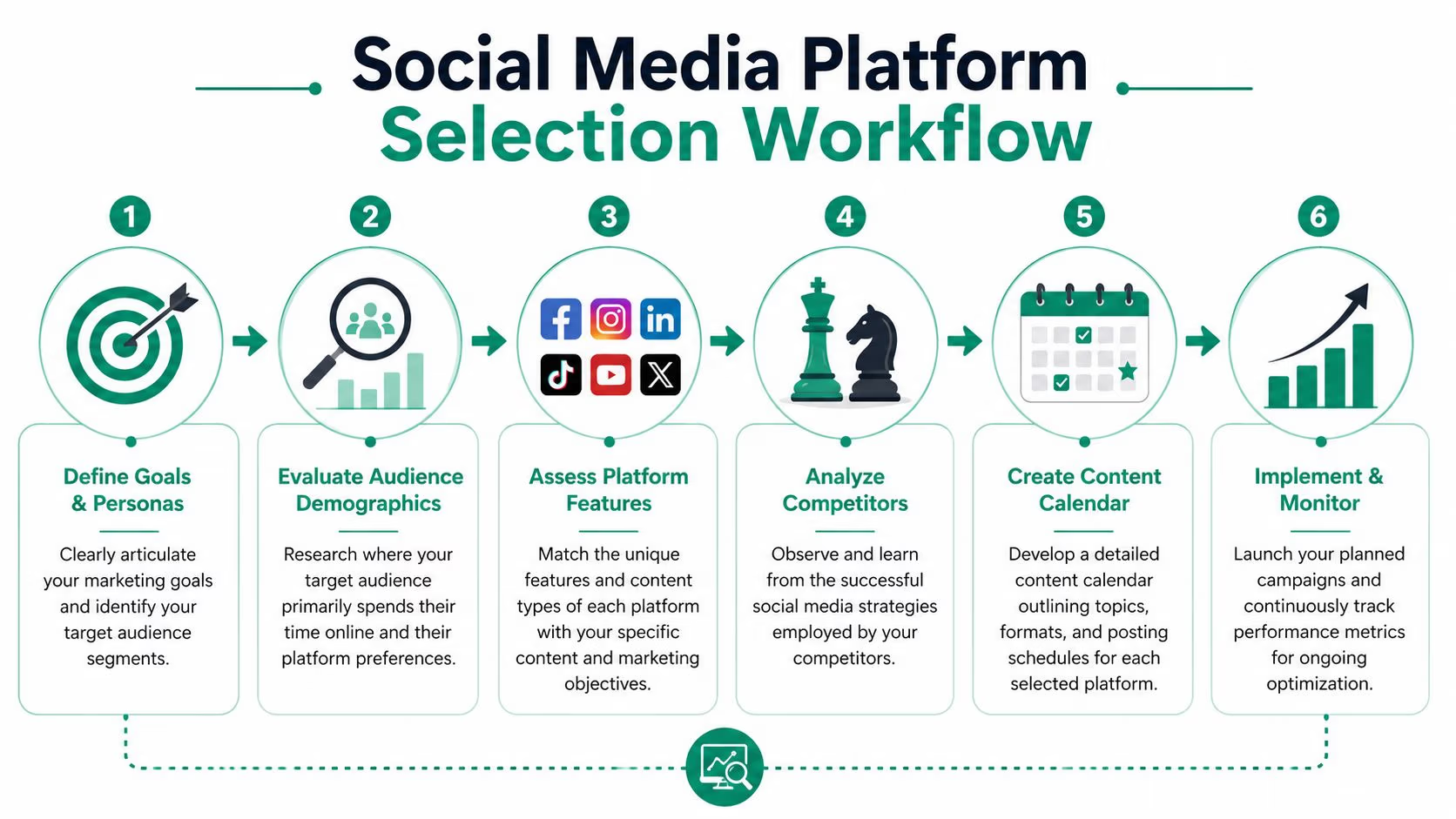
Picking platforms shouldn’t be ideological. Don’t choose channels because your competitors use them or because your team likes making a certain format. Choose them because the platform matches the buyer, the product, and the job.
Start with a simple filter. Where does your buyer discover products, where do they evaluate trust, and where are they willing to click out and buy? Those are not always the same place.
Match the platform to the product
Here’s the practical way to think about the main channels.
- Instagram: Strong for visual proof, product styling, creator reposts, and remarketing support. Good fit for products that benefit from demonstration and aesthetic context.
- TikTok: Useful when the product needs a hook, a use case, a before-and-after, or a fast explanation. Great for testing angles quickly.
- YouTube: Better for higher-consideration products that need demos, reviews, or comparison content.
- Facebook: Still matters when you need referral traffic, remarketing audiences, or established customer segments.
Don’t spread yourself thin. Two channels run well will beat four channels run badly.
Build a calendar that controls the mix
Most content calendars fail because they’re publishing calendars, not decision systems. A real calendar controls message type, funnel stage, content format, and offer timing.
Use the 50/30/20 rule from Number Analytics’ content benchmark. Allocate 50% of content to audience engagement, 30% to external insights, and 20% to direct brand promotion. That mix keeps your feed from turning into a constant sales pitch and helps reduce ad fatigue.
A simple four-week structure works well:
| Week | Focus | Content Examples |
|---|---|---|
| Week 1 | Audience engagement | Polls, Q&A prompts, customer questions, founder replies |
| Week 2 | Education and insights | Product care tips, buying guides, comparison content |
| Week 3 | Social proof | UGC clips, customer reviews, creator demos |
| Week 4 | Promotion | Offer posts, bundle pushes, launch reminders, retargeting support |
If you want a repeatable workflow, this guide on how to create a content calendar is a useful starting point.
After you map the month, pressure-test each post. Ask one question: what is this supposed to do? If the answer is fuzzy, cut it.
The workflow is simple enough to visualize before you build it into Notion, Airtable, or Google Sheets:
A content calendar should remove guessing. If your team still debates what to post every morning, the system isn’t finished.
Creative and Copy Best Practices
Bad social creative usually fails in the first second. The image is cluttered, the opening line says nothing, and the call to action asks for too much too soon. On mobile, that combination dies fast.
Your creative needs to do one job immediately. Stop the scroll, make the product understandable, and give the viewer a reason to keep moving.

Write the first line as it matters
Most captions waste the opening. Don’t begin with “New drop now live” or “We’re so excited.” Nobody cares yet.
Use direct openings built around one of these:
- Problem-first: “Still packing three products for one result?”
- Use-case-first: “How this bag fits a weekend trip without checking luggage”
- Objection-first: “If you think all protein powders taste chalky, start here”
- Outcome-first: “A cleaner countertop in under a minute”
AIDA still works when used properly. Attention comes from the hook. Interest comes from a specific problem or use case. Desire comes from proof, clarity, or contrast. Action comes from a simple next step.
PAS also works well for e-commerce social media marketing. Show the problem, make the frustration clear, then present the product as the fix. Keep it tight. Social captions are not landing pages.
Design for thumbs, not desktops
Still, teams often approve assets on a laptop and then wonder why mobile performance slips. That’s backwards.
Use these rules:
- Lead with the product fast: Show the item or the result in the first frame.
- Keep text sparse: One idea per frame. Too much text gets skipped.
- Use contrast for action: Your CTA needs visual separation from the rest of the layout.
- Show scale and context: A hand, a body, a room, or a before-and-after removes ambiguity.
- Add native interaction: Polls, sliders, stickers, and question boxes give people an easy action before the sale ask.
For teams producing more motion content, strong video production for marketing matters because weak framing, weak lighting, and weak pacing lower trust.
Judge content with thresholds, not opinions
Creative review meetings get messy when nobody agrees on what “good” means. Use performance ranges instead. According to Key G’s 2025 social metric benchmarks, mid-size profiles should target engagement rates of 1-3% and click-through rates of 0.5-2%, with weekly reach growth between 5-15%.
That gives you a scoreboard.
If engagement is healthy but CTR is weak, your creative may entertain without selling. If reach grows but engagement stays soft, the hook may attract the wrong audience. If CTR lands in range but sales lag, the problem likely sits on the landing page or checkout flow, not in the post.
Paid Social Strategy and Budget Management
Organic content tells you what people notice. Paid social tells you what they’ll do at scale. Don’t confuse the two.
A lot of brands burn budget because they launch ads before they’ve identified winning messages. They also spread spend too evenly, which sounds balanced but usually kills momentum. Budget should follow buying intent, creative fit, and platform economics.
Use paid social for three distinct jobs
Paid social works better when each campaign has a single role.
First, run prospecting to test hooks, offers, and audience-product fit. Second, run retargeting to catch product viewers and cart visitors who didn’t buy. Third, run creator or UGC amplification against proven content instead of forcing polished brand ads into every placement.
That’s the cleanest structure for most small and mid-sized stores.
A separate benchmark from the verified data supports the platform economics behind this approach. The average social ad return is strong enough to justify disciplined testing. According to the earlier discovery source already cited, average ROAS across major social platforms is 4.5:1, with Pinterest at 6.2:1 and Instagram at 4.2:1. You don’t need more channels first. You need better allocation.
Stop funding every platform equally
Your budget table shouldn’t pretend all channels deserve the same spend. Allocate based on evidence.
| Platform | Average CPC | Budget Allocation |
|---|---|---|
| Varies by audience, offer, and placement | Higher share for remarketing and proven referral traffic | |
| Varies by creative format and competition | Strong share for prospecting, retargeting, and creator amplification | |
| TikTok | Varies by hook strength and audience fit | Test budget for discovery and UGC-style conversion creative |
| Varies by category and search intent | Targeted budget where inspiration-led shopping matches the product |
I’m not filling this table with invented CPC numbers. You shouldn’t either. Pull actual CPC from your ad account by campaign type, not from a generic blog post, then set allocation around contribution to revenue.
What to test before increasing spend
Don’t scale a campaign because one ad looked promising over a short run. Scale when you know why it worked.
Test these variables in order:
Hook angle
Problem-first, result-first, comparison-first, or testimonial-first.Offer structure
Single SKU push, bundle, starter set, or category page.Creative format
Static image, UGC clip, founder video, carousel, or short demo.Audience source
Broad interest, custom list, past visitors, or customer exclusions.
Retargeting deserves special attention. A verified rollout framework from Social Pulse Stats outlines an 8-week structure for e-commerce social execution across Facebook, Instagram, TikTok, and YouTube, and notes that retargeting product viewers who didn’t convert can increase ROAS by 3x.
That’s why your best-performing product page traffic should never leave without entering a retargeting pool.
Don’t scale creative that only gets cheap clicks. Scale creative that produces profitable sessions, stronger add-to-cart behavior, and cleaner assisted conversion paths.
Guardrails that keep paid social useful
Paid social gets noisy fast. Use operating rules.
- Separate creative testing from scaling: New ads need their own budget and reporting view.
- Kill weak ads quickly: If the hook misses, no amount of budget rescue will fix it.
- Refresh winners before they collapse: Strong ads fade when audiences see them too often.
- Tie spend to product priority: Put budget behind SKUs that matter commercially, not just visually.
- Review by contribution, not platform ego: The platform with the loudest engagement isn’t always the one producing the best orders.
Good paid social strategy isn’t complicated. It’s disciplined. Most accounts improve when the team cuts half the distractions and tracks the path from ad to order more rigorously.
Conversion Optimization and Tracking Setup
Clicks don’t pay the bills. Orders do. That sounds obvious, but most e-commerce social media marketing setups still treat traffic as the win.
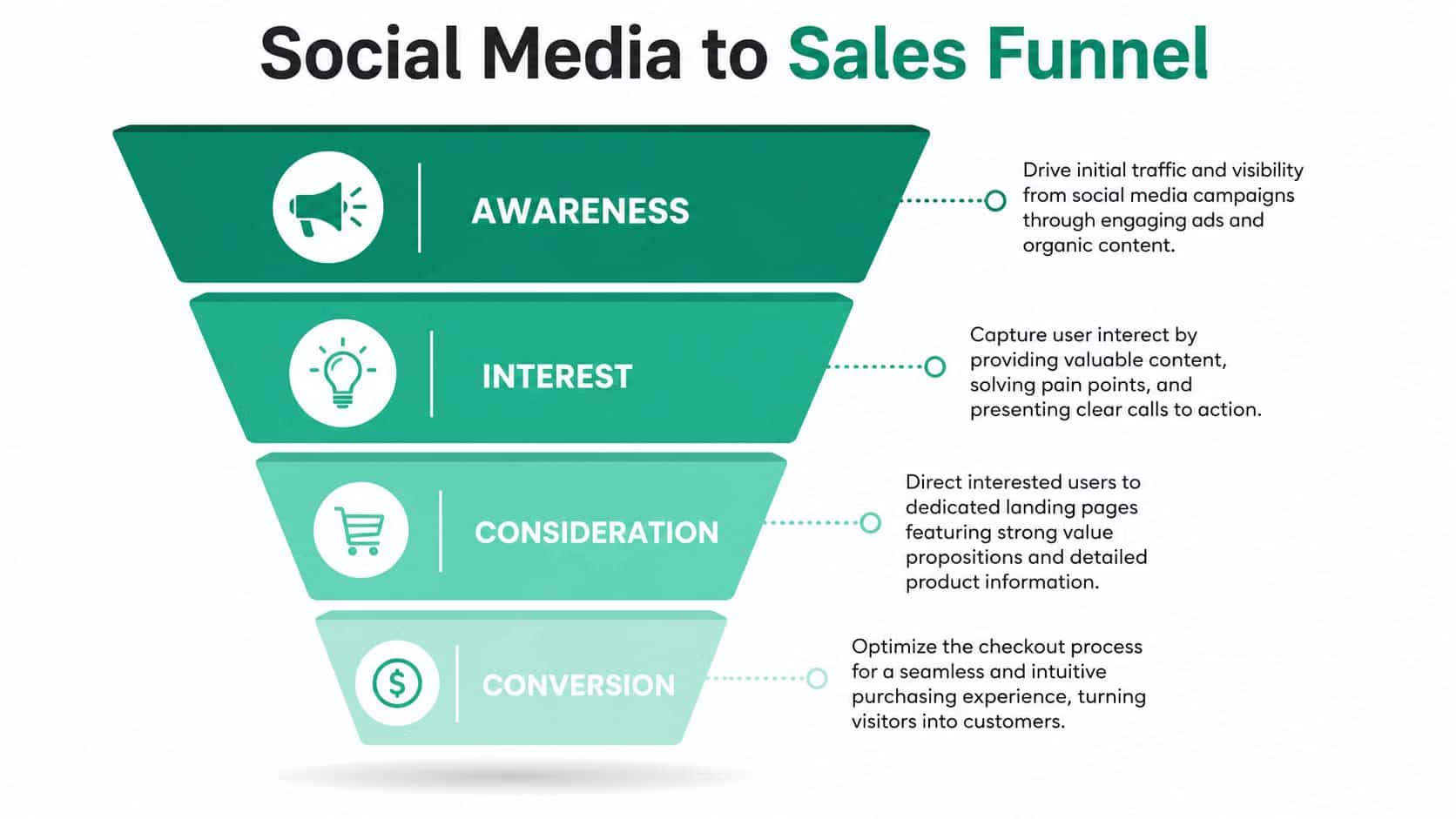
If you’re serious about revenue, every campaign needs a clean path from post or ad to landing page to product page to checkout. Then you need tracking that shows what happened at each stage. Without that, your social reporting is decoration.
Fix the landing experience first
Social traffic is impatient. Don’t send it to cluttered category pages and hope people will hunt.
A strong landing experience usually includes:
- A direct headline: Match the promise from the post or ad.
- A visible product benefit: Don’t make users infer what the item does.
- Fast proof: Reviews, UGC, demos, or concise trust signals.
- Simple next action: Add to cart, shop bundle, view shade finder, start quiz.
- Mobile-first layout: Social traffic arrives on phones, not on the conference room desktop.
You also need message match. If your ad says “starter kit for dry skin,” the landing page should say the same thing and present that offer immediately. Don’t force visitors to decode your catalog.
Use UTMs like an adult
Many teams say they track social, but all they really have is platform dashboard data plus a vague traffic spike in analytics. That isn’t attribution.
Every campaign should use structured UTM parameters. Keep naming conventions fixed across channels, campaign types, offers, and creative variants. If one team uses “ig_story” and another uses “instagram-stories,” your reporting gets messy fast.
A simple UTM structure should identify:
| Parameter | Purpose | Example Use |
|---|---|---|
| Source | Which platform sent the traffic | Instagram, TikTok, Facebook |
| Medium | Traffic type | Paid social, organic social, creator |
| Campaign | The promotion or launch | Spring bundle, summer drop |
| Content | The creative variation | UGC hook A, carousel B |
| Term | Optional audience or segment label | Retargeting viewers, past customers |
That setup lets you compare creator content against brand content, paid against organic, and bundle offers against single-product pushes without guessing.
Install pixels and verify event flow
Your pixel setup should track behavior beyond page views. You need a sequence you can trust.
At minimum, verify these events:
- View content
- Add to cart
- Begin checkout
- Purchase
If these events don’t fire consistently, your ad optimization suffers, and your reporting gets distorted. Facebook and TikTok pixel checks should be part of campaign launch, not an afterthought after results disappoint.
The fastest way to waste ad spend is to optimize against broken event data.
Set attribution windows that reflect reality
Single-touch reporting makes social look better in some cases and worse in others. Neither helps you manage budget. Use a model that reflects the buyer journey across multiple visits and touchpoints.
According to Social Rails on e-commerce attribution setup, you should implement multi-touch attribution with 7- to 30-day windows in Google Analytics 4 to capture assisted conversions and avoid misleading single-touch models.
That matters because many social-driven purchases don’t happen on the first click. A customer might discover the product on TikTok, revisit from Instagram, then convert later from email or direct traffic. If you don’t account for that sequence, you’ll underfund channels that influence revenue.
Build a reporting loop that ties social to money
A working reporting system should answer five questions every week:
- Which campaigns drove the most qualified sessions?
- Which creative variants produced the best add-to-cart rate?
- Which landing pages converted social traffic most cleanly?
- Which creators or formats influenced assisted conversions?
- Which products created profitable first purchases?
Don’t stop at engagement. Social teams need visibility into order quality too. That means checking average order value, refund patterns, and customer acquisition cost alongside content metrics.
Revenue-centric tracking is what separates brands that “do social” from brands that use social as a reliable growth channel.
Influencer Partnerships, UGC Measurement and Scaling
A lot of brands still pick influencers the wrong way. They choose the biggest audience they can afford, send a generic brief, repost the content once, and call it a campaign. That’s lazy. It also produces weak signal.
Niche creators and customer content usually outperform polished brand messaging because they answer the buyer’s real question. What does this look like in actual use, on an actual person, in a normal setting?
Use creators to prove the product, not just mention it
Pick creators who can demonstrate fit, routine, outcome, or comparison. Reach matters less than relevance. A smaller creator with the right audience and believable delivery often produces better sales content than a larger account with loose alignment.
Ask for content you can repurpose:
- First-use reactions
- Problem-solution demos
- Before-and-after clips
- Routine-based integrations
- FAQ-style explanations
Then cut those assets into paid variants, email blocks, product page proof, and retargeting creative.
“The creator’s job isn’t to borrow credibility from their audience. It’s to remove doubt from your product.”
Scale what sells, not what flatters the brand
Once UGC starts coming in, many teams make the same mistake again. They keep producing content around products that photograph well instead of products that move revenue.
Use a commercial filter. According to CommerceV3’s e-commerce reporting guidance, e-commerce teams should map the top 20% of SKUs driving 80% of revenue and publish weekly scorecards tracking conversion, AOV, refund rate, and CAC.
That rule changes content priorities fast.
If your top-performing SKUs already drive the business, your social calendar, creator briefs, and paid amplification plan should heavily support those products. Don’t waste attention on low-impact inventory because the visuals look nicer.
Turn weekly reviews into action
A weekly scorecard should lead to decisions, not another slide deck.
Use it to answer:
- Which creator content produced purchases, not just views?
- Which SKU deserves more ad support next week?
- Which UGC angle should move onto product pages?
- Which collaboration should stop now?
- Which customer segments need a different offer or message?
Automation helps once the structure is clear. Schedule approved posts, tag creator assets properly, monitor mentions, and trigger retargeting when users engage with product content but don’t buy. Scale follows organization. Without that, more creators just create more chaos.
If your team needs help turning social activity into measurable e-commerce growth, Ascendly Marketing can help you build the strategy, creative system, tracking setup, and reporting discipline needed to connect content and paid campaigns to revenue.