
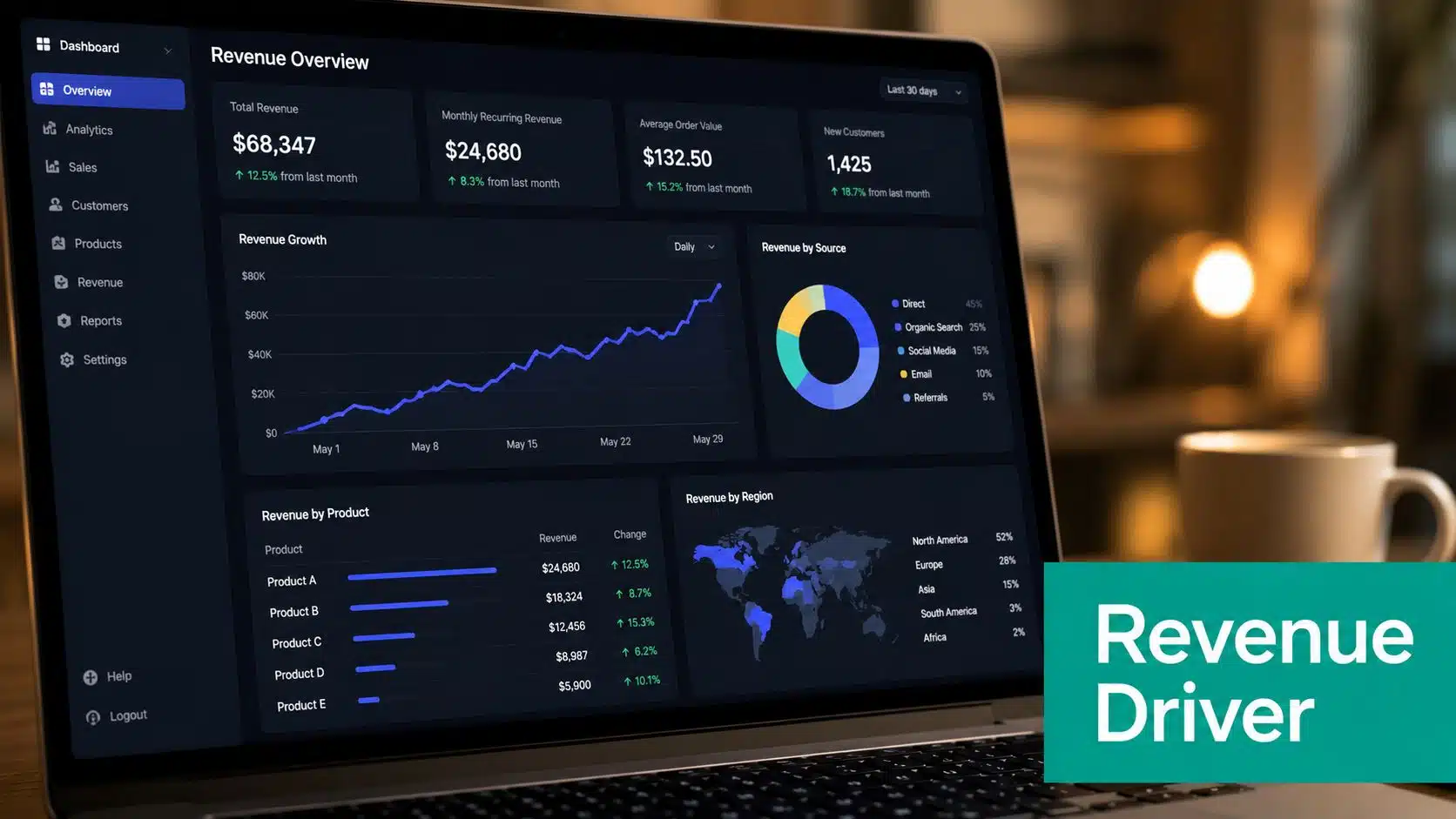
Automated email accounts for about 41% of email-driven revenue while making up only 5.3% of total send volume. In some benchmarks, automated messages are only 2% of sends yet generate 30% to 37% of all email revenue.
That gap changes how you should think about an email automation workflow. A person who keeps sending the same follow-up by hand every week is doing busy work while the triggered sequence is doing the selling.
A welcome email lands when someone signs up. A cart reminder arrives while the product is still open in the browser. A post-purchase follow-up shows up while the decision is still fresh. That timing is why triggered sequences outperform scheduled newsletters, and it’s why many teams use automation to improve efficiency with automation instead of treating email as a weekly blast channel.
If your list is being used for lead generation, the logic is the same whether you sell products or services. A practical overview of that relationship is covered in email marketing for lead generation, where the handoff from interest to action matters just as much as the message itself.
Why Email Automation Actually Moves the Revenue Needle
A lot of teams still run email like a calendar task. They write a batch, schedule it, then hope the timing fits someone’s buying window. That approach works poorly when intent changes by the hour.
A triggered flow meets the contact at a better moment. A welcome email fires after signup, a browse abandonment email lands while the person is still comparing options, and a post-purchase note reaches the buyer before the experience fades. Those are all different behaviors, but they share one thing: the contact is already in motion.
The revenue data explains why that matters. Automated or triggered email accounted for about 41% of email-driven revenue while representing only 5.3% of total send volume in 2026 benchmark reporting from Stripo’s email automation benchmarks. Other benchmark summaries in the same period found automated emails making up roughly 2% of sends but producing 30% to 37% of all email revenue, which is a very different efficiency profile from broadcast email.
A workflow does better work when the recipient already has intent.
A small e-commerce brand can feel this quickly. Someone signs up, gets a welcome sequence, adds a product to cart, then disappears. A manual sender usually catches the pattern late. A workflow catches it at the point where the decision is still active.
What changes in practice
The shift is not about sending more messages. It’s about sending fewer, better-timed ones that connect to a live action. That’s why triggered email sits inside lifecycle marketing, not just email marketing.
The upside is also operational. Once the logic is in place, the same structure can support welcome, cart recovery, post-purchase, and re-engagement without starting from scratch each time. The downside is that broken data or sloppy branching will ruin the result fast, so the workflow has to be treated as a system, not a one-time campaign.
The Four Parts Every Email Workflow Needs
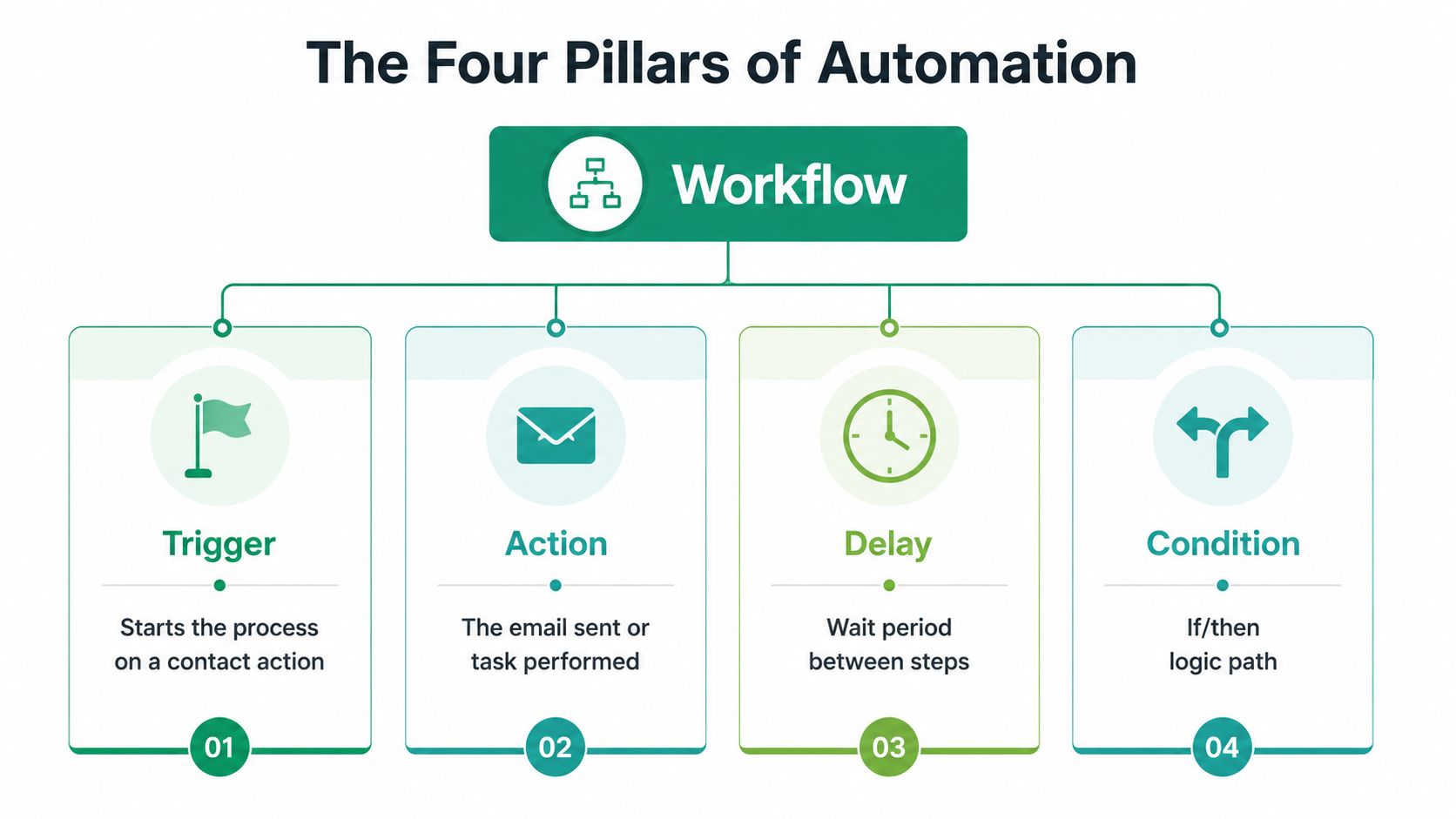
A working workflow has four parts, and the sequence matters. If one of them is weak, the whole thing behaves badly.
Trigger, condition, action, outcome
A trigger starts the workflow. That can be a form submission, a cart add, a pricing-page visit, or a field change in the CRM. The trigger decides who enters.
A condition checks the rules. Did the contact already buy? Did they open the last email? Has enough time passed? This prevents the workflow from sending the wrong message to the wrong person.
An action sends the response. That includes the subject line, body copy, personalization fields, links, and any internal task or tag you want applied.
The outcome records what happened next. Did they click, buy, ignore the email, or move into another stage? Without that feedback, you can’t improve the flow.
Practical rule: if you can’t point to the trigger in one sentence, the workflow is too vague to build cleanly.
How to spot a broken workflow
A missing trigger means nothing starts. A weak condition sends the wrong contacts down the path. A broken action means the email never sends or the fields stay blank. A missing outcome leaves you guessing.
I’ve seen teams spend hours polishing copy while the actual failure was a sync issue between the CRM and the email platform. That’s why the mechanics matter before the writing does. The sequence has to be decided correctly before the message can perform.
Building Your First Email Automation Workflow
The first workflow should be small. One clean flow teaches the team how the system behaves, and that usually beats launching five half-finished ones at once.
Start with paper, not software
Lay the workflow out before you open the platform. Define the audience, pick the trigger, map the sequence, add branches only where the path changes, then activate it. That build order matches the five-step process described in Emma’s workflow guide, and it keeps the logic legible.
An abandoned-cart flow is a strong first build because the trigger is simple and the intent is obvious. A contact adds items to the cart and doesn’t check out within the chosen window. The first email reminds them, the second uses a different angle, and a branch removes anyone who already purchased.
Build the cart sequence carefully
The sequence doesn’t need much drama. What it needs is consistency, clean timing, and correct data. The cart contents have to populate, the first name field has to render, and every link needs UTM tagging so you can see what happened later.
If you’re comparing tools, a practical breakdown of DXP vs ESP for agencies helps separate the platform features that support workflow logic from the features that only look nice in demos.
A single flow with clean branching usually beats a complicated setup you can’t test.
The mistake is rushing the launch. Most tangled workflows start because someone built inside the tool before deciding what should happen on paper. That creates messy branches, bad personalization, and a launch that breaks the first time the trigger fires.
Mapping Workflows to Customer Journey Stages
Workflows work when they match where the contact already is. If the message fights the stage, the contact feels the mismatch right away.
A new subscriber should enter a welcome sequence that sets expectations. A first-time buyer should enter a post-purchase flow that asks for a review or suggests a relevant next step. An inactive contact should go into re-engagement, where the goal is either a fresh start or a clean suppression path.
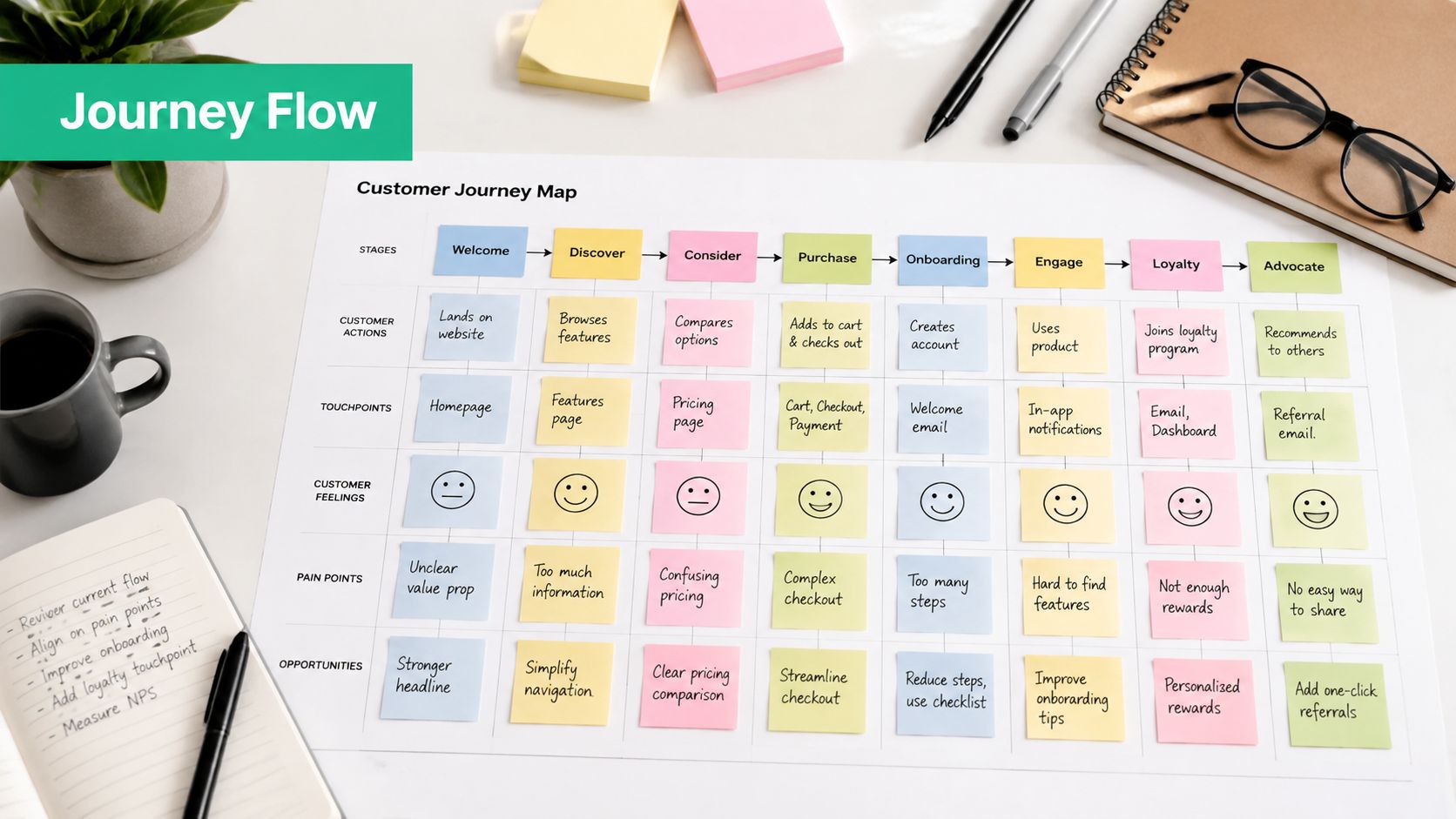
The same logic works in B2B, but the entry points differ. A form submission can trigger nurture content and a demo offer. A trial user who has not logged in for 7 days can enter a win-back path with troubleshooting. A contact with no opens in 90 days can move into suppression, which keeps the list cleaner and the sending more reliable.
Journey stage examples that actually hold up
- Welcome stage: A signup enters a sequence that explains the brand and gives the next step.
- Post-purchase stage: A buyer gets follow-up content tied to the order, not a generic sales pitch.
- Re-engagement stage: An inactive contact gets a clear choice: stay subscribed or drop out.
- B2B nurture stage: A lead gets useful proof points, usually case studies or a demo prompt, rather than a hard sell.
The useful part of journey mapping is measurement. Each stage has a different goal, so each workflow has a different outcome. That makes reporting cleaner and makes the next decision less subjective.
A practical example of that structure appears in an email drip campaign example, where sequence logic lines up with the contact’s stage instead of forcing one message on everyone.
Testing, Tracking, and Optimizing Your Workflows
A workflow that isn’t tested will break at launch. The failure usually shows up in the smallest places first: a bad link, a blank field, or a layout that looks fine in preview but falls apart in a real inbox.
Test before anyone sees it
Send the workflow to multiple clients, including Gmail, Outlook, and Apple Mail. Rendering shifts between clients, and that difference changes whether the email feels usable or broken. Check every link, every personalization token, and every redirect.
Measurement should start with revenue per recipient, not open rate. A flow with a weak open rate can still produce buyers, while a flow with a strong open rate can still waste sends if nobody converts. That’s why attribution belongs inside the setup, not after the campaign is already live.
| Workflow Performance Benchmarks | Average Flow | Top-Tier Flow |
|---|---|---|
| Open rate | 48.57% | 65.74% |
| Click-through rate | 4.67% | 12.21% |
| Conversion rate | 1.42% | 4.93% |
| Revenue per recipient | $1.94 | $16.96 |
Those Klaviyo benchmark figures show the difference between average and top-tier performance in real workflow terms. Omnisend-based reporting also found automated emails achieving about 52% higher open rates, 332% higher click rates, and 2,361% better conversion rates than regular campaign emails, which is why the comparison has to be against campaigns, not against wishful thinking.
What to watch after launch
Use UTM tagging and GA4 events so the workflow can be tied to actual conversions. A recovery flow should be judged on recovered revenue, not on the number of opens it gets. A nurture flow should be judged on the next step: demo request, purchase, repeat purchase, or another measurable action.
Abandoned-cart workflows deserve close attention because they are easy to measure and fast to diagnose. Current implementation guidance points to a recovery rate of about 8% to 15% when the trigger fires after a 1- to 4-hour delay, which makes timing one of the few levers you can test without rebuilding the whole flow.
For teams comparing outreach systems and deliverability discipline, Outreach Success Strategies is a useful reference point for the operational side of sending. It’s the kind of detail that shows up after launch, when inbox placement starts affecting the numbers.
If you already have reporting in place, a deeper dashboard setup belongs in analytics and reporting, because the workflow can’t improve if the numbers stay buried.
Keeping Workflows Healthy After Launch
The hard part isn’t building the flow. It’s keeping it reliable after the contact data starts aging, the list changes, and the CRM fills with records that no longer behave like the ones you launched against.
Data quality decides whether the workflow keeps working
Most mainstream guides focus on triggers, delays, and branches. They rarely spend enough time on what happens six months later. Empty personalization fields, duplicate records, stale lifecycle stages, and delayed syncs can make a good workflow look broken even when the copy is fine.
B2B-focused guidance points to a cleaner habit set, including real-time email validation at capture, regular cleanup, suppression of inactive or risky contacts, and alignment between marketing and sales data. The point is simple: bad inputs weaken the output. Better automation often comes from reducing noise, not adding another step.
A maintenance routine that holds up
- Audit the ESP and CRM sync monthly: Confirm field mapping still works after platform changes.
- Remove duplicates and stale records: Clean lists create cleaner triggers and fewer false branches.
- Check the fields your flow depends on: First name, product, lifecycle stage, and source data all need to populate correctly.
- Suppress inactive contacts on a defined schedule: If a person hasn’t engaged in the chosen period, keep them out of active sends until they re-engage.
- Review the workflow every month: Retire branches that no longer change the metric you care about.
Clean data keeps the workflow honest.
The monthly review matters because workflows drift. A branch that made sense when you launched can become dead weight once behavior changes. Contacts convert, move stages, or disappear from the buying cycle, and the flow needs to reflect that.
What to keep, what to remove, what to fix
Keep the trigger logic simple enough to explain out loud. Keep only the conditions that change a measurable result. Fix broken syncs before rewriting copy, because bad field mapping can make a good message fail for reasons the writer can’t solve.
If you use AI to speed up drafting or segmentation, keep human control on timing, voice, and business rules. That balance matters because automation can help execution, but it can’t decide whether a message still fits the journey or whether a branch should exist at all.
Ascendly Marketing also builds automated workflows tied to lead capture, client conversion, and relationship nurturing, along with email and SMS communication, so teams that want implementation support have a practical option to compare against in-house setup. The useful question is not whether to add more emails, but whether the workflow is still sending the right message to the right contact with clean data behind it.
What to Do When Your Workflow Breaks
Most workflow failures come from a small set of predictable problems. The first is weak or delayed sync between the CRM and the email platform. When that happens, personalization fields go blank, branches misfire, and contacts enter at the wrong time.
The fix starts with the sync schedule and the field map. Test them after every platform update, because even small changes can alter the way a flow reads the contact record. If the workflow depends on a field and that field stops populating, the whole chain goes off course.
The second problem is over-branching. Every new path makes testing harder, and after a while the workflow becomes hard to explain or optimize. Keep only the branches that change the outcome you’re tracking.
The third issue is incomplete testing. A preview can look clean and still break in Gmail, truncate on mobile, or send to a broken redirect. Test across at least three major email clients before launch, then spot-check the live sends.
The fourth problem is missing attribution. If UTM parameters and GA4 events aren’t in place, you won’t know which workflow is pulling revenue and which one is draining time. Build that tracking before activation, not after the dashboard gets confusing.
A broken workflow rarely needs a rebuild from scratch. Most of the time, it needs a cleaner trigger, fewer branches, a fixed sync, or better attribution.
Ascendly Marketing builds email and SMS workflows, lead generation systems, and conversion-focused websites for businesses that need their marketing to connect cleanly from first click to repeat purchase. If your current automation is sending the wrong message, missing field data, or failing to show what it returns, visit Ascendly Marketing and talk through a workflow that’s built to stay useful after launch.